
iOS 8's Variable Touch Sizing Bringing 'Surface Pressure' to FiftyThree's 'Pencil' Stylus - MacRumors
Skip to Content

iOS 8's Variable Touch Sizing Bringing 'Surface Pressure' to FiftyThree's 'Pencil' Stylus

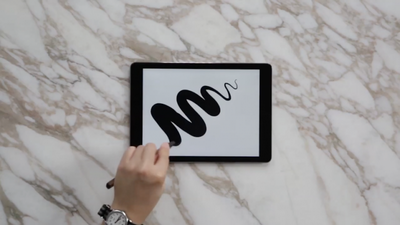
FiftyThree announced today (via TechCrunch) that its "Pencil" iPad stylus will be updated with a new Surface Pressure feature when iOS 8 debuts later this year. This feature allows users to change the thickness of the lines they create by controlling how much of the pencil tip comes in contact with the iPad screen.
pencil-paper-fifty-three

Pencil’s tapered tip was inspired by the expressive richness of real pencil points, which allow creators to change the character of the line with the angle of the tip. With Surface Pressure you’ll be able to control the lines you create based on how much of Pencil’s tip or eraser is in contact with your iPad. Use the point for fine details or the angled edge for broad strokes. Surface Pressure unlocks new capabilities for each of Paper's tools—fill faster as you draw, shade as you sketch, or carve away in varying widths as you erase.

This Surface Pressure option is made possible by iOS 8's variable touch sizing, which lets developers interpret touch along a range of point sizes that vary from a single point to a broad circle. The ability to adjust line thickness on the fly will provide a significant advantage to Pencil users, who now must control thickness via an in-app setting that is changed manually.


FiftyThree released the Bluetooth Pencil stylus last November as a companion to its popular Paper drawing app. It is available in either Graphite (US$60) or Walnut ($75) for consumers who live in the US or Canada. Surface Pressure will be included in a free Pencil software update, which will be released this fall following iOS 8.


Popular Stories

iOS 26

iOS 26.4 Adds Two New Features to CarPlay

Tuesday March 24, 2026 1:55 pm PDT by
iOS 26.4 was released today, and it includes a couple of new features for CarPlay: an Ambient Music widget and support for voice-based chatbot apps. To update your iPhone 11 or newer to iOS 26.4, open the Settings app and tap on General → Software Update. CarPlay will automatically offer the new features so long as the iPhone connected to your vehicle is running iOS 26.4 or later....
Apple Business hero

Apple Unveils 'Apple Business' All-in-One Platform

Tuesday March 24, 2026 8:53 am PDT by
Apple today announced Apple Business, a new all-in-one platform that unifies device management, productivity tools, and customer outreach features. The service is designed to be a consolidated replacement for several of Apple's existing business-focused offerings, including Apple Business Essentials, Apple Business Manager, and Apple Business Connect. It provides organizations with a single...
AirPods Pro Firmware Feature

Apple Releases New Firmware for AirPods Pro 3, AirPods Pro 2 and AirPods 4

Tuesday March 24, 2026 12:31 pm PDT by
Apple today released new firmware for the AirPods Pro 2, AirPods Pro 3, and the AirPods 4. The firmware has a version number of 8B39, up from 8B34 on the AirPods Pro 3, 8B28 on the AirPods Pro 2, and 8B21 on the AirPods 4. There is no word on what's included in the firmware, but Apple has a support document with limited notes. Most updates are limited to bug fixes and performance...

Top Rated Comments

154 months ago
It still baffles me why Apple hasn't included a proper digitizer with the iPads, and marketed their own thin tipped stylus. The "eco-friendly" Apple could shout from the rooftops that their products allow you to save trees.
Score: 10 Votes (Like | Disagree)
154 months ago
While I admire what they're doing with their app and styli, I do wish that Apple would put OS level pen support into iOS and the iPad. This is one major advantage of Windows tablets and even the Samsung Note line, both of which have vastly superior handwriting capabilities.

There are some applications where there simply is no replacement for handwriting, and I wish I could use an iPad in those situations.
Score: 9 Votes (Like | Disagree)
Cod3rror Avatar
154 months ago
While touch pressure sensitivity is nice. What I really want is super low latency of the screen so when you write there is absolutely no lag at all.
Score: 6 Votes (Like | Disagree)
154 months ago
Will this work for a Mac too? Any recommended alternatives ?
Better input devices already exist for Macs. Wacom, for instance.
Score: 3 Votes (Like | Disagree)
TheHateMachine Avatar
154 months ago
Too bad this doesn't look like it will work like true pressure sensitivity.

You won't be able to press the stylus harder to create a thicker stroke, it looks like you will have to have more of the stylus come in contact with the glass by pressing it at an angle.

from what it looks like, neither have actual pressure sensitivity, just 'surface area detection' to mimic it. the first pencil had nothing of the sort (draws one thickness of line until you change the setting manually) and this pencil lets you tilt the angled tip to draw in different thicknesses on the fly. an improvement, but not sounding like it approaches wacom caliber tech at all. simply pressing down harder is far superior to tilting your stylus, especially if the tilting action is not complimentary to what you're attempting to do with your wrist. i'll have to try it out to form a real opinion, but this faux-pressure stuff is making it harder for this artist/designer to ignore the MS Surface Pro right about now.

really, a stylus with real pressure sensitivity should run a pretty penny, not found sold next to hello-kitty iphone cases on street corners. i don't know if there really are any great styluses for touch-screen out there yet.
I use a SP 1 for all of my sketching and it works great. I recently got Autodesk Sketchbook on my Note 2 and there is true pressure sensitivity there as well. From what I understand, Samsung uses Wacom on their Note phones and tablets. Although I would not recommend their tablets, but I don't like iOS or Android tablets to begin with.

My office just ordered me a Surface Pro 3 and I want to test that out because I hear they switched from Wacom to Ntrig and there are less points of sensitivity.
Score: 3 Votes (Like | Disagree)
teslo Avatar
154 months ago
Doesn't Pencil already have pressure sensing? How will surface pressure make a difference then?
from what it looks like, neither have actual pressure sensitivity, just 'surface area detection' to mimic it. the first pencil had nothing of the sort (draws one thickness of line until you change the setting manually) and this pencil lets you tilt the angled tip to draw in different thicknesses on the fly. an improvement, but not sounding like it approaches wacom caliber tech at all. simply pressing down harder is far superior to tilting your stylus, especially if the tilting action is not complimentary to what you're attempting to do with your wrist. i'll have to try it out to form a real opinion, but this faux-pressure stuff is making it harder for this artist/designer to ignore the MS Surface Pro right about now.

really, a stylus with true pressure sensitivity should run a pretty penny, not be found sold next to hello-kitty iphone cases on street corners. i don't know if there really are any great styluses for touch-screen out there yet.
Score: 3 Votes (Like | Disagree)















