
Hands-On Installation and Usage of TouchPal's Gesture Keyboard for iOS 8

Following Apple's announcement at its Worldwide Developers Conference earlier this month that iOS 8 would include support for third-party keyboards on a systemwide basis, a number of companies working on the technology indicated that they would be moving forward with plans to support iOS. Among those companies was TouchPal, with quickly released a video showing an early version of its sliding gesture keyboard in action.

TouchPal has now released its first alpha version of its keyboard for iOS 8 to select media outlets, giving a good look at how third-party keyboard will work on iOS 8.
touchpal_installation
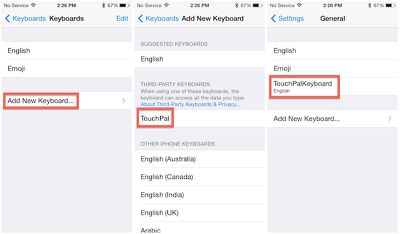
Installation is straightforward, leveraging a traditional App Store app to add TouchPal as an option when adding new keyboard in the Settings app. Once TouchPal is added, users can simply rearrange their installed keyboards in their preferred order, and rotate through each one while in use by tapping the globe key. Users who have activated the emoji keyboard on their devices will be familiar with that process.

Once activated, TouchPal is available anywhere a keyboard is traditionally used, such as in Mail, Messages, Safari, Notes, iWork apps, and third-party apps.
touchpal_usage
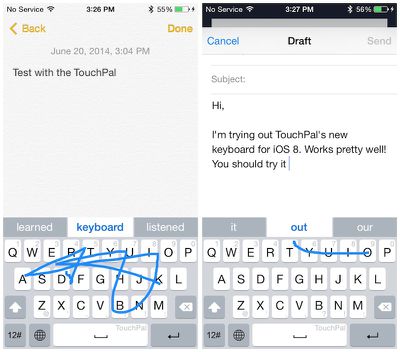
TouchPal's keyboard is similar to the perhaps more well-known one from Swype, allowing users to drag a finger in one continuous motion as they spell out the word. Based on the pattern drawn by the user, TouchPal suggests several options for the intended word, with highest-ranked option highlighted in the middle of the suggestions bar. Hitting the space bar or touching the word accepts the suggestion.

Numbers and common punctuation marks are input right from the main keyboard screen simply by flicking up or down on the proper key. Additional punctuation marks and emoticons are available by tapping the "12#" key at the lower left.

In our testing, there were definitely some glitches, particularly when switching between keyboards, but it is still early in the development process and Apple and third-party keyboard companies will continue to refine their implementations in the coming months leading up to the public release of iOS 8 this fall.


Related Forum: iOS 8

Popular Stories

Apple Logo Zoomed

Tim Cook Teases Plans for Apple's Upcoming 50th Anniversary

Thursday February 5, 2026 12:54 pm PST by
Apple turns 50 this year, and its CEO Tim Cook has promised to celebrate the milestone. The big day falls on April 1, 2026. "I've been unusually reflective lately about Apple because we have been working on what do we do to mark this moment," Cook told employees today, according to Bloomberg's Mark Gurman. "When you really stop and pause and think about the last 50 years, it makes your heart ...
wwdc sans text feature

Apple Rumored to Announce New Product on February 19

Thursday February 5, 2026 12:22 pm PST by
Apple plans to announce the iPhone 17e on Thursday, February 19, according to Macwelt, the German equivalent of Macworld. The report, citing industry sources, is available in English on Macworld. Apple announced the iPhone 16e on Wednesday, February 19 last year, so the iPhone 17e would be unveiled exactly one year later if this rumor is accurate. It is quite uncommon for Apple to unveil...
Finder Siri Feature

Why Apple's iOS 26.4 Siri Upgrade Will Be Bigger Than Originally Promised

Friday February 6, 2026 3:06 pm PST by
In the iOS 26.4 update that's coming this spring, Apple will introduce a new version of Siri that's going to overhaul how we interact with the personal assistant and what it's able to do. The iOS 26.4 version of Siri won't work like ChatGPT or Claude, but it will rely on large language models (LLMs) and has been updated from the ground up. Upgraded Architecture The next-generation...
iOS 26

iOS 26.3 and iOS 26.4 Will Add These New Features to Your iPhone

Tuesday February 3, 2026 7:47 am PST by
While the iOS 26.3 Release Candidate is now available ahead of a public release, the first iOS 26.4 beta is likely still at least a week away. Following beta testing, iOS 26.4 will likely be released to the general public in March or April. Below, we have recapped known or rumored iOS 26.3 and iOS 26.4 features so far. iOS 26.3 iPhone to Android Transfer Tool iOS 26.3 makes it easier...
maxresdefault

Apple Shows Off a Key Reason to Upgrade to the iPhone 17

Saturday February 7, 2026 9:26 am PST by
Apple today shared an ad that shows how the upgraded Center Stage front camera on the latest iPhones improves the process of taking a group selfie. "Watch how the new front facing camera on iPhone 17 Pro takes group selfies that automatically expand and rotate as more people come into frame," says Apple. While the ad is focused on the iPhone 17 Pro and iPhone 17 Pro Max, the regular iPhone...

Top Rated Comments

Lapidus Avatar
152 months ago
Don't know why, but I never seemed interested in this feature.
Score: 10 Votes (Like | Disagree)
CarpalMac Avatar
152 months ago
Don't know why, but I never seemed interested in this feature.

Then honestly, you have no idea what you are missing. Once you get used to it, old school single key typing seems prehistoric.
Score: 9 Votes (Like | Disagree)
Jalopybox Avatar
152 months ago
Had this on Android. Worked well, used it twice. Never used it again. Feels unnatural.
Score: 6 Votes (Like | Disagree)
phuocsandiego Avatar
152 months ago
Then honestly, you have no idea what you are missing. Once you get used to it, old school single key typing seems prehistoric.

Agreed. Swype is probably one of the coolest features of Android.
Score: 3 Votes (Like | Disagree)
WildCowboy Avatar
152 months ago
about freaking time! but i hate that it requires to download an actual "app" (even if its an obvious choice by apple) i hate the thought of having all those "apps" on my springboard just to get a feature activated and no longer actually need the "icon". wonder if the keyboard would stick even if i delete the app "icon" from the springboard?

If you delete the app, it stops working. An entry for it remains in the Settings section for keyboards, but it's blank and you can't use the keyboard.

At least that's how it currently works through beta.
Score: 3 Votes (Like | Disagree)
Goldex Avatar
152 months ago
about freaking time! but i hate that it requires to download an actual "app" (even if its an obvious choice by apple) i hate the thought of having all those "apps" on my springboard just to get a feature activated and no longer actually need the "icon". wonder if the keyboard would stick even if i delete the app "icon" from the springboard?
You can probably delete those apps after installing the keyboard, as was the case with Emoji.
Score: 3 Votes (Like | Disagree)















