
Netflix for Apple TV Gains 'Up Next' Feature for Automatic Episode Playback - MacRumors
Skip to Content

Netflix for Apple TV Gains 'Up Next' Feature for Automatic Episode Playback

by

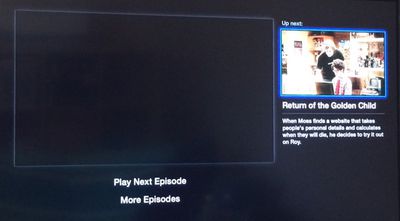
Netflix for the Apple TV was updated today to add a new "Up Next" feature, which lets users automatically select the next episode of a television show for playback. While easy playback of the next episode in a series has been long available on the web and in the Netflix app for iOS devices, it's been noticeably missing from the Apple TV.

Prior to today's update, Apple TV users were forced to return to the main series menu to initiate the playback of the next episode of a television show, a task that required several extra button clicks. As of today, episodes in a series will play automatically, requiring far less interaction with the Apple TV remote.
appletv
"Play Next Episode" on the Apple TV works similarly to the same feature on iOS devices and on the web, playing the next episode in a series automatically after a short countdown timer. It appears that the countdown timer is only available after a user initiates the "Play Next Episode" feature manually for the first time.

Netflix's new Apple TV feature comes as the company announces its Q2 financial results, with a total 50.05 million subscribers, up from 37.56 million in Q2 2013. Netflix saw $1.34 billion in total revenue during the quarter, with net income of $71 million.


Top Rated Comments

VforVelveta Avatar
152 months ago

Prior to today's update, Apple TV users were forced to return to the main series menu to initiate the playback of the next episode of a television show, a task that required several extra button clicks. As of today, playing the next episode of a series requires only a single click on the remote as the "Play Next Episode" option pops up as soon as an episode ends.


This has to be the most first world problem paragraph I've ever read.
Score: 10 Votes (Like | Disagree)
astopy Avatar
152 months ago
As of today, playing the next episode of a series requires only a single click on the remote as the "Play Next Episode" option pops up as soon as an episode ends.

"Play Next Episode" on the Apple TV is slightly different from the playback feature on iOS devices and on the web, which begin playing the next episode in a series automatically after a short countdown timer. The Apple TV still requires user interaction to play a new episode.

It does play the next episode without user interaction... in fact, it seems to play the next episode too early for me so I can't watch the last few seconds of anything now.
Score: 4 Votes (Like | Disagree)
152 months ago
YES.

I don't care about automatically playing it but I do mind the extra clicks to go back to the main list of episodes every single time.

I'm actually glad it doesn't automatically play the next episode for you, personally.
Score: 4 Votes (Like | Disagree)
bitslap47 Avatar
152 months ago
Netflix for Apple TV Gains 'Up Next' Feature for Automatic Episode Playback

Up next works like crap too. Keeps popping up and then switching waaaay before an episode is over and you have to hit menu to stop it. I hate it.
Score: 3 Votes (Like | Disagree)
152 months ago
I hate this 'feature' on PS3. (fortunately you can turn it off via the Netflix website)

You can't even dwell on the end of an episode / film anymore without being instantly kicked out of the moment by the screen shrinking to a tiny size and it force feeding you more TV / Films.

I'd love an option to 'let the credits roll'
Score: 3 Votes (Like | Disagree)
152 months ago
This has to be the most first world problem paragraph I've ever read.
Pretty much applies to all of Netflix in general, or much of personal computing overall really.
Score: 3 Votes (Like | Disagree)

Popular Stories

iOS 26

iOS 26.4 Adds Two New Features to CarPlay

Tuesday March 24, 2026 1:55 pm PDT by
iOS 26.4 was released today, and it includes a couple of new features for CarPlay: an Ambient Music widget and support for voice-based chatbot apps. To update your iPhone 11 or newer to iOS 26.4, open the Settings app and tap on General → Software Update. CarPlay will automatically offer the new features so long as the iPhone connected to your vehicle is running iOS 26.4 or later....
Apple Business hero

Apple Unveils 'Apple Business' All-in-One Platform

Tuesday March 24, 2026 8:53 am PDT by
Apple today announced Apple Business, a new all-in-one platform that unifies device management, productivity tools, and customer outreach features. The service is designed to be a consolidated replacement for several of Apple's existing business-focused offerings, including Apple Business Essentials, Apple Business Manager, and Apple Business Connect. It provides organizations with a single...
AirPods Pro Firmware Feature

Apple Releases New Firmware for AirPods Pro 3, AirPods Pro 2 and AirPods 4

Tuesday March 24, 2026 12:31 pm PDT by
Apple today released new firmware for the AirPods Pro 2, AirPods Pro 3, and the AirPods 4. The firmware has a version number of 8B39, up from 8B34 on the AirPods Pro 3, 8B28 on the AirPods Pro 2, and 8B21 on the AirPods 4. There is no word on what's included in the firmware, but Apple has a support document with limited notes. Most updates are limited to bug fixes and performance...














