
Microsoft's Office for iPad Apps Gain New Picture Tools, Third-Party Fonts, and Ability to Send Files as PDFs

Microsoft's Office for iPad apps, including Word, Excel, and PowerPoint received a major update today that adds several new user-requested features to each app. All three apps have gained the ability to export files as PDFs, and each one has also gained new Picture Tools that let users crop to focus on the right part of an image. Third-party fonts have also been added to each app.

Excel now includes improved external keyboard support to make the experience of using Excel on the iPad more like a desktop usage experience. There are more print options available, and a new "Flick to Select" feature lets users flick to select all data in a row or column.
excel1

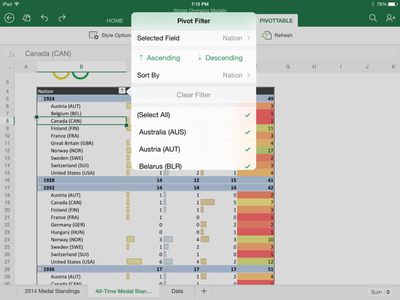
Excel is all about interacting with, consuming, and manipulating your data. When it comes to interacting with data, PivotTables are key to helping explore that data. With Excel for iPad you can now sort, filter, expand and collapse, show details, and even refresh PivotTables whose data is all contained within the workbook. You can even change how your PivotTables look and feel by changing both their visual style and layout.

We’ve also made it easier to consume workbooks and select data, including a large data range, with the introduction of a new flick gesture. Simply grab the selection handle, flick it in any direction, and Excel will automatically select from where you started to the next blank cell. Say you’re at the top of a column of data and want to select all the way to the bottom. Just flick down and the column is selected automatically.

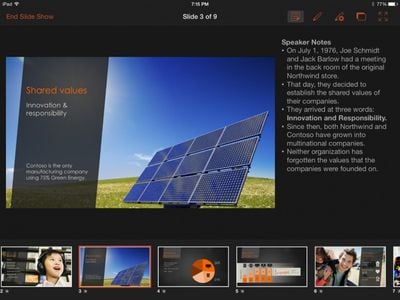
Word didn't gain new features beyond the Picture Tools, Fonts, and ability to send PDFs, but PowerPoint has seen some improvements. The app has a new Presenter View that lets users view and edit speaker notes, see next slides, and jump to other slides while presenting. Presenter tools allow for highlights and drawings to be erased within presentations, while new media features make it possible for users to play videos, sound effects, and background music while presenting. There are also new tools to insert videos from the Camera Roll and add/edit hyperlinks.
powerpoint1

With this update you can also make your presentations more rich and interactive than ever by more easily including video and sound to help get your point across. Not only do all of your embedded videos and sound recordings now play right from PowerPoint for iPad, but you can insert video directly from your Camera Roll as well. This allows you to quickly record, embed, and present interactive content more quickly than ever, and all from one device.

Today's update is the second major update the Office software has gotten since its March release. Back in April, the three apps gained some important features that had been missing since launch, including the ability to print directly from the apps.

Microsoft's Office for iPad apps have proven to be highly successful for the company. During its Q4 earnings call in July, Microsoft announced that its Office for iPad software had been downloaded more than 35 million times.

Microsoft has committed to continually improving its Office for iPad apps, which now directly compete with Apple's own iWork suite including Numbers, Keynote, and Pages. "As this wave of updates hopefully shows, we're making good on our commitment to delivering continuous updates and improvements to the Office for iPad apps," read's the company's blog post on the new update.

All of the updates to the new Office apps are currently available and can be downloaded from the App Store for free. While the apps can be accessed for free, unlocking full capabilities, including editing and creating documents, requires an Office 365 subscription.

- Microsoft Word for iPad [Direct Link]
- Microsoft Excel for iPad [Direct Link]
- Microsoft PowerPoint for iPad [Direct Link]


Popular Stories

wwdc sans text feature

Apple Rumored to Announce New Product on February 19

Thursday February 5, 2026 12:22 pm PST by
Apple plans to announce the iPhone 17e on Thursday, February 19, according to Macwelt, the German equivalent of Macworld. The report, citing industry sources, is available in English on Macworld. Apple announced the iPhone 16e on Wednesday, February 19 last year, so the iPhone 17e would be unveiled exactly one year later if this rumor is accurate. It is quite uncommon for Apple to unveil...
Apple Logo Zoomed

Tim Cook Teases Plans for Apple's Upcoming 50th Anniversary

Thursday February 5, 2026 12:54 pm PST by
Apple turns 50 this year, and its CEO Tim Cook has promised to celebrate the milestone. The big day falls on April 1, 2026. "I've been unusually reflective lately about Apple because we have been working on what do we do to mark this moment," Cook told employees today, according to Bloomberg's Mark Gurman. "When you really stop and pause and think about the last 50 years, it makes your heart ...
Finder Siri Feature

Why Apple's iOS 26.4 Siri Upgrade Will Be Bigger Than Originally Promised

Friday February 6, 2026 3:06 pm PST by
In the iOS 26.4 update that's coming this spring, Apple will introduce a new version of Siri that's going to overhaul how we interact with the personal assistant and what it's able to do. The iOS 26.4 version of Siri won't work like ChatGPT or Claude, but it will rely on large language models (LLMs) and has been updated from the ground up. Upgraded Architecture The next-generation...
maxresdefault

Apple Shows Off a Key Reason to Upgrade to the iPhone 17

Saturday February 7, 2026 9:26 am PST by
Apple today shared an ad that shows how the upgraded Center Stage front camera on the latest iPhones improves the process of taking a group selfie. "Watch how the new front facing camera on iPhone 17 Pro takes group selfies that automatically expand and rotate as more people come into frame," says Apple. While the ad is focused on the iPhone 17 Pro and iPhone 17 Pro Max, the regular iPhone...
iOS 26

iOS 26.3 and iOS 26.4 Will Add These New Features to Your iPhone

Tuesday February 3, 2026 7:47 am PST by
While the iOS 26.3 Release Candidate is now available ahead of a public release, the first iOS 26.4 beta is likely still at least a week away. Following beta testing, iOS 26.4 will likely be released to the general public in March or April. Below, we have recapped known or rumored iOS 26.3 and iOS 26.4 features so far. iOS 26.3 iPhone to Android Transfer Tool iOS 26.3 makes it easier...

Top Rated Comments

Piggie Avatar
151 months ago
Are people still using Office? Everyone I know has moved on and only the most conservative of businesses I've seen still use it.

80% of companies are supposed to be using some version of office.

You don't know many people then it seems :)
Score: 13 Votes (Like | Disagree)
Morky Avatar
151 months ago
Are people still using Office? Everyone I know has moved on and only the most conservative of businesses I've seen still use it.

Yep, millions of us. Even us non-conservative types. Could easily live without Word and Powerpoint (I'd take even iCloud Keynote over Powerpoint), but Excel is still awesome and indispensable.
Score: 12 Votes (Like | Disagree)
paulsdenton Avatar
151 months ago
If they simply sold this I'd buy it in a heartbeat. But no subscription, thanks!
Score: 8 Votes (Like | Disagree)
skaertus Avatar
151 months ago
What about Office for Mac now? Office for iPad is nice and all, but Office for Mac is still getting dust after almost four years without a meaningful update.
Score: 7 Votes (Like | Disagree)
archimonster Avatar
151 months ago
I love that they are working so hard on these. It is great to see some competition to iWork. Understandably, Office can't be free, but so far, I am sure many people have been able to justify springing for the subscription just for their iPads
Score: 7 Votes (Like | Disagree)
sracer Avatar
151 months ago
Cononical posts for "MS Office-related" threads:

[LIST=1]
* MS Office? Do people still use that?
* Subscription for Office? No thanks, I don't rent software.
* iWorks is all anyone really needs.
* Those who don't use MS Office don't really need anything more advanced than a dumbphone.
* Serious productivity work can only be done with MS Office.
* oh yeah, well you're a poopy-head!


Pick a number and go with it. :D
Score: 6 Votes (Like | Disagree)















