New Research Claims iMessage Accounts for 30% of Mobile Spam Messages - MacRumors
Skip to Content

New Research Claims iMessage Accounts for 30% of Mobile Spam Messages

iMessage is responsible for more than 30% of all spam messages on mobile devices, according to research done by security expert Tom Landesman and anti-spam company Cloudmark (via Wired). The researcher notes that there are multiple reasons as to why the platform has become a prime choice for spammers, stating that iMessage's reach across the iPhone, iPad, and Mac along with its accessibility have made it easy to target users:

That fusion of the desktop and mobile world makes it particularly easy for scammers to write a Mac OS script that can send messages to all types of devices just as fast as Apple will allow. “It’s almost like a spammer’s dream,” says Landesman. “With four lines of code, using Apple scripts, you can tell your Mac machine to send message to whoever they want.”
imessage_ios72
With iMessage, spammers can send unwanted messages to a user's associated emails and phone numbers if enabled. The ability for the desktop Messages client to verify numbers with the iMessage network has also made sending spam to confirmed users easier, along with the fact that signing up for the service can be done with just an email. The researcher further notes that iMessage's read receipts feature (which can be turned off) allows spammers to better generate a list of verified users to spam based on activity.

Apple has made a few moves to combat spam in iMessage over the past year, adding a rate-limit for sent messages after some iOS developers experienced a denial-of-service prank, and adding a spam reporting tool. However, that tool remains a bit complicated to use, as it requires users to send Apple an email containing the screenshot of the spam message, the email or phone number it was received from, and the date and time.


Popular Stories

iOS 26

iOS 26.4 Adds Two New Features to CarPlay

Tuesday March 24, 2026 1:55 pm PDT by
iOS 26.4 was released today, and it includes a couple of new features for CarPlay: an Ambient Music widget and support for voice-based chatbot apps. To update your iPhone 11 or newer to iOS 26.4, open the Settings app and tap on General → Software Update. CarPlay will automatically offer the new features so long as the iPhone connected to your vehicle is running iOS 26.4 or later....
Apple Business hero

Apple Unveils 'Apple Business' All-in-One Platform

Tuesday March 24, 2026 8:53 am PDT by
Apple today announced Apple Business, a new all-in-one platform that unifies device management, productivity tools, and customer outreach features. The service is designed to be a consolidated replacement for several of Apple's existing business-focused offerings, including Apple Business Essentials, Apple Business Manager, and Apple Business Connect. It provides organizations with a single...
AirPods Pro Firmware Feature

Apple Releases New Firmware for AirPods Pro 3, AirPods Pro 2 and AirPods 4

Tuesday March 24, 2026 12:31 pm PDT by
Apple today released new firmware for the AirPods Pro 2, AirPods Pro 3, and the AirPods 4. The firmware has a version number of 8B39, up from 8B34 on the AirPods Pro 3, 8B28 on the AirPods Pro 2, and 8B21 on the AirPods 4. There is no word on what's included in the firmware, but Apple has a support document with limited notes. Most updates are limited to bug fixes and performance...

Top Rated Comments

MartinAppleGuy Avatar
151 months ago
I can only speak for myself an everyone who I know has an Apple device (so we are talking lots of people :P ), I have never seen nor heard of any spam via iMessage.
Score: 70 Votes (Like | Disagree)
151 months ago
i don't have such a problem so far using iMessage.
Score: 41 Votes (Like | Disagree)
151 months ago
Non issue

I've never received a spam iMessage ever, but...


Simple fix : add a toggle option to 'only receive iMessages from people in my contact list'

Non approved senders will have to revert to email ( same amount of spam as usual) or SMS ( costs money)
Score: 38 Votes (Like | Disagree)
saving107 Avatar
151 months ago
For a while I had a spammer sending me iMessages around 8am, I know that since iOS 7 I can now block people from texting/calling me and for a while this is what I was doing with this spammer (though he would eventually just message me from a new email address).

About 2 months ago I got a message once again around 8am, I was getting ready for work and rather than block it I just swiped and delete the message, then the next day same thing, on the 3rd day he messaged me and it happen to be my day off. I received the message on my Mac and I was rather annoyed so I googled "Gay Porn" images and saved about 20 pictures, then using copy and paste I sent well over 100 text images (20 pictures each time) of gay porn from my Mac to that guy.

Two months later not a single spam from that person.

The spam was a sale on sunglasses and a bunch of accessories.
Score: 19 Votes (Like | Disagree)
151 months ago
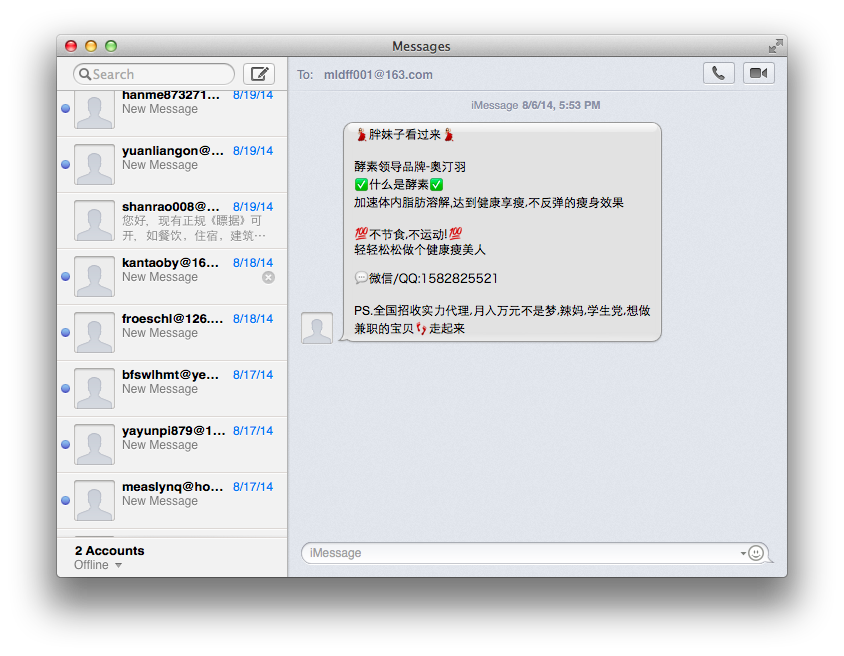
I get TONS of spam through iMessage

Since everyone else is busy declaring there is no such thing as spam on iMessage, let me just share my own experience of receiving multiple spam messages from multiple accounts every day.

Blacklisting isn't helpful since they just use a new address every time, and turning off iMessage for people who aren't contacts isn't really a good alternative for me as I have to communicate with a lot of people in a lot of countries, many of whom I don't necessarily have contact details for ahead of time.

Screenshot to show my experience:


Oh, and for reference I live in China. Don't know if spam should be worse here or not, but clearly an issue worth looking at.
Score: 11 Votes (Like | Disagree)
151 months ago
Never received one. Ever.

I received the message on my Mac and I was rather annoyed so I googled "Gay Porn" images and saved about 20 pictures, then using copy and paste I sent well over 100 text images (20 pictures each time) of gay porn from my Mac to that guy.
Any chance you could resend them to me?

P.S. Saving them probably put them into your Photo Stream...
Score: 9 Votes (Like | Disagree)