
Hands On With QuickBoard, a Quick Text Insertion Keyboard Coming to iOS 8

When iOS 8 is released to the public in the fall, iOS users will be able to take advantage of several new operating system features, including system wide third-party keyboards, which will bring fresh functionality to the default iOS keyboard.

Third-party keyboards are available on Android devices and have been long-desired on iOS, so several popular keyboard developers announced plans to bring their software to iOS shortly after third-party keyboard integration was announced at WWDC. After iOS 8 launches, we'll be seeing new keyboards from well-known developers like Fleksy, Swype, SwiftKey, and TouchPal.

iOS 8's third-party keyboard support will also allow new entrants into the customized keyboard arena, with developers bringing us apps that offer all kinds of different functions to improve the way we use our keyboards. One such developer, Kevin Wolkober, has created a quick text insertion keyboard that offers a unique function we haven't seen with previously previewed keyboards.


While keyboards like Swype and Fleksy focus on improving the typing experience through gestures and predictive text, Wolkober's QuickBoard is designed to give users a quicker way to enter the snippets of text that they type repeatedly into their iOS devices, including addresses, credit card information, email signatures, and more.

QuickBoard is actually split by function into three separate keyboard elements, including TextBoard, MeBoard, and LocationBoard. Each of these three keyboard functions lets users to tap to insert often-repeated text elements in any app to save time and effort.

TextBoard allows users to store snippets of text, accommodating any text from a one line signature to a lengthy paragraph. MeBoard stores all of a user's contact info, such as name, email, and home address, and is handy when filling out forms. LocationBoard will automatically determine a user's current location, allowing them to paste in a Google Maps URL or coordinates, or an approximate address, which is useful when a location needs to be shared outside of Messages.

Like any other customized keyboard, QuickBoard operates through an app that's installed on the iOS device and set up in iOS 8's Settings, as described in our hands-on TouchPal installation guide. The personal information and pre-written snippets of text available in the QuickBoard keyboard are created using the installed QuickBoard app.
quickboard4

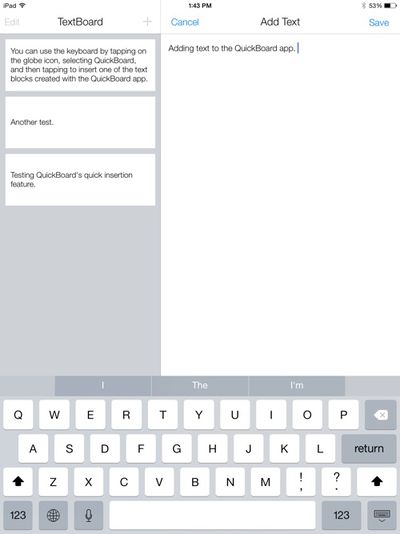
Inserting text into the QuickBoard app

Chunks of text can be entered into TextBoard section of the app, for example, while the MeBoard pulls in information like name, address, and phone number. Though MeBoard is currently limited to information pulled from the Contacts app, custom information will be added before the app's official launch. Location data isn't inserted in the app itself, since it is pulled from the phone's current location whenever it's used.

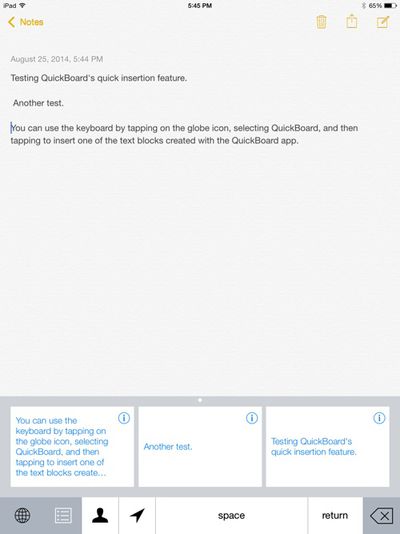
The text elements saved in the QuickBoard app can be used in any other app, including Mail, Safari, Messages, Notes, iWork, and more. Inserting saved text into one of these apps is as simple as tapping on the globe icon on the keyboard to activate QuickBoard and then tapping on the relevant block of text.

Personal information, such as name and address, can be inserted by tapping on the person icon, and the arrow will determine a user's approximate location, allowing it to be quickly inserted into a text message, email, or other app. Location information is especially useful, as it cuts out several steps that would normally be necessary when sharing a location an email or other app.
quickboard3

QuickBoard demonstrated in the Notes app

QuickBoard includes access to a space bar, return key, and delete key for formatting purposes, but the rest of the typing is left to another keyboard app or iOS 8's default predictive text function. QuickBoard works seamlessly with any other keyboards installed, and switching between them is as simple as tapping on the globe icon.

Though simpler than most of the other keyboards we've seen before, QuickBoard hints at some of the innovative ways developers will take advantage of third-party keyboard integration in iOS 8. At the current time, QuickBoard is still in the beta testing phases, but Wolkober tells MacRumors that the app will be ready for download shortly after iOS 8 officially launches in the fall, with pricing yet to be determined.


Popular Stories

Apple Logo Zoomed

Tim Cook Teases Plans for Apple's Upcoming 50th Anniversary

Thursday February 5, 2026 12:54 pm PST by
Apple turns 50 this year, and its CEO Tim Cook has promised to celebrate the milestone. The big day falls on April 1, 2026. "I've been unusually reflective lately about Apple because we have been working on what do we do to mark this moment," Cook told employees today, according to Bloomberg's Mark Gurman. "When you really stop and pause and think about the last 50 years, it makes your heart ...
wwdc sans text feature

Apple Rumored to Announce New Product on February 19

Thursday February 5, 2026 12:22 pm PST by
Apple plans to announce the iPhone 17e on Thursday, February 19, according to Macwelt, the German equivalent of Macworld. The report, citing industry sources, is available in English on Macworld. Apple announced the iPhone 16e on Wednesday, February 19 last year, so the iPhone 17e would be unveiled exactly one year later if this rumor is accurate. It is quite uncommon for Apple to unveil...
Finder Siri Feature

Why Apple's iOS 26.4 Siri Upgrade Will Be Bigger Than Originally Promised

Friday February 6, 2026 3:06 pm PST by
In the iOS 26.4 update that's coming this spring, Apple will introduce a new version of Siri that's going to overhaul how we interact with the personal assistant and what it's able to do. The iOS 26.4 version of Siri won't work like ChatGPT or Claude, but it will rely on large language models (LLMs) and has been updated from the ground up. Upgraded Architecture The next-generation...
iOS 26

iOS 26.3 and iOS 26.4 Will Add These New Features to Your iPhone

Tuesday February 3, 2026 7:47 am PST by
While the iOS 26.3 Release Candidate is now available ahead of a public release, the first iOS 26.4 beta is likely still at least a week away. Following beta testing, iOS 26.4 will likely be released to the general public in March or April. Below, we have recapped known or rumored iOS 26.3 and iOS 26.4 features so far. iOS 26.3 iPhone to Android Transfer Tool iOS 26.3 makes it easier...
iphone 17 pro dark blue 1

iPhone 18 Pro Max Rumored to Deliver Next-Level Battery Life

Friday February 6, 2026 5:14 am PST by
The iPhone 18 Pro Max will feature a bigger battery for continued best-in-class battery life, according to a known Weibo leaker. Citing supply chain information, the Weibo user known as "Digital Chat Station" said that the iPhone 18 Pro Max will have a battery capacity of 5,100 to 5,200 mAh. Combined with the efficiency improvements of the A20 Pro chip, made with TSMC's 2nm process, the...

Top Rated Comments

cambookpro Avatar
150 months ago
It may be useful for some people, but I never really type enough of the same blocks of text for this to ever be used.

In any case, every message necessitates a slightly different tone which can't be achieved using this keyboard. If I was sending lots of the same message, I'd just use copy and paste as it's unlikely that'd you'd ever need to send it again after.

And weren't Autofill and iCloud Keychain invented so you didn't have to resort to manually typing in your address and billing information??
Score: 19 Votes (Like | Disagree)
JAT Avatar
150 months ago
I just use Keyboard Shortcuts to do this. I type 2 letters for my email address, for instance.
Score: 8 Votes (Like | Disagree)
penajmz Avatar
150 months ago
I can definitely see myself using this. Great idea!
Score: 6 Votes (Like | Disagree)
kevinwo Avatar
150 months ago
Hi everyone! This is Kevin, the creator of QuickBoard. If you have any questions, I'll answer them the best I can as quickly as possible. And thanks for reading about QuickBoard!
Score: 3 Votes (Like | Disagree)
miamialley Avatar
150 months ago
Cool idea, but skeptical about 3rd party keyboards.
Lol, wow. Ever heard of Android?
Score: 3 Votes (Like | Disagree)
kevinwo Avatar
150 months ago
Why not just use short cuts?

http://youtu.be/kupaKfm0UUU
iOS Keyboard Shortcuts are definitely awesome. However, my objective with the TextBoard feature of QuickBoard is to make managing and inserting multi-line text much simpler (e.g. letter templates, signatures, directions, etc.).

Also, as mentioned in the article, TextBoard is just one of three main features. MeBoard helps insert and fill out contact/billing info where autofill is not present. LocationBoard gets your current location and allows you to insert it in quickly as a Google Maps URL, approximate address, or coordinates.
Score: 2 Votes (Like | Disagree)















