
SwiftKey's Systemwide Gesture Keyboard Launching Alongside iOS 8 for Free - MacRumors
Skip to Content

SwiftKey's Systemwide Gesture Keyboard Launching Alongside iOS 8 for Free

by

Earlier this year, popular Android alternative keyboard maker SwiftKey expanded to iOS with a note-taking app integrating the company's gesture keyboard. And with Apple opening up iOS to systemwide third-party keyboard as part of iOS 8, SwiftKey is ready to expand its presence.
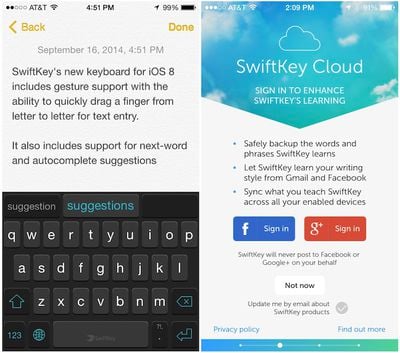
swiftkey_ios_8_ss
In a blog post and appearance at TechCrunch Disrupt last week, SwiftKey showed off its iOS 8 gesture keyboard and announced that it will launch alongside iOS 8 when the new operating system debuts tomorrow. In addition to allowing users to type by dragging their fingers from key to key and offering predictive suggestions, the keyboard will integrate with SwiftKey Cloud to allow the user's preferences and learned language data to be backed up and synced across devices. And in the biggest news for the release, SwiftKey's keyboard will be available free of charge, allowing anyone to give the keyboard a try.

SwiftKey has also released a short promotional video narrated by Stephen Fry:


We've had some time to try out SwiftKey for iOS 8 and can say that it works very well. Available in dark and light themes, SwiftKey is accessible systemwide as is typical for these new keyboards under iOS 8, and users can easily switch between keyboards by tapping the globe icon on the keyboard.

In our testing, we found Swiftkey's suggestions to be relevant both in relation to words being typed and contextually with preceding words. The optional "SwiftKey Flow" input method of dragging from letter to letter also works well in most situations, accurately interpreting the patterns being traced out as the intended words.

SwiftKey for iOS allows users to type in two languages simultaneously without switching keyboards, and the keyboard will support over a dozen language-country combinations at launch with more to come. The keyboard will be available for all iOS 8 devices, including iPhone, iPad, and iPod touch.


Top Rated Comments

Mad Mac Maniac Avatar
150 months ago
This and all extensions about new keyboards for iPhone's... are DISGUSTING!!!
That's what I loved about an iPhone... One UNIVERSAL keyboard for ALL apps and ALL iPhones...

whyyyyyy

Well you are in luck!! You get to keep your keyboard! Now let me ask you, why do you care what keyboard I use?

Note: These keyboards are still universal for ALL apps
Score: 15 Votes (Like | Disagree)
Apple_Robert Avatar
150 months ago
I like the idea. However, why do companies continue to believe everyone has or wants to log into FB or Google + all the time when using a third party app?
Score: 11 Votes (Like | Disagree)
150 months ago
This and all extensions about new keyboards for iPhone's... are DISGUSTING!!!
That's what I loved about an iPhone... One UNIVERSAL keyboard for ALL apps and ALL iPhones...

whyyyyyy

No one is forcing you to change your keyboard.
Score: 9 Votes (Like | Disagree)
Locoboof Avatar
150 months ago
Commercials like this are so frustrating. These companies a so focused on making a beautiful commercial that you learn NOTHING about the product.
If you just saw this commercial and never heard of swift key before,what did you learn in this ad? NOTHING!
Here's a great idea. Show us in the commercial how it works and the benefits of your product to make me want it.
Score: 5 Votes (Like | Disagree)
nepalisherpa Avatar
150 months ago
Tomorrow is going to be a great day!
Score: 5 Votes (Like | Disagree)
150 months ago
This and all extensions about new keyboards for iPhone's... are DISGUSTING!!!
That's what I loved about an iPhone... One UNIVERSAL keyboard for ALL apps and ALL iPhones...

whyyyyyy

You have a point. I really enjoy Apple products because of consistency in design language across hardware and software. However, I also really, really want the swiping functionality of a touchscreen keyboard in iOS. Thus, the perfect keyboard for me would be one that looks stock but has swiping functionality. I can type so much faster and more accurate using the swipe feature.
Score: 4 Votes (Like | Disagree)

Popular Stories

iOS 26

iOS 26.4 Adds Two New Features to CarPlay

Tuesday March 24, 2026 1:55 pm PDT by
iOS 26.4 was released today, and it includes a couple of new features for CarPlay: an Ambient Music widget and support for voice-based chatbot apps. To update your iPhone 11 or newer to iOS 26.4, open the Settings app and tap on General → Software Update. CarPlay will automatically offer the new features so long as the iPhone connected to your vehicle is running iOS 26.4 or later....
Apple Business hero

Apple Unveils 'Apple Business' All-in-One Platform

Tuesday March 24, 2026 8:53 am PDT by
Apple today announced Apple Business, a new all-in-one platform that unifies device management, productivity tools, and customer outreach features. The service is designed to be a consolidated replacement for several of Apple's existing business-focused offerings, including Apple Business Essentials, Apple Business Manager, and Apple Business Connect. It provides organizations with a single...
AirPods Pro Firmware Feature

Apple Releases New Firmware for AirPods Pro 3, AirPods Pro 2 and AirPods 4

Tuesday March 24, 2026 12:31 pm PDT by
Apple today released new firmware for the AirPods Pro 2, AirPods Pro 3, and the AirPods 4. The firmware has a version number of 8B39, up from 8B34 on the AirPods Pro 3, 8B28 on the AirPods Pro 2, and 8B21 on the AirPods 4. There is no word on what's included in the firmware, but Apple has a support document with limited notes. Most updates are limited to bug fixes and performance...















