
List of Third-Party Keyboards Now Available for iOS 8 Users - MacRumors
Skip to Content

List of Third-Party Keyboards Now Available for iOS 8 Users

iOS 8, released to the public today, includes an API that allows developers to create system-wide third-party keyboards for the first time, which will let users select from a range of different keyboards with unique functions.

We've rounded up a list of the best third-party keyboards currently available to you find the keyboard best suited to you. Some of these keyboards are in the App Store now, while others will begin rolling out today following the launch of iOS 8.

SwiftKey (Free) [Direct Link] - SwiftKey is a gesture-based keyboard that allows users to type by dragging their fingers from key to key. Along with offering predictive suggestions, SwiftKey integrates with SwiftKey Cloud to let a user's preferences be backed up and synced across all devices.


Swype ($0.99) [Direct Link]- Like SwiftKey, Swype is a gesture-based keyboard that allows users to drag their fingers from key to key in order to create words. Swype's built-in predictive text engine determines what was being typed, and it offers predictive punctuation to speed up typing. Swype also includes several different themes for custom looks. SwiftKey and Swype are fairly similar, and Re/code has done a review comparing and contrasting them.


Minuum
($1.99) [Direct Link] - Minuum is a resizable keyboard that can be shrunken down (via swipe gestures) to allow more of the screen to be seen. Minuum also takes advantage of a robust autocorrect feature that automatically corrects spelling as words are typed and offers word suggestions.


Fleksy ($1.99) [Direct Link] - Fleksy is known as the fastest keyboard in the world. It incorporates advanced autocorrection features to interpret what's typed (which improves over time) and it uses swipe gestures to make it easy for users to delete, add punctuation, spaces, and select alternate autocorrect suggestions. It also includes support for emoji and offers a resizable keyboard.


TouchPal (Free) [Direct Link] - TouchPal is another keyboard that lets users drag a finger over letters in quick succession to spell words, suggesting different choices based on input. TouchPal also offers a design that's similar to the standard keyboard, but it incorporates quick access buttons to allow for easy insertion of punctuation and special characters.


TextExpander ($4.99) [Direct Link] - Built into an update of the existing TextExpander app, the TextExpander keyboard allows users to type in short abbreviations, which are then spelled out fully. For example, tyvm might become thank you very much.


KuaiBoard ($1.99) [Direct Link] - Formerly known as QuickBoard, KuaiBoard is not a traditional keyboard. It's designed to let users insert chunks of frequently typed text like signatures, address information, billing information, and more. As outlined in our full hands-on post, KuaiBoard lets users create blocks of text that can then be inserted anywhere. It also has a feature that automatically detects a user's location, allowing it to be typed into a text message or email.
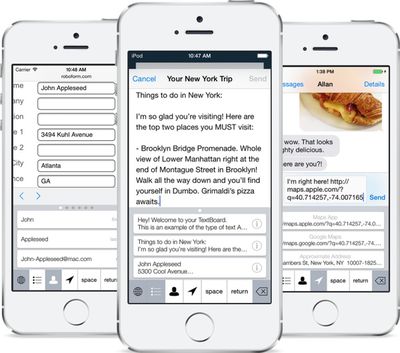
kuaiboard

Keymoji (Free) [Direct Link] - Keymoji is an emoji keyboard that converts text into emojis as it is typed. Users can use Keymoji to insert an emoji into a sentence quickly or replace text entirely with emoji symbols. For example, if a phrase like "cookie monster" is typed, Keymoji will give users the option to replace the text with a cookie emoji next to a monster emoji. "Toilet paper" becomes a toilet emoji next to a paper emoji, while "goatee" becomes a goat emoji next to a tea emoji.

Kaomoji (Free) - Kaomoji keyboard is a fun third-party keyboard that allows users to insert kaomoji, or ASCII text emoticons, into messages, email, and more. Many users may not be familiar with kaomoji, but the popular table flip emoticon seen in the image below is one example. The Kaomoji keyboard isn't available yet, but it should be launching soon.
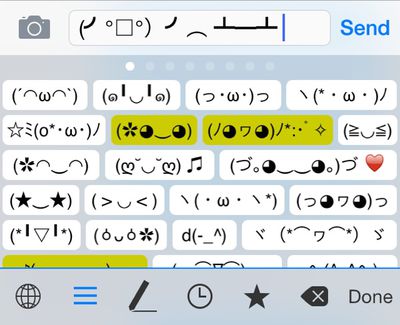
kaomojikeyboard
Third-party keyboards require users to install a separate app for each keyboard. Once downloaded, a keyboard can be turned on in the Settings app. In Settings, go to General --> Keyboards --> Add New Keyboard and tap whichever keyboard needs to be installed. From there, it is easy to switch between available keyboards by holding down on the Globe or Emoji icon in any app that supports keyboards.


Related Forum: iOS 8

Popular Stories

iPhone Duo Trio

Here's What Apple's Apps Look Like on the iPhone Duo

Tuesday October 20, 2026 11:12 am PDT by
With just three days to go until the iPhone Duo is released, Apple is getting ready for the launch. Behind the scenes, the App Store now has screenshots of Apple's built-in apps running on the Duo. We've seen some apps in marketing materials, but images of the ones we haven't seen give us an idea of what it will be like using the iPhone Duo day to day. Many apps are shown in landscape...
Apple Creator Studio iWork suite

Apple Pulls Keynote, Pages and Numbers From App Store [Update: Back]

Thursday October 22, 2026 11:01 am PDT by
Apple has temporarily removed Keynote, Pages, and Numbers from the App Store, just after releasing an update that added iPhone Duo support and a new Intelligent Assistant. It is not clear if the apps were removed intentionally, or if it is a bug. Apple has not said when the apps will be reinstated, but if it was in error, they should return soon. Update: The Mac versions are back without...
M5 MacBook Pro

RIP, MacBook Ultra

Monday October 19, 2026 9:37 am PDT by
Apple today sent out invites for an experience in Los Angeles on Wednesday, October 28, and the "Pro and tell" tagline on the invitation likely means that the rumored MacBook models with touch-enabled OLED displays will stick with MacBook Pro branding instead of the once-rumored "MacBook Ultra" name. The long-rumored "iPhone Ultra" ended up being named iPhone Duo, so speculation that Apple...

Top Rated Comments

158 months ago
Hi everyone! This is Kevin, the creator of KuaiBoard. If you have any questions, I'll answer them the best I can as quickly as possible. And thanks for checking out KuaiBoard!
Score: 10 Votes (Like | Disagree)
158 months ago
Hallelujah. Third-party keyboards were pretty much the only thing Android had going for it.
Score: 8 Votes (Like | Disagree)
Small White Car Avatar
158 months ago
Wow, that Swiftkey ad sure convinced me that my life up until now has been completely worthless.

How did I manage to not commit suicide the last 33 years without Swiftkey in my life? It boggles the mind!
Score: 7 Votes (Like | Disagree)
158 months ago
swiftkey only works if you send them your keystrokes. No thanks!!! And it's asking for Facebook signup.
Score: 6 Votes (Like | Disagree)
Arkanok Avatar
158 months ago
Wait up. Swift key warns me it may log and send my credit card info if I enable full access? Um. Red flag? Should I do it?
Score: 5 Votes (Like | Disagree)
158 months ago
I guess it's bad when Android takes concepts and features from iOS, but totally fine when iOS takes them from Android.

BECAUSE THATS INNOVATION!!! :apple:
Score: 4 Votes (Like | Disagree)
Latest Stories
iPhone Duo Demand Reportedly Exceeds Apple's Expectations
2 hours ago
iPhone Duo Launch Begins as First Orders Reach Customers
8 hours ago
1Password for Agents Keeps Your Passwords Hidden From AI
9 hours ago
iPhone Duo 24 Hours Later: Your Questions Answered
10 hours ago
Apple's iWork Apps Get 'Intelligent Assistant' and iPhone Duo Support
10 hours ago
Apple is Apparently Considering a Slightly Larger iPhone Duo
11 hours ago
Giant iPhone Duo Displays Coming to Four Apple Stores
12 hours ago
Apple Pulls Keynote, Pages and Numbers From App Store [Update: Back]
13 hours ago
Apple Updates More Apps With iPhone Duo Support
13 hours ago
Apple Will Label Apps 'Made for iPhone Duo' in App Store
16 hours ago
Amazon Takes $49 Off iPad With Prices Starting at $399.99
16 hours ago
F1 on Apple TV Now Available in Dolby Atmos
17 hours ago
Apple Reveals More Than 50 Apps That Will Be Updated for iPhone Duo
17 hours ago
Apple Blocks Certificates That Could Help Attackers Fake Websites
19 hours ago
Giant iPhone Duo Installations Spotted at Apple Fifth Avenue
19 hours ago
iPhone Duo 2 Prototypes Include Under-Display Face ID
20 hours ago
Tesla App Gains iPad and iPhone Duo Support
1 day ago
Apple Reportedly Boosts iPhone Duo Orders by 44%
1 day ago
Fortnite Returning to Australian App Store After Court Ruling
1 day ago
Apple Ordered to Open iPhone to Rival App Stores in Australia
1 day ago
Apple Suppliers Face Hurdles Cutting Circuit Board Emissions
1 day ago
Things Updated for iPhone Duo With Adaptive Layout
1 day ago
Simplicity and Siri AI Are HomeView's Killer Features, Apple Says
1 day ago
iPhone Duo Reviewers Really Miss Face ID
1 day ago
Does the iPhone Duo Run Hot? Here's What Reviews Found
1 day ago
Apple Music's New Look is Now Live on Apple's Website
1 day ago
Anthropic Launches Claude Duet, a Proactive AI Agent
1 day ago
What 32,000 Folds Did to the iPhone Duo's Hinge
1 day ago
iPhone Duo's Hidden FaceTime Camera Takes 'Trash' Photos
2 days ago
iPhone Duo Has 'Edge Light' Feature That Debuted on Macs Last Year
2 days ago








































