
Hands On With QuickBoard, a Quick Text Insertion Keyboard Coming to iOS 8 - GeekWebGuides
Skip to Content

Hands On With QuickBoard, a Quick Text Insertion Keyboard Coming to iOS 8

When iOS 8 is released to the public in the fall, iOS users will be able to take advantage of several new operating system features, including system wide third-party keyboards, which will bring fresh functionality to the default iOS keyboard.

Third-party keyboards are available on Android devices and have been long-desired on iOS, so several popular keyboard developers announced plans to bring their software to iOS shortly after third-party keyboard integration was announced at WWDC. After iOS 8 launches, we'll be seeing new keyboards from well-known developers like Fleksy, Swype, SwiftKey, and TouchPal.

iOS 8's third-party keyboard support will also allow new entrants into the customized keyboard arena, with developers bringing us apps that offer all kinds of different functions to improve the way we use our keyboards. One such developer, Kevin Wolkober, has created a quick text insertion keyboard that offers a unique function we haven't seen with previously previewed keyboards.


While keyboards like Swype and Fleksy focus on improving the typing experience through gestures and predictive text, Wolkober's QuickBoard is designed to give users a quicker way to enter the snippets of text that they type repeatedly into their iOS devices, including addresses, credit card information, email signatures, and more.

QuickBoard is actually split by function into three separate keyboard elements, including TextBoard, MeBoard, and LocationBoard. Each of these three keyboard functions lets users to tap to insert often-repeated text elements in any app to save time and effort.

TextBoard allows users to store snippets of text, accommodating any text from a one line signature to a lengthy paragraph. MeBoard stores all of a user's contact info, such as name, email, and home address, and is handy when filling out forms. LocationBoard will automatically determine a user's current location, allowing them to paste in a Google Maps URL or coordinates, or an approximate address, which is useful when a location needs to be shared outside of Messages.

Like any other customized keyboard, QuickBoard operates through an app that's installed on the iOS device and set up in iOS 8's Settings, as described in our hands-on TouchPal installation guide. The personal information and pre-written snippets of text available in the QuickBoard keyboard are created using the installed QuickBoard app.
quickboard4

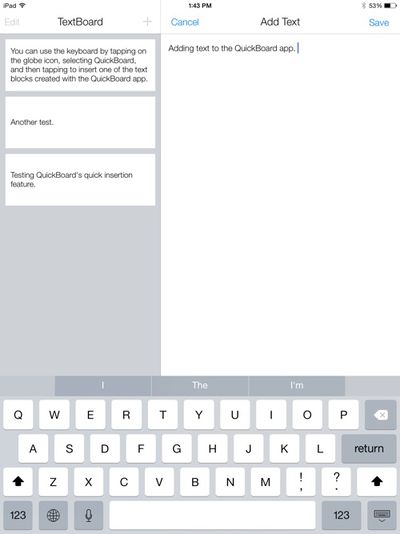
Inserting text into the QuickBoard app

Chunks of text can be entered into TextBoard section of the app, for example, while the MeBoard pulls in information like name, address, and phone number. Though MeBoard is currently limited to information pulled from the Contacts app, custom information will be added before the app's official launch. Location data isn't inserted in the app itself, since it is pulled from the phone's current location whenever it's used.

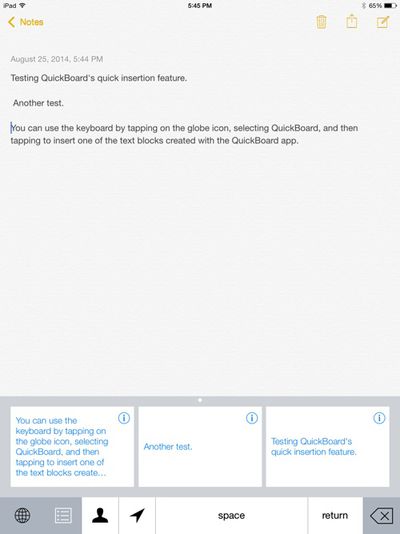
The text elements saved in the QuickBoard app can be used in any other app, including Mail, Safari, Messages, Notes, iWork, and more. Inserting saved text into one of these apps is as simple as tapping on the globe icon on the keyboard to activate QuickBoard and then tapping on the relevant block of text.

Personal information, such as name and address, can be inserted by tapping on the person icon, and the arrow will determine a user's approximate location, allowing it to be quickly inserted into a text message, email, or other app. Location information is especially useful, as it cuts out several steps that would normally be necessary when sharing a location an email or other app.
quickboard3

QuickBoard demonstrated in the Notes app

QuickBoard includes access to a space bar, return key, and delete key for formatting purposes, but the rest of the typing is left to another keyboard app or iOS 8's default predictive text function. QuickBoard works seamlessly with any other keyboards installed, and switching between them is as simple as tapping on the globe icon.

Though simpler than most of the other keyboards we've seen before, QuickBoard hints at some of the innovative ways developers will take advantage of third-party keyboard integration in iOS 8. At the current time, QuickBoard is still in the beta testing phases, but Wolkober tells GeekWebGuides that the app will be ready for download shortly after iOS 8 officially launches in the fall, with pricing yet to be determined.


Popular Stories

M5 MacBook Pro

RIP, MacBook Ultra

Monday October 19, 2026 9:37 am PDT by
Apple today sent out invites for an experience in Los Angeles on Wednesday, October 28, and the "Pro and tell" tagline on the invitation likely means that the rumored MacBook models with touch-enabled OLED displays will stick with MacBook Pro branding instead of the once-rumored "MacBook Ultra" name. The long-rumored "iPhone Ultra" ended up being named iPhone Duo, so speculation that Apple...
iPhone Duo Trio

Here's What Apple's Apps Look Like on the iPhone Duo

Tuesday October 20, 2026 11:12 am PDT by
With just three days to go until the iPhone Duo is released, Apple is getting ready for the launch. Behind the scenes, the App Store now has screenshots of Apple's built-in apps running on the Duo. We've seen some apps in marketing materials, but images of the ones we haven't seen give us an idea of what it will be like using the iPhone Duo day to day. Many apps are shown in landscape...
apple pro tell logo

Apple Announcing New Products Next Week: 'Pro and Tell'

Monday October 19, 2026 9:05 am PDT by
Apple's Greg Joswiak today hinted at new product announcements coming next week, sharing a social media post that says "Can't wait to pro and tell next week." Rumors suggest Apple is planning to debut the new MacBook Pro with an OLED touchscreen display, an M6 entry-level MacBook Pro, an M6 iMac, an iPad mini with an OLED display. Can't wait to pro and tell next week....

Top Rated Comments

cambookpro Avatar
159 months ago
It may be useful for some people, but I never really type enough of the same blocks of text for this to ever be used.

In any case, every message necessitates a slightly different tone which can't be achieved using this keyboard. If I was sending lots of the same message, I'd just use copy and paste as it's unlikely that'd you'd ever need to send it again after.


And weren't Autofill and iCloud Keychain invented so you didn't have to resort to manually typing in your address and billing information??
Score: 19 Votes (Like | Disagree)
159 months ago
I just use Keyboard Shortcuts to do this. I type 2 letters for my email address, for instance.
Score: 8 Votes (Like | Disagree)
penajmz Avatar
159 months ago
I can definitely see myself using this. Great idea!
Score: 6 Votes (Like | Disagree)
159 months ago
Hi everyone! This is Kevin, the creator of QuickBoard. If you have any questions, I'll answer them the best I can as quickly as possible. And thanks for reading about QuickBoard!
Score: 3 Votes (Like | Disagree)
miamialley Avatar
159 months ago
Cool idea, but skeptical about 3rd party keyboards.
Lol, wow. Ever heard of Android?
Score: 3 Votes (Like | Disagree)
159 months ago
Why not just use short cuts?

http://youtu.be/kupaKfm0UUU
iOS Keyboard Shortcuts are definitely awesome. However, my objective with the TextBoard feature of QuickBoard is to make managing and inserting multi-line text much simpler (e.g. letter templates, signatures, directions, etc.).

Also, as mentioned in the article, TextBoard is just one of three main features. MeBoard helps insert and fill out contact/billing info where autofill is not present. LocationBoard gets your current location and allows you to insert it in quickly as a Google Maps URL, approximate address, or coordinates.
Score: 2 Votes (Like | Disagree)
Latest Stories
Tesla App Gains iPad and iPhone Duo Support
1 hour ago
Apple Reportedly Boosts iPhone Duo Orders by 44%
2 hours ago
Fortnite Returning to Australian App Store After Court Ruling
2 hours ago
Apple Ordered to Open iPhone to Rival App Stores in Australia
3 hours ago
Apple Suppliers Face Hurdles Cutting Circuit Board Emissions
3 hours ago
Things Updated for iPhone Duo With Adaptive Layout
3 hours ago
Simplicity and Siri AI Are HomeView's Killer Features, Apple Says
4 hours ago
iPhone Duo Reviewers Really Miss Face ID
9 hours ago
Does the iPhone Duo Run Hot? Here's What Reviews Found
10 hours ago
Apple Music's New Look is Now Live on Apple's Website
11 hours ago
Anthropic Launches Claude Duet, a Proactive AI Agent
11 hours ago
What 32,000 Folds Did to the iPhone Duo's Hinge
12 hours ago
iPhone Duo's Hidden FaceTime Camera Takes 'Trash' Photos
14 hours ago
iPhone Duo Has 'Edge Light' Feature That Debuted on Macs Last Year
14 hours ago
Apple Support App Updated for iPhone Duo's Larger Display
14 hours ago
Amazon Sweetens the Deal on Entry-Level 16-Inch MacBook Pro With $570 Off
15 hours ago
iPhone Duo Tips Over on MagSafe Stands When Unfolded
15 hours ago
Apple Music's New Look Officially Announced
16 hours ago
iPhone Duo Supports Apple Pencil Starting With iOS 27.2
17 hours ago
iPhone Duo Accessories Roundup: Cases and Screen Protectors From OtterBox, ZAGG, and More
18 hours ago
Apple Stores Will Have 'Limited' Availability of iPhone Duo for Walk-In Customers
18 hours ago
iPhone Duo Reviews Explain Why Device is Both 'Fun' and 'Frustrating'
18 hours ago
Apple Says 'Reachability' Feature Coming to iPhone Duo Later This Year
20 hours ago
Loop Capital Cuts Apple Rating Over iPhone Sales Outlook
1 day ago
Apple Stores in Bordeaux and Lille Looted During French Protests
1 day ago
Bluesound Adds Native Apple Music Support
1 day ago
Apple CEO John Ternus Explains What Makes Good Product Design
1 day ago
UK Proposes New Ways to Help Apple Pay Rivals
1 day ago
WhatsApp Developing In-App Browser for All Chat Links on iPhone
1 day ago
Apple's App Store Chief Explains Its Push for Premium Games
1 day ago







































