
A List of OS X Yosemite Apps With Notification Center Widgets, Share Support, and More - MacRumors
Skip to Content

A List of OS X Yosemite Apps With Notification Center Widgets, Share Support, and More

Yesterday, Apple launched OS X Yosemite which brought a complete redesign to the OS and a number of features like Continuity, an enhanced Notification Center with widget support, iCloud Drive, and more. A number of developers have updated their apps to take advantage of those new features, and we've rounded up some of the most notable apps for Yosemite below.

1Password ($34.99 for a limited time, usually $49.99) [Direct Link]

Popular password manager 1Password has received a number of new features that integrate with OS X Yosemite including support for Dark Mode, iCloud Drive compatibility for enhanced syncing between devices, and Wi-Fi sync which now works with attachments. The 1Password mini menubar attachment has also been refined, bringing faster access and new shortcuts.
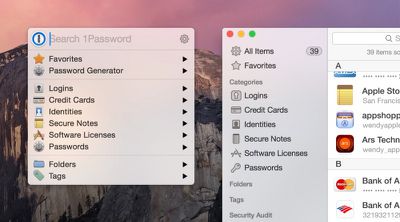
1passwordyosemite
Coinverter (Free public beta) [Direct Link]

Daft Logic Studio brings its iOS currency converter to the Mac with a flat look that is in line with the rest of OS X Yosemite and a Notification Center widget that can display multiple conversions at once. The full version of Coinverter for Mac will launch soon, and interested users can participate in a free public beta.

Wunderlist (Free) [Direct Link]

To-do app Wunderlist for Mac has received an update to 3.1.0 and brings a number of new features for OS Yosemite, including a custom Today widget in the Notification Center, a custom Share extension that works in Safari, and full Handoff support which allows users to edit lists between devices. The app has also received a redesign that allows for quicker access to list elements.
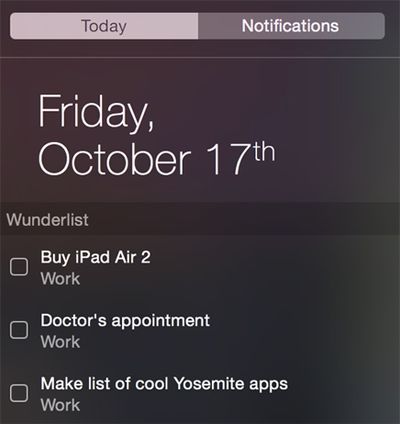
wunderlistosxyosemite2
Pocket (Free) [Direct Link]

Read-it-later service Pocket has received an update that now features its own share extension that allows users to save content in a number of apps, and a new design that gives a flat look. The service has also now integrated some of its premium features like full text search and suggested tags, along with a number of improvements like a dark mode for reading.

Deliveries ($4.99) [Direct Link]

Developer Junecloud has launched a Mac version of its popular Delivery Status touch app, and features its own Notification Center widget that allows users to track their packages along with the ability to share a shipment over email, iMessage, or AirDrop.
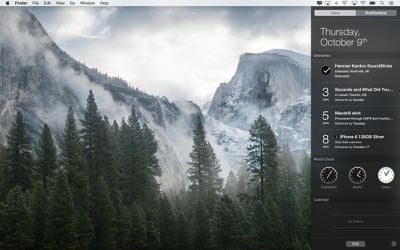
deliveriesyosemite
PCalc ($9.99) [Direct Link]

Advanced calculator PCalc is now compatible with OS X Yosemite and includes its own Notification Center Widget to perform calculations, Handoff support, and the ability to import custom calculator layouts created on iOS via iCloud. The newest version of the app also includes new themes, preferences, bug fixes, and more.
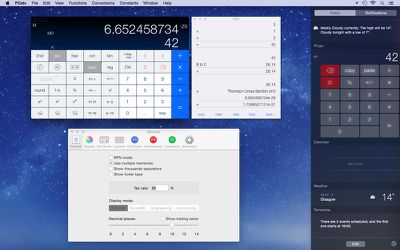
pcalcyosemite
Monity ($0.99 until October 19) [Direct Link]

Monity is a system monitoring widget made for OS X Yosemite which can be accessed in the Today view inside of Notification Center. The widget can monitor a number of OS X statistics including system uptime, app processes, memory usage, battery life, network activity, and more.
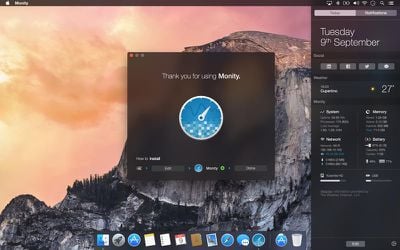
monityyosemite
CloudApp (Free) [Direct Link]

File and screenshot sharing app CloudApp has received a new update for OS X Yosemite which allows users to record their screen at 60 frames a second and a share extension that allows users to share content from their Mac to the service. CloudApp also supports Dark Mode and contains a number of performance improvements.


Related Forum: OS X Yosemite

Popular Stories

iOS 26

iOS 26.4 Adds Two New Features to CarPlay

Tuesday March 24, 2026 1:55 pm PDT by
iOS 26.4 was released today, and it includes a couple of new features for CarPlay: an Ambient Music widget and support for voice-based chatbot apps. To update your iPhone 11 or newer to iOS 26.4, open the Settings app and tap on General → Software Update. CarPlay will automatically offer the new features so long as the iPhone connected to your vehicle is running iOS 26.4 or later....
Apple Business hero

Apple Unveils 'Apple Business' All-in-One Platform

Tuesday March 24, 2026 8:53 am PDT by
Apple today announced Apple Business, a new all-in-one platform that unifies device management, productivity tools, and customer outreach features. The service is designed to be a consolidated replacement for several of Apple's existing business-focused offerings, including Apple Business Essentials, Apple Business Manager, and Apple Business Connect. It provides organizations with a single...
AirPods Pro Firmware Feature

Apple Releases New Firmware for AirPods Pro 3, AirPods Pro 2 and AirPods 4

Tuesday March 24, 2026 12:31 pm PDT by
Apple today released new firmware for the AirPods Pro 2, AirPods Pro 3, and the AirPods 4. The firmware has a version number of 8B39, up from 8B34 on the AirPods Pro 3, 8B28 on the AirPods Pro 2, and 8B21 on the AirPods 4. There is no word on what's included in the firmware, but Apple has a support document with limited notes. Most updates are limited to bug fixes and performance...

Top Rated Comments

Parasprite Avatar
149 months ago
Apple creates widgets.
Microsoft copies and makes gadgets.
Apple copies and makes notification center widgets.

my mind is blown
Your mind is pretty simple.

The Gadgets on Vista were pretty horrible though, no gesture support, heck, I couldn't even find keyboard shortcuts for them so hiding/showing them was a pain, and they just looked ugly.
Also the whole bit about them being questionable security-wise.
Score: 6 Votes (Like | Disagree)
Watabou Avatar
149 months ago
Apple creates widgets.
Microsoft copies and makes gadgets.
Apple copies and makes notification center widgets.

my mind is blown
The Gadgets on Vista were pretty horrible though, no gesture support, heck, I couldn't even find keyboard shortcuts for them so hiding/showing them was a pain, and they just looked ugly.
Score: 4 Votes (Like | Disagree)
Abazigal Avatar
149 months ago
Anyone wishing for a control centre equivalent where we can easily toggle music controls from the notifications panel?
Score: 3 Votes (Like | Disagree)
149 months ago
Taking the functionality of Dashboard and cramming everything into a thin vertical strip of screen ranks up there as one of the worse UX ideas Apple has come up with in the past few years. It's a good thing Dashboard still exists in Yosemite. One key-press gives me tons of relevant information at a glance. Notification Center is a square peg shoved into a round hole.
Score: 3 Votes (Like | Disagree)
Watabou Avatar
149 months ago
Not sure if I'm allowed to advertise here, but Lyrical is also a Notification Center widget that lets you control iTunes, and shows you song information/lyrics. I just uploaded v1.0.1 with some UI fixes and v1.1 will have Last.fm support, and a much better icon. The current one is a bit ugly I know, I sort of rushed it when Apple announced I can submit my app. :)

Check out the Link to it in my sig.

Oh and also, it's pretty helpful to set a keyboard shortcut for the Notification Center, (I like Option + Space, similar to Command+Space for Spotlight) if you don't want to move your hands away from the keyboard. It's quicker than moving your hand to perform the gesture, imo.
Score: 3 Votes (Like | Disagree)
149 months ago
Disagree. Found myself never using Dashboard but I'm rather enjoying Notification Center. Primarily because it doesn't move me out of whatever app Im using.

You don't HAVE to leave your existing app to use Dashboard.
Go to Settings/Mission Control, find the Dashboard Popup menu (about halfway down the window) and choose As Overlay (rather than the default of As Space).

This will give you a Dashboard which
- appears on top of your existing apps (it zooms in and zooms out rather than sliding/pushing)
- cannot be accessed via the 3-fingers swipe on a trackpad (because it's no longer a space) but
- CAN be accessed via F12

I don't know if this is the right sort of setting for you, but I find it helpful.
I agree with the original complainer that I tend to have so much stuff displayed in Dashboard that I don't want it all (can't fit it) in a small sidebar, and I don't look at it often, but I do want it all to be there when I do access it.
Score: 2 Votes (Like | Disagree)















