
OS X Yosemite: An In-Depth Look at Markup and Mail Drop in the Mail App

OS X Yosemite has brought some major changes to Apple's Mail app, and those changes aren't limited to a simple visual overhaul. Mail may have a new look, but it also has several new features like Mail Drop and Markup.

With Markup, you can annotate images and PDFs from directly within the Mail app. For example, when composing an email message and attaching a PDF, it's possible to use various tools to add signatures, emphasis, and more. The same is possible with an image -- simply attach a file in a message that's being composed and right click on it, selecting Markup.

Markup has a set of tools at the top that allow users to create shapes, write text words, and insert signatures. There are different brushes that can be used, along with a color palette and various font options.
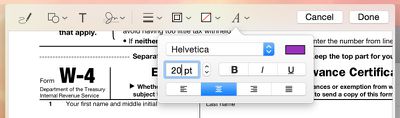
markuptools
Users can enter various shapes, such as stars, circles, squares, speech bubbles and more, and there's a magnifying glass that will magnify sections of text or photos. A crop tool also allows for simple image edits, and there's a pen tool for free-handed writing or drawing.

Markup's neatest feature is a signature tool that lets users insert a signature using the trackpad of a MacBook or a camera. With the trackpad, clicking begin and then signing a name with a finger on the trackpad will create a signature that's automatically entered into a document.
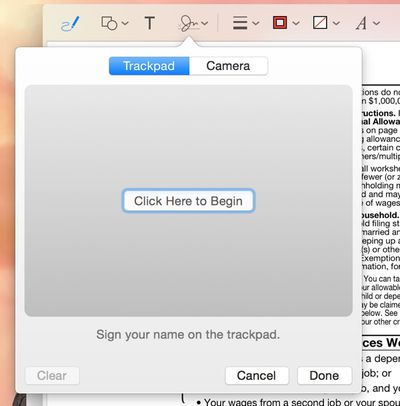
trackpad
There's also an option that allows users to write a signature on a white piece of paper and use a Mac's FaceTime camera to import it into the document. It's a little bit finicky getting the camera to recognize the signature, but once it's lined up properly, the feature works well.
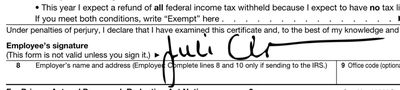
markupsignature
Along with Markup, Mail has a new feature called Mail Drop that lets users send large file attachments of up to 5GB using iCloud. Composing an email message and attaching a file that would normally be too large to send will prompt Mail to ask a user if they would like to use Mail Drop to deliver the message.
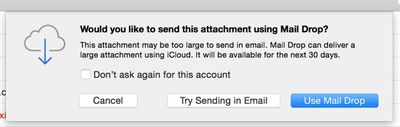
sendmaildrop
When the Mail Drop option is selected, the person receiving the email will receive the file attachment as normal if they're using Mail, while non-Mail users will receive a message with a download link that allows them to download the file directly from iCloud. Files are stored in iCloud for several days before being deleted.
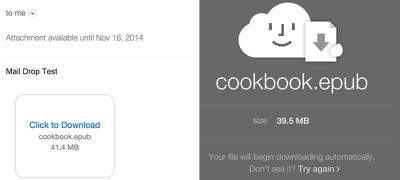
maildropicloud
MacRumors did not experience any issues getting Mail Drop to function with files ranging in size from 10MB to over 1GB, but some users on the Apple Support forums have been having trouble with the feature. Because Mail Drop works based on a sender's file size limits rather than a receiver's, users have run into an issue where they can send a file that is below their own maximum file size threshold, but above a receiver's file size limits.

For example, sending a 10MB message from an email account that has a 30MB file size limit to an email account that has a 6MB file size limit will not activate Mail Drop and turn the file into a clickable link that can be downloaded from iCloud. Therefore, the person sending the message will get a bounce back reply that the user can't accept a message of that size, even if the receiver also has Mail Drop.

According to Apple, Mail Drop can only be used to send files that "exceed the maximum size allowed by the provider of your email account," which means there is no way for a user to select a custom file size threshold to activate Mail Drop to avoid the above situation. It is not clear if Apple has plans to implement manual size controls for Mail Drop, but for the time being, it appears that Mail Drop may not be useful for all users in certain situations.

Released to the public yesterday, OS X Yosemite can be downloaded from the Mac App Store at no cost. It runs on all machines that were capable of running OS X Mountain Lion and OS X Mavericks, and it requires 8GB of storage space and 2GB of RAM. [Direct Link]


Related Forum: OS X Yosemite

Popular Stories

Apple Logo Zoomed

Tim Cook Teases Plans for Apple's Upcoming 50th Anniversary

Thursday February 5, 2026 12:54 pm PST by
Apple turns 50 this year, and its CEO Tim Cook has promised to celebrate the milestone. The big day falls on April 1, 2026. "I've been unusually reflective lately about Apple because we have been working on what do we do to mark this moment," Cook told employees today, according to Bloomberg's Mark Gurman. "When you really stop and pause and think about the last 50 years, it makes your heart ...
iOS 26

iOS 26.3 and iOS 26.4 Will Add These New Features to Your iPhone

Tuesday February 3, 2026 7:47 am PST by
While the iOS 26.3 Release Candidate is now available ahead of a public release, the first iOS 26.4 beta is likely still at least a week away. Following beta testing, iOS 26.4 will likely be released to the general public in March or April. Below, we have recapped known or rumored iOS 26.3 and iOS 26.4 features so far. iOS 26.3 iPhone to Android Transfer Tool iOS 26.3 makes it easier...
imac video apple feature

Apple Makes Its Second-Biggest Acquisition Ever

Tuesday February 3, 2026 12:45 pm PST by
Apple recently acquired Israeli startup Q.ai for close to $2 billion, according to Financial Times sources. That would make this Apple's second-biggest acquisition ever, after it paid $3 billion for the popular headphone maker Beats in 2014. This is also the largest known Apple acquisition since the company purchased Intel's smartphone modem business and patents for $1 billion in 2019....
wwdc sans text feature

Apple Rumored to Announce New Product on February 19

Thursday February 5, 2026 12:22 pm PST by
Apple plans to announce the iPhone 17e on Thursday, February 19, according to Macwelt, the German equivalent of Macworld. The report, citing industry sources, is available in English on Macworld. Apple announced the iPhone 16e on Wednesday, February 19 last year, so the iPhone 17e would be unveiled exactly one year later if this rumor is accurate. It is quite uncommon for Apple to unveil...
Finder Siri Feature

Why Apple's iOS 26.4 Siri Upgrade Will Be Bigger Than Originally Promised

Friday February 6, 2026 3:06 pm PST by
In the iOS 26.4 update that's coming this spring, Apple will introduce a new version of Siri that's going to overhaul how we interact with the personal assistant and what it's able to do. The iOS 26.4 version of Siri won't work like ChatGPT or Claude, but it will rely on large language models (LLMs) and has been updated from the ground up. Upgraded Architecture The next-generation...

Top Rated Comments

X-X Avatar
148 months ago
what a hideous confusing UI
Do you want to use Mail Drop?

YES_____NO


That is too confusing for you :D ...hilarious
Score: 11 Votes (Like | Disagree)
darkslide29 Avatar
148 months ago
Seem OS X 10.10 could benefit from more work before rushing it out every year since 10.7. Delta updates during beta testing over a few months for developers compared to 1-2 years prior with clean installs each beta does not a solid OS make. Quite a few open bugs that are serious enough have yet to be resolved. I'd wait for 10.10.1 before diving in.
One does not simply visit MacRumors every day and anticipate releases, only to be patient and wait for 10.10.1! :D
Score: 7 Votes (Like | Disagree)
KALLT Avatar
148 months ago
Didn’t Federighi say that they would focus on ‘the basics’ of Mail in Yosemite? So far the only changes I can see are the features he demonstrated during the keynote. Mail Drop and Markup are nice additions, but not ones I would use very often, if at all. I still miss features like the swipe gestures, tagging, better folder management, new e-mail rules, better spam filtering, native PGP support and so on.
Score: 7 Votes (Like | Disagree)
X-X Avatar
148 months ago
People still use email?
How do you communicate with clients, employer, online stores, insurance, banks...

Snapchat?
Score: 6 Votes (Like | Disagree)
Asclepio Avatar
148 months ago
what a hideous confusing UI
Score: 6 Votes (Like | Disagree)
MacOG728893 Avatar
148 months ago
People still use email?

Another instance where I truly miss the down vote option.
Score: 5 Votes (Like | Disagree)















