
How to Set Up Apple Pay and Add Credit Cards

Now that iOS 8.1 has been released to the public, we're getting our first look at what Apple Pay looks like on the iPhone 6 and the iPhone 6 Plus. Apple Pay isn't immediately obvious when iOS 8.1 is installed -- users will need to open up Settings or Passbook to see various Apple Pay features.

The initial setup for Apple Pay can be done through Passbook. Tapping the "+" icon in Passbook will allow users to add a card. If a card is already associated with an iTunes account, users can tap choose to use that card, or enter another one using the camera.
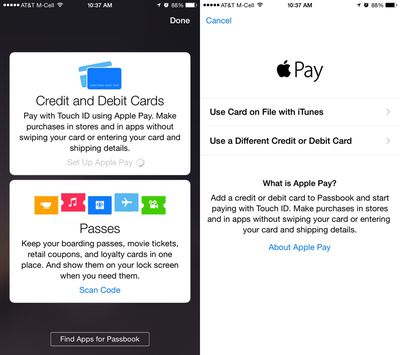
applepaysetup1
The camera roll will capture a card number, expiration date, and user's name, requiring the security code on the card to verify the number with the bank.

The verification process takes just a few seconds for most cards that are currently working with Apple Pay, after which the card can immediately be used for purchases. Some cards require additional verification steps, such as phone calls and emails. All cards stored in Passbook will be stacked on top of each other in Passbook's traditional style, with tap pulling a specific card to the forefront of the app.
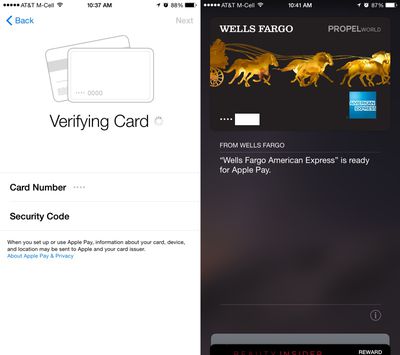
verifyingcardapplepay
Apple Pay's neatest features are buried in the Settings menu, located under the new "Passbook and Apple Pay" section. Each credit card listed added to Passbook is listed here, along with Transaction Defaults like billing address, shipping address, email, and phone number.
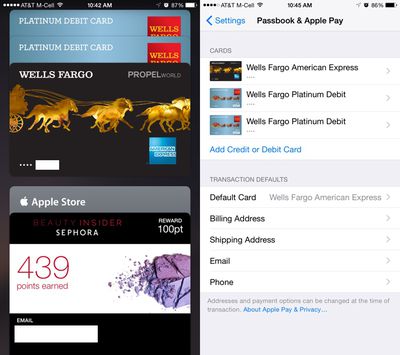
applepaysettingspassbook
Tapping on one of the cards provides specific information about the card, allowing users to see the last digits of the card number, the last digits of the Device Account Number that replaces the card number in transactions, and it also provides contact information for the bank behind the card, as well as an app download.

Each card also includes a list of recent transactions that have been made, and with some cards, transactions made in stores that don't support Apple Pay will be listed right alongside Apple Pay transactions. This settings area is also where a card can be removed from Apple Pay.
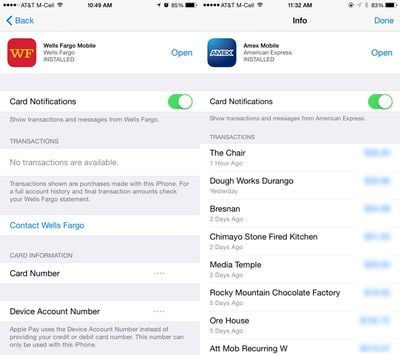
applepaysettings
After being set up, Apple Pay can be used within stores and within participating apps to make purchases with a single touch. When in a store, making a purchase is as simple as holding an iPhone 6 or 6 Plus near a contactless payment terminal with a finger on Touch ID, can be seen in the demo video below from The Verge.


According to Apple, Apple Pay will work with more than 200,000 stores that support contactless payments, and it has partnered with several retailers like Walgreens, Macy's, and Whole Foods to ensure support in those locations. Apple Pay also works for purchases made in participating apps like Uber, Starbucks, and Apple's own Apple Store app.


Related Roundup: Apple Pay

Popular Stories

Apple Logo Zoomed

Tim Cook Teases Plans for Apple's Upcoming 50th Anniversary

Thursday February 5, 2026 12:54 pm PST by
Apple turns 50 this year, and its CEO Tim Cook has promised to celebrate the milestone. The big day falls on April 1, 2026. "I've been unusually reflective lately about Apple because we have been working on what do we do to mark this moment," Cook told employees today, according to Bloomberg's Mark Gurman. "When you really stop and pause and think about the last 50 years, it makes your heart ...
wwdc sans text feature

Apple Rumored to Announce New Product on February 19

Thursday February 5, 2026 12:22 pm PST by
Apple plans to announce the iPhone 17e on Thursday, February 19, according to Macwelt, the German equivalent of Macworld. The report, citing industry sources, is available in English on Macworld. Apple announced the iPhone 16e on Wednesday, February 19 last year, so the iPhone 17e would be unveiled exactly one year later if this rumor is accurate. It is quite uncommon for Apple to unveil...
Finder Siri Feature

Why Apple's iOS 26.4 Siri Upgrade Will Be Bigger Than Originally Promised

Friday February 6, 2026 3:06 pm PST by
In the iOS 26.4 update that's coming this spring, Apple will introduce a new version of Siri that's going to overhaul how we interact with the personal assistant and what it's able to do. The iOS 26.4 version of Siri won't work like ChatGPT or Claude, but it will rely on large language models (LLMs) and has been updated from the ground up. Upgraded Architecture The next-generation...
iOS 26

iOS 26.3 and iOS 26.4 Will Add These New Features to Your iPhone

Tuesday February 3, 2026 7:47 am PST by
While the iOS 26.3 Release Candidate is now available ahead of a public release, the first iOS 26.4 beta is likely still at least a week away. Following beta testing, iOS 26.4 will likely be released to the general public in March or April. Below, we have recapped known or rumored iOS 26.3 and iOS 26.4 features so far. iOS 26.3 iPhone to Android Transfer Tool iOS 26.3 makes it easier...
iphone 17 pro dark blue 1

iPhone 18 Pro Max Rumored to Deliver Next-Level Battery Life

Friday February 6, 2026 5:14 am PST by
The iPhone 18 Pro Max will feature a bigger battery for continued best-in-class battery life, according to a known Weibo leaker. Citing supply chain information, the Weibo user known as "Digital Chat Station" said that the iPhone 18 Pro Max will have a battery capacity of 5,100 to 5,200 mAh. Combined with the efficiency improvements of the A20 Pro chip, made with TSMC's 2nm process, the...

Top Rated Comments

amirite Avatar
148 months ago
Lol @ trusting apple with secure data
Yeah it's not like they've been trusted with hundreds of millions of credit cards for several years...
Score: 41 Votes (Like | Disagree)
elvisimprsntr Avatar
148 months ago
Now that my wallet is obsolete, where am i supposed to put these now?
Score: 12 Votes (Like | Disagree)
urda Avatar
148 months ago
Uhm... your DEBIT card?

Seriously, who does that? Whoever it is gets an all-caps FANBOI.


Because people use Debit cards more offten than credit at times? The hell is wrong with you.
Score: 10 Votes (Like | Disagree)
RA1N1 Avatar
148 months ago
UK please, kthxbai.
Score: 8 Votes (Like | Disagree)
bbeagle Avatar
148 months ago
My bank doesn't support it, useless update for me. Google wallet worked fine with my Visa debit card on my Nexus.
Of course Google wallet works fine with any card - it doesn't use bank-verified tokens, it uses your ACTUAL credit card numbers. This makes Apple Pay much more secure than Google Wallet.
Score: 7 Votes (Like | Disagree)
Xiph0s Avatar
148 months ago
Lol @ trusting apple with secure data
Apparently you have no idea how Apple Pay works. Apple has 0% of your data. They just provide the mechanism to transfer your encrypted key to the bank from the merchant for authorization.
Score: 7 Votes (Like | Disagree)















