
Pixelmator, a popular Photoshop replacement on the Mac, was released for the iPad today. The image editing iOS app is similar to the Mac app, incorporating many of the same tools to allow users to retouch and enhance photos and images.

The app includes a complete set of painting tools and a painting engine that can take advantage of a range of brushes from crayon and marker to pencil and paintbrush to create works of art from scratch or improve photos.
pixelmator
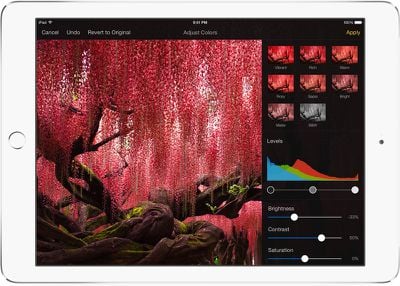
It offers several photo editing tools, including advanced retouching tools that let users remove unwanted objects from images in just a few minutes. There are color adjustment tools (including levels, brightness/contrast, curves, white balance, and more) to improve the look of photos, and a selection of more than 14 pre-created effects can be applied to images.


Pixelmator for iOS supports non-destructive layer styles and it includes powerful selection tools along with image straightening and cropping tools. There are also built-in shape and text tools.

Pixelmator comes with a set of top-quality retouching tools so you can easily make every picture absolutely stunning. With the innovative repair tool, quickly and easily get rid of unwanted image elements simply by painting on them or, with just a simple tap fix red eyes, brush away blemishes, smudge to smooth out hard lines, paint to boost the colors, bring in some light and so much more. Advanced technologies used in retouching tools make them incredibly fast and accurate, so that you can seamlessly bring an image to perfection.

Loaded with dozens of breathtaking effects, Pixelmator for iPad gives even more ways to enhance pictures. Add gorgeous effects like blur, vignette, vintage, black & white, light leak, bokeh, miniaturize and many more -- in an instant. You can even combine different effects for unique, near-effortless artistic creations and see the stunning results in real time.

The app has been designed from the ground up for iOS 8 and it fully supports several different iOS 8 features. It uses iCloud Drive to store images, for example, and with Handoff, it's possible to start editing an image on the iPad and pick it up on the Mac.

There's Document Picker support to allow users to edit images in other apps, and there's a Pixelmator Photo Editing extension designed for the Photos app. It's also possible to share images with other apps with Share extensions.

When Apple unveiled the new iPad Air 2 on October 16, it invited the Pixelmator team to take the stage to demo the Pixelmator app for the iPad Air 2, as it is designed to take advantage of the tablet's powerful 64-bit processor. Though created to utilize a 64-bit processor, Pixelmator for iPad is compatible with iPad 2, iPad 3, iPad 4, iPad Air, iPad Air 2, iPad mini, iPad mini 2, and iPad mini 3. iPad 4 or later is recommended for the best performance, however.

Pixelmator can be downloaded from the App Store for $4.99. [Direct Link]

Top Rated Comments

citi Avatar
148 months ago
Instant buy...especially at that price.
Score: 15 Votes (Like | Disagree)
reden Avatar
148 months ago
Can someone tell me if macrumors makes money off these advertisements?

Why does that matter? You obviously visit this site, and it doesn't ask you for money.
Score: 13 Votes (Like | Disagree)
twintin Avatar
148 months ago
Nice. Would buy if I had an iPad.
So what are you waiting for. Go out an buy an iPad so you can enjoy Pixelmator as everyone else. :p
Score: 13 Votes (Like | Disagree)
FieldingMellish Avatar
148 months ago
I'd buy it and not use it just in order to help fund an Adobe antidote.
Score: 11 Votes (Like | Disagree)
nostaws Avatar
148 months ago
Apple had better treat developers like these well. Pixelmator adds way more value to the iPad than a lot of other apps.
Score: 10 Votes (Like | Disagree)
Mak47 Avatar
148 months ago
I've been playing with it on the iPad Air today. It runs smoothly, no problems that I've found.

In some ways it's even more user friendly than on the Mac. I like the rotary dial controls. Very cool.

The only gripe I have is fonts. It's so close to the Mac version that I want to use it for real projects, but without the ability to add fonts from my Mac, I can't do that. Even opening old projects isn't possible because the fonts aren't supported.

I'm sure this will get better in time.
Score: 8 Votes (Like | Disagree)

Popular Stories

Apple Logo Zoomed

Tim Cook Teases Plans for Apple's Upcoming 50th Anniversary

Thursday February 5, 2026 12:54 pm PST by
Apple turns 50 this year, and its CEO Tim Cook has promised to celebrate the milestone. The big day falls on April 1, 2026. "I've been unusually reflective lately about Apple because we have been working on what do we do to mark this moment," Cook told employees today, according to Bloomberg's Mark Gurman. "When you really stop and pause and think about the last 50 years, it makes your heart ...
wwdc sans text feature

Apple Rumored to Announce New Product on February 19

Thursday February 5, 2026 12:22 pm PST by
Apple plans to announce the iPhone 17e on Thursday, February 19, according to Macwelt, the German equivalent of Macworld. The report, citing industry sources, is available in English on Macworld. Apple announced the iPhone 16e on Wednesday, February 19 last year, so the iPhone 17e would be unveiled exactly one year later if this rumor is accurate. It is quite uncommon for Apple to unveil...
Finder Siri Feature

Why Apple's iOS 26.4 Siri Upgrade Will Be Bigger Than Originally Promised

Friday February 6, 2026 3:06 pm PST by
In the iOS 26.4 update that's coming this spring, Apple will introduce a new version of Siri that's going to overhaul how we interact with the personal assistant and what it's able to do. The iOS 26.4 version of Siri won't work like ChatGPT or Claude, but it will rely on large language models (LLMs) and has been updated from the ground up. Upgraded Architecture The next-generation...
maxresdefault

Apple Shows Off a Key Reason to Upgrade to the iPhone 17

Saturday February 7, 2026 9:26 am PST by
Apple today shared an ad that shows how the upgraded Center Stage front camera on the latest iPhones improves the process of taking a group selfie. "Watch how the new front facing camera on iPhone 17 Pro takes group selfies that automatically expand and rotate as more people come into frame," says Apple. While the ad is focused on the iPhone 17 Pro and iPhone 17 Pro Max, the regular iPhone...
iOS 26

iOS 26.3 and iOS 26.4 Will Add These New Features to Your iPhone

Tuesday February 3, 2026 7:47 am PST by
While the iOS 26.3 Release Candidate is now available ahead of a public release, the first iOS 26.4 beta is likely still at least a week away. Following beta testing, iOS 26.4 will likely be released to the general public in March or April. Below, we have recapped known or rumored iOS 26.3 and iOS 26.4 features so far. iOS 26.3 iPhone to Android Transfer Tool iOS 26.3 makes it easier...
















