
'WALTR' for Mac Lets Users Upload Any Media File to an iOS Device for Native Playback - MacRumors
Skip to Content

'WALTR' for Mac Lets Users Upload Any Media File to an iOS Device for Native Playback

by

WALTR is a new Mac app from Softorino that's designed to make it easy to upload and convert any music or video file to an iPad or iPhone format for native playback.

It supports a huge variety of media file types, including MP3, MP4, AVI, CUE, WMA, M4R, AAC, M4V, M4A, FLAC, ALAC, MKV, and more. It even supports file types that are not normally compatible with iOS, including MKV, AVI, FLAC, and CUE, allowing them to be played in the native Music and Movie apps on iOS.


Using WALTR is simple. After closing iTunes, a user just needs to plug an iPhone or iPad into a Mac and open the WALTR app. The iOS device and its available storage space is listed at the top of the app, and files can be dragged to the blank space in the app for immediate transfer to the iOS device.

Uploads begin as soon as a file is dragged into the WALTR app, and most uploads are very quick, taking a few seconds. The app has been experiencing some issues uploading certain file types like AVIs, but the developers are working to fix any remaining bugs.
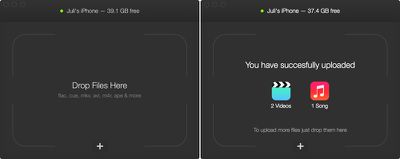
waltrupload
Once a file has been transferred to the iPhone or iPad, it is accessible in either the native Movies or Music app on the iOS device, and overall, the WALTR process is simpler than converting via a separate app and then uploading through iTunes.
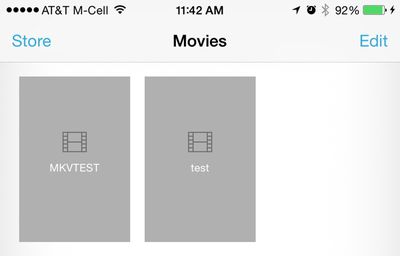
waltermovies
WALTR for Mac can be purchased from Softorino for the discounted price of $14.97, and a free trial is also available so users can give the software a try.

Update: The codes that MacRumors had available are now gone, but a free trial of the software is still available from Softorino.


Top Rated Comments

148 months ago
Why not Handbrake (which is free)?
Score: 10 Votes (Like | Disagree)
148 months ago
So since it doesn't actually transcode the files into a format native to Movies/Music apps on iOS (which would take a time measured in hours in many cases when using Handbrake), what black magic exactly is employed to make the files compatible and playable?
Score: 8 Votes (Like | Disagree)
148 months ago
Why not just use VLC for iOS (http://www.videolan.org/vlc/download-ios.html) which is FREE and plays all these formats.
Score: 6 Votes (Like | Disagree)
148 months ago
Infuse 3. Seriously check it out.

Infuse 3 by FireCore, LLC
https://appsto.re/ca/-4KzI.i
Score: 4 Votes (Like | Disagree)
justperry Avatar
148 months ago
i was wrong

About what. :confused::confused::confused:
Score: 3 Votes (Like | Disagree)
dweezle3 Avatar
148 months ago
MacRumors has been provided 25 promo codes to give out on a first come, first serve basis.

3 minutes later:
Update: The codes that MacRumors had available are now gone, but a free trial of the software is still available from Softorino.

Well, that was quick.
Score: 3 Votes (Like | Disagree)

Popular Stories

iOS 26

iOS 26.4 Adds Two New Features to CarPlay

Tuesday March 24, 2026 1:55 pm PDT by
iOS 26.4 was released today, and it includes a couple of new features for CarPlay: an Ambient Music widget and support for voice-based chatbot apps. To update your iPhone 11 or newer to iOS 26.4, open the Settings app and tap on General → Software Update. CarPlay will automatically offer the new features so long as the iPhone connected to your vehicle is running iOS 26.4 or later....
Apple Business hero

Apple Unveils 'Apple Business' All-in-One Platform

Tuesday March 24, 2026 8:53 am PDT by
Apple today announced Apple Business, a new all-in-one platform that unifies device management, productivity tools, and customer outreach features. The service is designed to be a consolidated replacement for several of Apple's existing business-focused offerings, including Apple Business Essentials, Apple Business Manager, and Apple Business Connect. It provides organizations with a single...
AirPods Pro Firmware Feature

Apple Releases New Firmware for AirPods Pro 3, AirPods Pro 2 and AirPods 4

Tuesday March 24, 2026 12:31 pm PDT by
Apple today released new firmware for the AirPods Pro 2, AirPods Pro 3, and the AirPods 4. The firmware has a version number of 8B39, up from 8B34 on the AirPods Pro 3, 8B28 on the AirPods Pro 2, and 8B21 on the AirPods 4. There is no word on what's included in the firmware, but Apple has a support document with limited notes. Most updates are limited to bug fixes and performance...













