
DeskConnect today launched Workflow, a universal iOS app billed as a "personal automation tool" that allows users to easily create workflows to accomplish various tasks such as creating animated GIFs from a series of photos, grabbing images from a web page, automatically cross-posting photos to Twitter, Facebook, and Instagram in one step, and more.


Workflow contains over 100 different actions users can combine in their own custom workflows, or users can select from a gallery of pre-populated workflows focused on various topics. The gallery includes a number of sample workflows at launch, and users can submit their own for inclusion.
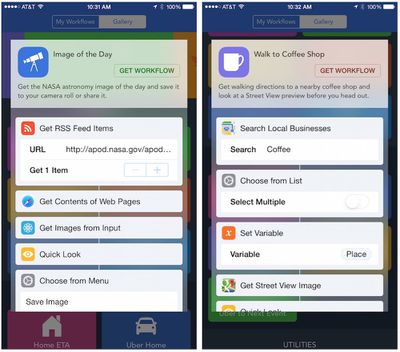
workflow_gallery_samples

Sample workflows from the gallery

The app's simple drag-and-drop interface makes it easy to build workflows, which can be initiated from within in the app, saved to the home screen as a web URL that launches the specified workflow, or launched from other apps through a share sheet extension.

Interestingly, Workflow originally contained a Notification Center widget that allowed users to launch workflows, but as with a number of other developers, DeskConnect ran into issues with Apple's restrictions on what types of content can be presented in Notification Center widgets and the feature had to be removed. Still, Workflow offers a number of handy options for accomplishing tasks of varying complexity, pulling together different types of inputs and actions to greatly simplify multi-step tasks that would normally see users manually switching between several apps to accomplish.

Workflow is available now at an introductory price of $2.99 for a limited time. [Direct Link]

Top Rated Comments

iMacmatician Avatar
146 months ago
This app reminds me of Automator.
Score: 3 Votes (Like | Disagree)
baryon Avatar
146 months ago
Hope this is better than ITTT, which can't even do the simplest things.
Score: 3 Votes (Like | Disagree)
mxmgodin Avatar
146 months ago
It's featured as an Editor's Choice on the App Store, so it should be safe (for now).

I played around with it a bit, and I quite like it. I hope for better and more varied support of 3rd party apps and services. For example, I'd like to be able to use Google Maps, instead of the stock Maps app, mostly because of transit information, etc.

Update: Just noticed that Google Maps is already supported. :P
Score: 2 Votes (Like | Disagree)
motulist Avatar
146 months ago
I don't see what this would be useful for for most people. Can someone give a list of real world uses that many people would find useful or desirable?
Score: 1 Votes (Like | Disagree)
PSB136 Avatar
146 months ago
I'm looking for a real practical use for it. Posting tweets, making animgifs, and sharing photos is of zero interest to me. Anyone got any useful examples of where it can save time for non-social media users like myself?

Can it close all running apps?

Can it play all songs by an artist without me creating a playlist?

Can it set the clipboard text before opening an email (so I can paste a canned response to someone)?

Can it open any website with specific criteria that I've set, such as opening this MacRumors forum with search results for my name?

And so on.
Score: 1 Votes (Like | Disagree)
Halopend Avatar
146 months ago
I'd love Siri integration... to be able to execute my own commands via Siri. But I'm thinking Apple hasn't opened that function up to 3rd party apps yet?

Only for HomeKit (the new home automation api). I think that homekit is only available to "hardware partners" meaning there is a fairly extensive vetting process before a dev even has access to it (I believe).
Score: 1 Votes (Like | Disagree)

Popular Stories

wwdc sans text feature

Apple Rumored to Announce New Product on February 19

Thursday February 5, 2026 12:22 pm PST by
Apple plans to announce the iPhone 17e on Thursday, February 19, according to Macwelt, the German equivalent of Macworld. The report, citing industry sources, is available in English on Macworld. Apple announced the iPhone 16e on Wednesday, February 19 last year, so the iPhone 17e would be unveiled exactly one year later if this rumor is accurate. It is quite uncommon for Apple to unveil...
Apple Logo Zoomed

Tim Cook Teases Plans for Apple's Upcoming 50th Anniversary

Thursday February 5, 2026 12:54 pm PST by
Apple turns 50 this year, and its CEO Tim Cook has promised to celebrate the milestone. The big day falls on April 1, 2026. "I've been unusually reflective lately about Apple because we have been working on what do we do to mark this moment," Cook told employees today, according to Bloomberg's Mark Gurman. "When you really stop and pause and think about the last 50 years, it makes your heart ...
maxresdefault

Apple Shows Off a Key Reason to Upgrade to the iPhone 17

Saturday February 7, 2026 9:26 am PST by
Apple today shared an ad that shows how the upgraded Center Stage front camera on the latest iPhones improves the process of taking a group selfie. "Watch how the new front facing camera on iPhone 17 Pro takes group selfies that automatically expand and rotate as more people come into frame," says Apple. While the ad is focused on the iPhone 17 Pro and iPhone 17 Pro Max, the regular iPhone...
Finder Siri Feature

Why Apple's iOS 26.4 Siri Upgrade Will Be Bigger Than Originally Promised

Friday February 6, 2026 3:06 pm PST by
In the iOS 26.4 update that's coming this spring, Apple will introduce a new version of Siri that's going to overhaul how we interact with the personal assistant and what it's able to do. The iOS 26.4 version of Siri won't work like ChatGPT or Claude, but it will rely on large language models (LLMs) and has been updated from the ground up. Upgraded Architecture The next-generation...
iOS 26

iOS 26.3 and iOS 26.4 Will Add These New Features to Your iPhone

Tuesday February 3, 2026 7:47 am PST by
While the iOS 26.3 Release Candidate is now available ahead of a public release, the first iOS 26.4 beta is likely still at least a week away. Following beta testing, iOS 26.4 will likely be released to the general public in March or April. Below, we have recapped known or rumored iOS 26.3 and iOS 26.4 features so far. iOS 26.3 iPhone to Android Transfer Tool iOS 26.3 makes it easier...















