
CES 2015: iDevices Announces HomeKit-Enabled 'Switch' Smart Plug

iDevices today announced its upcoming Switch smart plug, a HomeKit-enabled device that allows users to remotely control a variety of devices around the home. The system takes advantage of the existing iDevices Connected app to give users control over the plug, which plugs into a standard electrical outlet and connects to the home's Wi-Fi network to provide control over a device plugged into Switch.
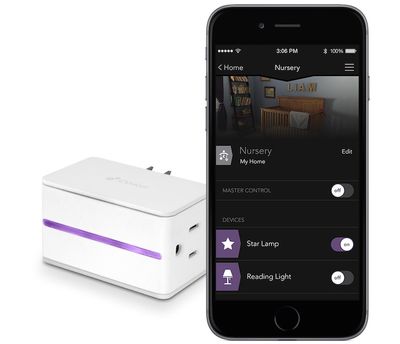
idevices_switch
With HomeKit integration for Switch, users will be able to take advantage of a number of iOS features in the system, including the ability to use Siri to control their devices. Switch requires no dedicated hub device or subscription services, making it simple to set up.

- Siri – Switch’s HomeKit integration provides an easy, secure way to control Switch using Siri on your iPhone, iPad or iPod touch. You can even create your own commands to control multiple home settings. For example, you can automatically turn off lamps connected to your iDevices Switch, lock your doors, close the garage door and set the thermostat to the desired temperature, all with one command.

- Remote Access – iDevices designed a custom IoT cloud for Switch so that users can access their home from wherever they are with no additional hub required.

- Create Custom Events and Schedules – Through the iDevices Connected app, users are able to design custom events (or schedules) that fit their lifestyle. The iDevices Switch has the unique ability to remember events and make sure they happen even when the user is away.


Switch also includes several personalization options including the ability to upload photos from around the home to personalize the control app and make it easier to identify devices, as well as a built-in highlight on the Switch itself with customizable color choices.

Switch launches later in the first half of 2015, and The Verge says the device will cost $49.99.

iHome is also announcing a similar iSP5 SmartPlug smart plug that will launch later this year, but details remain scant at this time. Like iDevices' Switch, iHome's SmartPlug supports HomeKit and is a Wi-Fi enabled plug that allows users to control individual devices without the need for a hub. iHome does tout that multiple SmartPlugs can be grouped together into "scenes" to control various devices together. Pricing and an exact launch timeframe for SmartPlug have yet to be announced.


Popular Stories

Apple Logo Zoomed

Tim Cook Teases Plans for Apple's Upcoming 50th Anniversary

Thursday February 5, 2026 12:54 pm PST by
Apple turns 50 this year, and its CEO Tim Cook has promised to celebrate the milestone. The big day falls on April 1, 2026. "I've been unusually reflective lately about Apple because we have been working on what do we do to mark this moment," Cook told employees today, according to Bloomberg's Mark Gurman. "When you really stop and pause and think about the last 50 years, it makes your heart ...
wwdc sans text feature

Apple Rumored to Announce New Product on February 19

Thursday February 5, 2026 12:22 pm PST by
Apple plans to announce the iPhone 17e on Thursday, February 19, according to Macwelt, the German equivalent of Macworld. The report, citing industry sources, is available in English on Macworld. Apple announced the iPhone 16e on Wednesday, February 19 last year, so the iPhone 17e would be unveiled exactly one year later if this rumor is accurate. It is quite uncommon for Apple to unveil...
Finder Siri Feature

Why Apple's iOS 26.4 Siri Upgrade Will Be Bigger Than Originally Promised

Friday February 6, 2026 3:06 pm PST by
In the iOS 26.4 update that's coming this spring, Apple will introduce a new version of Siri that's going to overhaul how we interact with the personal assistant and what it's able to do. The iOS 26.4 version of Siri won't work like ChatGPT or Claude, but it will rely on large language models (LLMs) and has been updated from the ground up. Upgraded Architecture The next-generation...
iOS 26

iOS 26.3 and iOS 26.4 Will Add These New Features to Your iPhone

Tuesday February 3, 2026 7:47 am PST by
While the iOS 26.3 Release Candidate is now available ahead of a public release, the first iOS 26.4 beta is likely still at least a week away. Following beta testing, iOS 26.4 will likely be released to the general public in March or April. Below, we have recapped known or rumored iOS 26.3 and iOS 26.4 features so far. iOS 26.3 iPhone to Android Transfer Tool iOS 26.3 makes it easier...
iphone 17 pro dark blue 1

iPhone 18 Pro Max Rumored to Deliver Next-Level Battery Life

Friday February 6, 2026 5:14 am PST by
The iPhone 18 Pro Max will feature a bigger battery for continued best-in-class battery life, according to a known Weibo leaker. Citing supply chain information, the Weibo user known as "Digital Chat Station" said that the iPhone 18 Pro Max will have a battery capacity of 5,100 to 5,200 mAh. Combined with the efficiency improvements of the A20 Pro chip, made with TSMC's 2nm process, the...

Top Rated Comments

reden Avatar
145 months ago
$50 to automate my reading light? I'll manually flip the switch, thanks.
Score: 22 Votes (Like | Disagree)
Z400Racer37 Avatar
145 months ago
Yup, better than:

Get your iPhone out of your pocket.
Unlock iPhone.
Look for HomeKit app.
Open Homekit.
Search for the switch.
Switch on/off.

:eek:

"Hey Siri, turn of the lights in my room." :cool:
Score: 17 Votes (Like | Disagree)
BornAgainMac Avatar
145 months ago
I want the dishes and floors and bathroom cleaned. I'll deal with the lights.
Score: 9 Votes (Like | Disagree)
justperry Avatar
145 months ago
$50 to automate my reading light? I'll manually flip the switch, thanks.

Yup, better than:

Get your iPhone out of your pocket.
Unlock iPhone.
Look for HomeKit app.
Open Homekit.
Search for the switch.
Switch on/off.

:eek:
Score: 9 Votes (Like | Disagree)
blackcrayon Avatar
145 months ago
What's all this talk about unlocking your phone opening an app and all that?

Swipe down from the lock screen, press the button on the (hopefully existing) widget that corresponds to the switch. Done.
Score: 8 Votes (Like | Disagree)
bloggerblog Avatar
145 months ago
"Hey Siri, turn of the lights in my room." :cool:

Siri: Sorry, I do not know how to burn oven lights go vroom. Would you like me to search the internet for that? :D
Score: 6 Votes (Like | Disagree)















