
Apple's iOS and Mac App Stores were today updated with new "Get Productive" sections, offering discounted prices on many popular productivity apps for iOS devices and Macs.

In the iOS App Store, the 19 discounted apps include Fantastical 2 for iPhone and iPad, Workflow, Clear, Duet Display, Calendars 5, and more. Apps are available for up to 60 percent off their regular prices.
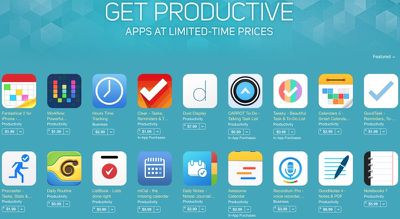
getproductivepromotion
In the Mac App Store, there are 20 apps available at discounted prices up to 75 percent off, including popular offerings like Day One, Byword, iA Writer Pro, iTranslate, mSecure, iStudiez Pro, Notability, and more.

Apple has also named ProCam 2 as its App of the Week, and as a result, the camera and photo editing app is available at no cost, instead of at its regular $1.99 price. [Direct Link]

The iPad version of the app, ProCam XL 2 is also free. [Direct Link]

Top Rated Comments

Saddington Avatar
144 months ago
pretty excited to have my small indie app, Desk App (https://itunes.apple.com/us/app/desk-writing-blogging-notetaking/id915839505?mt=12&ign-mpt=uo%3D4), represented! pretty honored and humbled, that's for sure!
Score: 12 Votes (Like | Disagree)
Traverse Avatar
144 months ago
You know, I've really turned my iPad in quite the productive little machine.

My 15" MacBook stays docked to a large external monitor at home and I take my iPad 3 with a Logitech Ultrathin Smart Cover to school. I use Word (and occasionally OneNote) to take notes during lectures or annotate professor supplied power points as they talk. I use Excel for iOS for some (very light) spreadsheet organization. I'm using PDF expert to read and annotate over 400 pages of PDFs for this terms classes. I've stopped printing PowerPoint slides and notes and simply consolidate them all into one large (50 to 200 page) PDF to study for exams. All my files stay in sync via Dropbox. I use Calendar and various Reminders lists to stay onto of my tasks and I stay on top of my emails throughout the day instead of letting them pile up until I'm home.

When I get home I pick up where I left off on my Mac to finish papers, work on my online class presentations, and work on my thesis (but I read the thesis PDFs and data on the iPad).

Together they make a pretty good team. My Mac is excellent for my heavy lifting tasks and my iPad works perfect as a light on-the-go device. The ability to use a keyboard in a more traditional laptop fashion when taking notes, but detach it into a more "book" like form factor for reading and annotating PDFs is a big help especially since some of my PDFs are rendered as one image so I can't highlight individual text on my Mac, but I can draw or freeform highlight on my iPad.
Score: 7 Votes (Like | Disagree)
farewelwilliams Avatar
144 months ago
we all need several todo lists, one for each calendar app we download. put that in one of your notes app.
Score: 7 Votes (Like | Disagree)
FieldingMellish Avatar
144 months ago
Anti-productivity. You guys want productivity? Stop investigating and buying / trying apps and just get back to work.
Score: 4 Votes (Like | Disagree)
roland.g Avatar
144 months ago
we all need several todo lists, one for each calendar app we download. put that in one of your notes app.

Or you could just use Omnifocus 2.
Score: 3 Votes (Like | Disagree)
tevion5 Avatar
144 months ago
Perhaps the software development team in charge of quality control at Apple would do well to take a similar initiative.
Score: 2 Votes (Like | Disagree)

Popular Stories

Apple Logo Zoomed

Tim Cook Teases Plans for Apple's Upcoming 50th Anniversary

Thursday February 5, 2026 12:54 pm PST by
Apple turns 50 this year, and its CEO Tim Cook has promised to celebrate the milestone. The big day falls on April 1, 2026. "I've been unusually reflective lately about Apple because we have been working on what do we do to mark this moment," Cook told employees today, according to Bloomberg's Mark Gurman. "When you really stop and pause and think about the last 50 years, it makes your heart ...
wwdc sans text feature

Apple Rumored to Announce New Product on February 19

Thursday February 5, 2026 12:22 pm PST by
Apple plans to announce the iPhone 17e on Thursday, February 19, according to Macwelt, the German equivalent of Macworld. The report, citing industry sources, is available in English on Macworld. Apple announced the iPhone 16e on Wednesday, February 19 last year, so the iPhone 17e would be unveiled exactly one year later if this rumor is accurate. It is quite uncommon for Apple to unveil...
Finder Siri Feature

Why Apple's iOS 26.4 Siri Upgrade Will Be Bigger Than Originally Promised

Friday February 6, 2026 3:06 pm PST by
In the iOS 26.4 update that's coming this spring, Apple will introduce a new version of Siri that's going to overhaul how we interact with the personal assistant and what it's able to do. The iOS 26.4 version of Siri won't work like ChatGPT or Claude, but it will rely on large language models (LLMs) and has been updated from the ground up. Upgraded Architecture The next-generation...
maxresdefault

Apple Shows Off a Key Reason to Upgrade to the iPhone 17

Saturday February 7, 2026 9:26 am PST by
Apple today shared an ad that shows how the upgraded Center Stage front camera on the latest iPhones improves the process of taking a group selfie. "Watch how the new front facing camera on iPhone 17 Pro takes group selfies that automatically expand and rotate as more people come into frame," says Apple. While the ad is focused on the iPhone 17 Pro and iPhone 17 Pro Max, the regular iPhone...
iOS 26

iOS 26.3 and iOS 26.4 Will Add These New Features to Your iPhone

Tuesday February 3, 2026 7:47 am PST by
While the iOS 26.3 Release Candidate is now available ahead of a public release, the first iOS 26.4 beta is likely still at least a week away. Following beta testing, iOS 26.4 will likely be released to the general public in March or April. Below, we have recapped known or rumored iOS 26.3 and iOS 26.4 features so far. iOS 26.3 iPhone to Android Transfer Tool iOS 26.3 makes it easier...
















