
OS X 10.10.3 Beta Adds Support for Google 2-Step Verification on Internet Accounts - MacRumors
Skip to Content

OS X 10.10.3 Beta Adds Support for Google 2-Step Verification on Internet Accounts

In addition to a new Photos app and emoji improvements, yesterday's developer release of the first OS X 10.10.3 beta also includes new direct support for Google's 2-Step Verification when setting up Google services in the Internet Accounts section of System Preferences.

2-Step Verification is an optional security setting that requires users to enter not only their account password but also a unique code sent by Google via phone app, text message, or voice call to a previously registered device or phone number, greatly enhancing account security.

Not all devices and apps support Google's 2-Step Verification, however, and as a backup Google also allows users to generate app-specific passwords to register a unique password for that device or app. The app-specific password can be revoked at any time by logging into the user's Google account for another time, making it easy to disable access on a device that has been lost or stolen.

On OS X 10.10.2 and earlier, users setting up their machines to access Google accounts with 2-Step Verification enabled have had to use this app-specific password option. Users trying to log in with their standard Google account passwords are met with error messages informing them they need to use this option.
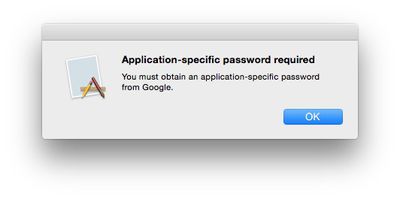
yosemite_2fa_reject

OS X 10.10.2 requiring an app-specific password for a Google account protected with 2-Step Verification

But as noticed by developer Jonathan Wight, the new OS X 10.10.3 beta now fully supports 2-Step Verification, allowing users to log in with their standard passwords and unique verification codes.
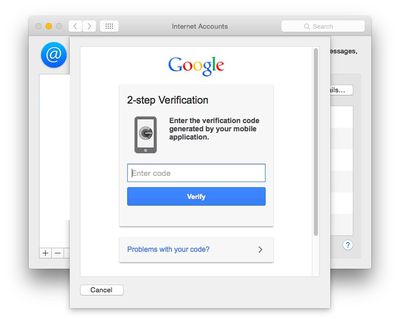
yosemite_google_2step

OS X 10.10.3 requesting verification code after logging in with standard password

The change makes logging in with 2-Step protected accounts much simpler and increases security by making sure the user attempting to log in has a secondary trusted device to provide the verification code.

(Thanks, Sean!)

Related Forum: OS X Yosemite

Popular Stories

iOS 26

iOS 26.4 Adds Two New Features to CarPlay

Tuesday March 24, 2026 1:55 pm PDT by
iOS 26.4 was released today, and it includes a couple of new features for CarPlay: an Ambient Music widget and support for voice-based chatbot apps. To update your iPhone 11 or newer to iOS 26.4, open the Settings app and tap on General → Software Update. CarPlay will automatically offer the new features so long as the iPhone connected to your vehicle is running iOS 26.4 or later....
Apple Business hero

Apple Unveils 'Apple Business' All-in-One Platform

Tuesday March 24, 2026 8:53 am PDT by
Apple today announced Apple Business, a new all-in-one platform that unifies device management, productivity tools, and customer outreach features. The service is designed to be a consolidated replacement for several of Apple's existing business-focused offerings, including Apple Business Essentials, Apple Business Manager, and Apple Business Connect. It provides organizations with a single...
AirPods Pro Firmware Feature

Apple Releases New Firmware for AirPods Pro 3, AirPods Pro 2 and AirPods 4

Tuesday March 24, 2026 12:31 pm PDT by
Apple today released new firmware for the AirPods Pro 2, AirPods Pro 3, and the AirPods 4. The firmware has a version number of 8B39, up from 8B34 on the AirPods Pro 3, 8B28 on the AirPods Pro 2, and 8B21 on the AirPods 4. There is no word on what's included in the firmware, but Apple has a support document with limited notes. Most updates are limited to bug fixes and performance...

Top Rated Comments

AngerDanger Avatar
145 months ago
Please, you expect us to believe that anybody at Apple has been doing anything besides working on Emoji?
Score: 16 Votes (Like | Disagree)
gavroche Avatar
145 months ago
I have an Apple Airport Extreme router. After my iMac wakes from sleep, I often cannot connect to Wi-Fi, even with OSX 10.10.2. And yet my iPad and iPhone connect perfectly every time. What does this tell you? Apple gets it right with iOS, but they are no longer putting the resources into Macs and OSX. It shouldn’t take this many months to get the bugs out of a new OS.

Not to berate you, or knock your complaints... But not sure what this has to do with the article (2-Step Verification)...
Score: 8 Votes (Like | Disagree)
CrazyForApple Avatar
145 months ago
There should be a 2 step verification process for everything.
Score: 5 Votes (Like | Disagree)
DCstewieG Avatar
145 months ago
The "webpage-inside-a-sheet" look looks pretty lazy, but it is a beta.
I could be wrong but I think it needs to be that way to hand control over to Google to do the authentication. That's the same thing you'll see in any application that supports their 2-factor setup.
Score: 5 Votes (Like | Disagree)
145 months ago
The "webpage-inside-a-sheet" look looks pretty lazy, but it is a beta.

I have an Apple Airport Extreme router. After my iMac wakes from sleep, I often cannot connect to Wi-Fi, even with OSX 10.10.2. And yet my iPad and iPhone connect perfectly every time. What does this tell you? Apple gets it right with iOS, but they are no longer putting the resources into Macs and OSX. It shouldn’t take this many months to get the bugs out of a new OS.
It doesn't tell you anything. Everyone has different experiences...for me, iOS 8 is way buggier than OS X, especially Safari.
Score: 5 Votes (Like | Disagree)
viorelgn Avatar
145 months ago
I have an Apple Airport Extreme router. After my iMac wakes from sleep, I often cannot connect to Wi-Fi, even with OSX 10.10.2. And yet my iPad and iPhone connect perfectly every time. What does this tell you? Apple gets it right with iOS, but they are no longer putting the resources into Macs and OSX. It shouldn’t take this many months to get the bugs out of a new OS.
Score: 4 Votes (Like | Disagree)
















