

At its "Spring Forward" event on Monday, Apple announced a brand-new MacBook and updated 13-inch MacBook Pros with a fully redesigned trackpad called the Force Touch trackpad.
Like on the Apple Watch, Force Touch allows the device to distinguish between a light press and a deep press, opening up new methods for interaction. For example, while a light press could be a simple click, a deep press while browsing in Safari could bring up a Wikipedia entry in a pop-up window.
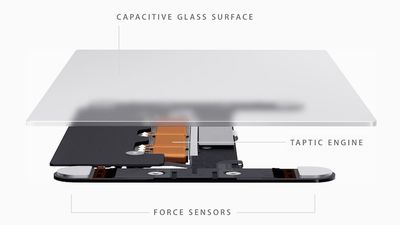
The Force Touch trackpad on the MacBook and new MacBook Pros achieves this through a total reinvention of the way the trackpad works. Apple ditched the "diving board" structure of older trackpads for a new design with four sensors, called Force Sensors.
These Force Sensors allow the user to click anywhere on the Force Touch trackpad. The "diving board" design on previous trackpads made it difficult to click toward the top of the trackpad, forcing users to move their fingers toward the bottom of the trackpad to click.
The Force Sensors are bundled together with the Taptic Engine, which is also featured in the upcoming Apple Watch. The Taptic Engine senses when a user clicks on the trackpad and issues haptic feedback to let a user know that their action was successful. As noted by TechCrunch's Matthew Panzarino, this is because the trackpad itself doesn't move. While the Force Touch trackpad sounds like it clicks and feels like it clicks, it doesn't actually click.
There is a set of vibrating motors underneath that provides ‘force feedback’, also known as haptics in some applications. This feedback fools your finger into believing that you’ve pressed down on a hinged button, the way your current trackpad works. This feedback relies on phenomenon called lateral force fields (LFFs), which can cause humans to experience vibrations as haptic ‘textures’. This can give you the feel of a ‘clickable’ surface or even depth. The Force Touch feature of the new trackpad allows you to press ‘deeper’, giving you additional levels of tapping feedback. The effect is done so well that you actually feel like you’re pressing down deeper into a trackpad that still isn’t moving at all. It’s so good it’s eerie.
While the Force Touch trackpad was a main highlight of Apple's introduction of the new MacBook, the updated 13-inch MacBook Pro is actually the first Mac to ship with the feature. iFixit has already performed a teardown of the new MacBook Pro to get a closer look at the workings of the Force Touch trackpad after removing the machine's well-glued battery.
iFixit's teardown reveals the electromagnets that make up the Taptic Engine, with four separate magnets likely working together in various combinations to generate different types of vibrational feedback.
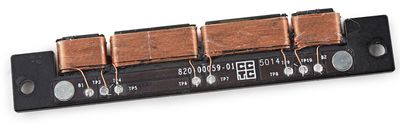
The magnets rapidly push and pull against a metal rail mounted beneath the trackpad, to create a tiny "buzz" of feedback with each click (and a second buzz for a "force click.")
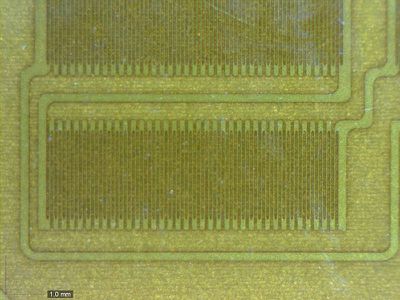
Digging further into the trackpad, iFixit discovered what appear to be strain gauges mounted on metal supports, allowing the trackpad to sense the amount of force being applied to the surface of the trackpad.
The internals of the new MacBook Pro are otherwise largely unchanged from the previous generation, with only some minor tweaks in the layout of logic board components, a not unexpected development considering the update is primarily a speed bump with the new trackpad offering a nice extra feature to entice customers to upgrade.
While iFixit's look at the Force Touch trackpad gives a sense of the hardware involved, software also plays an important role in the overall user experience, with the new Force Click "deep press" able to feature multiple levels of "clicks" performing varying functions in different applications. MacRumors forum member TylerWatt12 notes that in QuickTime users can push harder to access around 10 additional "click levels". In its hands-on of the new MacBook, The Verge says that this added complexity can be difficult to get used to and some users may need to meddle with Force Touch's sensitivity options to find what's most comfortable for them.
Gizmodo, on the other hand, said it "loved" the new feature and that it feels like something that could make it easier to get work done because of how OS X makes smart use of the new input feature. Engadget agreed, saying Force Touch feels "very deliberate" and "controlled", and that it can't see many users "deep pressing" when they meant to "lightly press" and vice versa.
While Force Touch is currently limited to the updated 13-inch MacBook Pros and the upcoming Apple Watch and MacBook, it's likely the feature will make its way across other Apple devices as well. Yesterday, a report indicated that Apple is going to add the new feature to both the iPhone 6s and iPhone 6s Plus later this year.






















