
Retina MacBook Pro Users Complain of Anti-Reflective Display Coating Wearing Off - MacRumors
Skip to Content

Retina MacBook Pro Users Complain of Anti-Reflective Display Coating Wearing Off

A growing number of users have turned to the Apple Support Communities, MacRumors discussion forums and Facebook in recent weeks to voice their complaints about the anti-reflective coating on Retina MacBook Pros becoming scratched or wearing off. The long-standing display issue appears to affect several MacBook Pros, including mid-2012 to mid-2014 models sold between June 2012 and present.
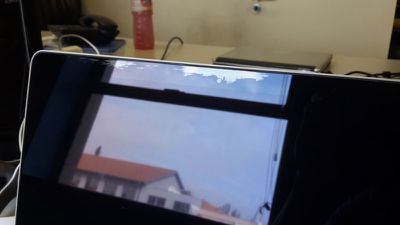
MacBook Pro Coating
The anti-reflective coating appears to be wearing off under a variety of circumstances, including the pressure of the keys and trackpad on the display when closed, and the use of third-party cleaning solutions and microfiber cloths. While the issue is typically isolated to small areas of the screen, some users have shared pictures showing the anti-reflective coating wearing off across virtually the entire display.

"I had the exact same problem, and I followed the cleaning instructions on the Apple website: a lint free cloth and a small amount of water," writes MacRumors forum member wj2. "Was trying to remove a mark in the corner of my screen and a shiny scratch appeared on the bezel. It grew in size and it looked like the coating on the bezel was coming off like everyone is saying. Started happening at the top of my display by the camera also. I looked it up and stumbled across this same forum and realized that it was a problem that I should take up with Apple."

Affected users have received mixed responses from Apple. While some Retina MacBook Pro owners covered under a one-year limited warranty or AppleCare Protection Plan have been able to get their notebook repaired through the Genius Bar for no charge, others have been told that cosmetic damage is not covered under warranty and offered to have their notebooks repaired for a service charge costing hundreds of dollars.
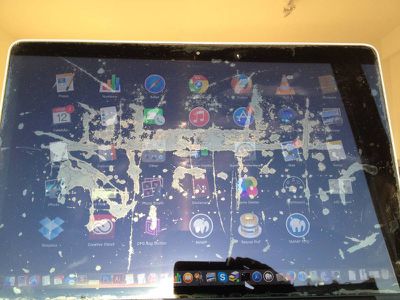
Retina MacBook Pro Coating
While the anti-reflective coating issues are not new, with complaints dating back to at least August 2013, the problem has been gaining momentum in recent weeks. The issue has received over 100,000 views and 600 responses between the Apple Support Communities and MacRumors discussion forums, and dozens of users have submitted pictures of their damaged Retina MacBook Pros throughout March in a Facebook group set up to discuss the problem.

Update Mar 17: An unofficial website called "Staingate" has launched where affected users can join a database and submit photos of the display coating wearing off on their MacBook Pro.


Related Roundup: MacBook Pro
Buyer's Guide: MacBook Pro (Buy Now)
Related Forum: MacBook Pro

Popular Stories

iOS 26

iOS 26.4 Adds Two New Features to CarPlay

Tuesday March 24, 2026 1:55 pm PDT by
iOS 26.4 was released today, and it includes a couple of new features for CarPlay: an Ambient Music widget and support for voice-based chatbot apps. To update your iPhone 11 or newer to iOS 26.4, open the Settings app and tap on General → Software Update. CarPlay will automatically offer the new features so long as the iPhone connected to your vehicle is running iOS 26.4 or later....
Apple Business hero

Apple Unveils 'Apple Business' All-in-One Platform

Tuesday March 24, 2026 8:53 am PDT by
Apple today announced Apple Business, a new all-in-one platform that unifies device management, productivity tools, and customer outreach features. The service is designed to be a consolidated replacement for several of Apple's existing business-focused offerings, including Apple Business Essentials, Apple Business Manager, and Apple Business Connect. It provides organizations with a single...
AirPods Pro Firmware Feature

Apple Releases New Firmware for AirPods Pro 3, AirPods Pro 2 and AirPods 4

Tuesday March 24, 2026 12:31 pm PDT by
Apple today released new firmware for the AirPods Pro 2, AirPods Pro 3, and the AirPods 4. The firmware has a version number of 8B39, up from 8B34 on the AirPods Pro 3, 8B28 on the AirPods Pro 2, and 8B21 on the AirPods 4. There is no word on what's included in the firmware, but Apple has a support document with limited notes. Most updates are limited to bug fixes and performance...

Top Rated Comments

144 months ago
You're wiping it wrong.
Score: 55 Votes (Like | Disagree)
144 months ago
it is NOT a cosmetic damage

It's not a scratch on the body, on the keyboard, on the trackpad or something else. It is on the SCREEN! Thıs is where you look all the time and do your work all the time.

If there is a problem on the coating process of the glass, they should replace the glass or the whole screen free of charge, end of discussion.
Score: 48 Votes (Like | Disagree)
144 months ago
Outrageous that Apple would charge repairs for what is clearly a defect.
Score: 28 Votes (Like | Disagree)
144 months ago
Should've stuck with the matte screen option, instead of this plastic piece of crap.
Score: 24 Votes (Like | Disagree)
Reason077 Avatar
144 months ago
water, even in the tiniest amounts, has dramatic effects
There are three rules to owning a MacBook:

(1) no bright lights

(2) don't get it wet

(3) NEVER EVER feed it after midnight, no matter how much it begs!
Score: 18 Votes (Like | Disagree)
Asclepio Avatar
144 months ago
i always said it, stay away from the first 4 generations of a apple new product.
Score: 18 Votes (Like | Disagree)














