
Images of Apple Wireless Keyboard With Backlight Keys and Power Button Appear in Online Store [Updated] - MacRumors
Skip to Content

Images of Apple Wireless Keyboard With Backlight Keys and Power Button Appear in Online Store [Updated]

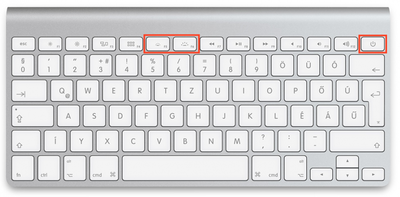
A new Apple wireless keyboard featuring backlight keys and a power button has been spotted on the Apple Online Store in Czech Republic and Hungary, with an identical Arabic version appearing on the U.S. storefront. The graphic render shows controls for adjusting the brightness of the backlight added to the F5 and F6 keys, as found on current MacBook models, while the eject key for CDs has been replaced with a power button.
Apple Keyboard Czech
Apple has not updated the product description for its wireless keyboard to match the new visualization, so it remains to be seen if this was simply a mistake or if the company will quietly refresh the keyboard in the near future. The old Apple Wireless Keyboard with no backlight keys and an eject key is still shown on the Apple Online Store in the United States, Canada, United Kingdom and other English-speaking countries.

The addition of a power button on the keyboard is interesting, given that Macs currently do not detect wireless keyboards until after booting. It could be speculated that the power button is for turning on or off the wireless keyboard itself, but additional photos reveal that the keyboard still has a power button on the side in its traditional spot. As such, the exact functionality of the key remains unknown.

Update Mar 24: Apple has removed images of the new Apple Wireless Keyboard with backlight keys and a power button on the Apple Online Store in Czech Republic and Hungary. Graphic renders of the current Apple Wireless Keyboard with no backlight controls and an eject key are now showing again.

(Thanks, Roman!)

Popular Stories

iOS 26

iOS 26.4 Adds Two New Features to CarPlay

Tuesday March 24, 2026 1:55 pm PDT by
iOS 26.4 was released today, and it includes a couple of new features for CarPlay: an Ambient Music widget and support for voice-based chatbot apps. To update your iPhone 11 or newer to iOS 26.4, open the Settings app and tap on General → Software Update. CarPlay will automatically offer the new features so long as the iPhone connected to your vehicle is running iOS 26.4 or later....
Apple Business hero

Apple Unveils 'Apple Business' All-in-One Platform

Tuesday March 24, 2026 8:53 am PDT by
Apple today announced Apple Business, a new all-in-one platform that unifies device management, productivity tools, and customer outreach features. The service is designed to be a consolidated replacement for several of Apple's existing business-focused offerings, including Apple Business Essentials, Apple Business Manager, and Apple Business Connect. It provides organizations with a single...
AirPods Pro Firmware Feature

Apple Releases New Firmware for AirPods Pro 3, AirPods Pro 2 and AirPods 4

Tuesday March 24, 2026 12:31 pm PDT by
Apple today released new firmware for the AirPods Pro 2, AirPods Pro 3, and the AirPods 4. The firmware has a version number of 8B39, up from 8B34 on the AirPods Pro 3, 8B28 on the AirPods Pro 2, and 8B21 on the AirPods 4. There is no word on what's included in the firmware, but Apple has a support document with limited notes. Most updates are limited to bug fixes and performance...

Top Rated Comments

KindredMAC Avatar
144 months ago
Still no full sized keyboard with number pad.....
:confused:
Score: 51 Votes (Like | Disagree)
144 months ago
Needs Touch ID.
Score: 41 Votes (Like | Disagree)
Arkious Avatar
144 months ago
wired numerical version!
Score: 34 Votes (Like | Disagree)
bushido Avatar
144 months ago
still not black :-/
Score: 31 Votes (Like | Disagree)
gaximus Avatar
144 months ago
I want a wireless with a num pad
Score: 26 Votes (Like | Disagree)
144 months ago
Add a backlight and a ten-key and it'd be perfect!!
Score: 17 Votes (Like | Disagree)
















