
Apple Watch Digital Crown Works as Remote Shutter for Camera Apps Using Music Glance - MacRumors
Skip to Content

Apple Watch Digital Crown Works as Remote Shutter for Camera Apps Using Music Glance

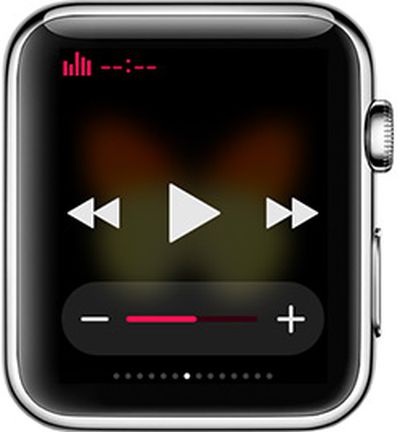
musicglanceSeveral apps that make use of the iPhone's camera have a feature that lets the volume button be used as a trigger to snap a photo, and in those apps, the Apple Watch's Music Glance lets the Apple Watch's Digital Crown serve as a remote camera trigger.

Discovered by a reddit user this morning, the hidden trick works in any app that lets the iPhone's volume buttons be used to take a photograph. Examples include Snapchat, Camera+, and Manual, all apps where the iPhone's volume button works in the same way as a press on the on-screen photo capturing button.

To use the Apple Watch as a remote trigger, open a compatible app like Snapchat, open up the Music Glance, and turn the Digital Crown. The action will cause the camera to take a photograph, much like pressing on the iPhone's volume button would do. It also works within the Music app itself.


This seems to work because in the Music app and the Glance, the Digital Crown serves as a replacement for the iPhone's volume controls, triggering the camera functionality. Headphones with volume controls work in much the same way. It's not clear if this was an intentional feature addition or if it's a bug that was overlooked, but it's a handy way to use the Apple Watch as a shutter remote for iPhone apps that support the functionality.

Though the Apple Watch can be used as a remote trigger for compatible apps through the Music Glance, the function is not as feature rich as Apple's remote control option for the built-in camera. With the default camera, the Apple Watch can turn the iPhone on and capture a photograph.


Related Roundup: Apple Watch 11
Buyer's Guide: Apple Watch (Neutral)

Popular Stories

iOS 26

iOS 26.4 Adds Two New Features to CarPlay

Tuesday March 24, 2026 1:55 pm PDT by
iOS 26.4 was released today, and it includes a couple of new features for CarPlay: an Ambient Music widget and support for voice-based chatbot apps. To update your iPhone 11 or newer to iOS 26.4, open the Settings app and tap on General → Software Update. CarPlay will automatically offer the new features so long as the iPhone connected to your vehicle is running iOS 26.4 or later....
Apple Business hero

Apple Unveils 'Apple Business' All-in-One Platform

Tuesday March 24, 2026 8:53 am PDT by
Apple today announced Apple Business, a new all-in-one platform that unifies device management, productivity tools, and customer outreach features. The service is designed to be a consolidated replacement for several of Apple's existing business-focused offerings, including Apple Business Essentials, Apple Business Manager, and Apple Business Connect. It provides organizations with a single...
AirPods Pro Firmware Feature

Apple Releases New Firmware for AirPods Pro 3, AirPods Pro 2 and AirPods 4

Tuesday March 24, 2026 12:31 pm PDT by
Apple today released new firmware for the AirPods Pro 2, AirPods Pro 3, and the AirPods 4. The firmware has a version number of 8B39, up from 8B34 on the AirPods Pro 3, 8B28 on the AirPods Pro 2, and 8B21 on the AirPods 4. There is no word on what's included in the firmware, but Apple has a support document with limited notes. Most updates are limited to bug fixes and performance...

Top Rated Comments

142 months ago
Very neat. Let me try this on my Apple Watch...oh wait, it's still processing since 4/10. :(
Score: 7 Votes (Like | Disagree)
dotnet Avatar
142 months ago
Yeah, you can do that with the default Camera Remote app that comes pre-installed on the Watch.

Plus, the Camera Remote app supports using the side button (instead of the crown) as shutter release.
Score: 4 Votes (Like | Disagree)
larrylaffer Avatar
142 months ago
That's a bug.
Score: 4 Votes (Like | Disagree)
JaJaWa Avatar
142 months ago
Are there Apple camera apps that allow you to see the picture you're about to take (ie remote viewing) using the watch as a shutter?

Yeah, you can do that with the default Camera Remote app that comes pre-installed on the Watch.
Score: 3 Votes (Like | Disagree)
jclo Avatar
142 months ago
I know this has nothing to do with the article, but why is he wearing two watches? @Creator of the video, if you are here, I must know.

The watch on my right wrist is an activity tracking watch that I am going to be writing a review for. I'm testing it out. A watch on each wrists makes more sense than two watches on one wrist!
Score: 2 Votes (Like | Disagree)
142 months ago
That's a bug.

I wouldn't call it a bug. The apps are designed to take pictures with command for volume control. As the article points out, it works the same with the remote buttons on the EarPods and Bluetooth headsets. This is just a way to control music volume on the apple watch so it's working as expected.
Score: 2 Votes (Like | Disagree)















