

SwiftKey is one of the more popular third-party keyboard choices on iOS, due to its autocorrect and word prediction capabilities that are able to adapt to an individual's usage style over time. Since its debut last September, SwiftKey has been updated several times with features like predictive emoji and typing stats, and as of today, it's getting another major update that will allow for deeper customization: a theme store.
The new SwiftKey theme store allows users to purchase new themes to personalize the look of their keyboards with unique color schemes. There are 12 new themes available for purchase, available in a range of different colors and styles.
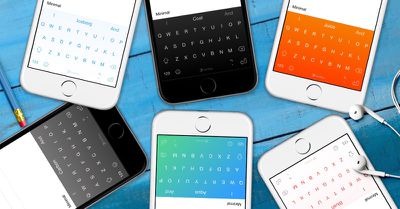
Organized into categories, there are five new Nickel themes, six Minimal themes, and one animated theme -- Shooting Stars. Colors range from black and white to pink, blue, and orange. In combination with the three free existing themes SwiftKey offers, there are now a total of 15 themes available. Themes range from $0.99 for basic themes to $1.99 for the animated Shooting Stars theme.
Shooting Stars, which features a beautiful night sky, changes as you move your phone, giving the theme a more realistic and dimensional look and feel by making use of parallax. Parallax is just a fancy word for when an object, or objects, seem to be in a different positions depending on where you're viewing them from.
For $1.99, you can give your keyboard a twinkling background with stars that are dynamically generated each time the keyboard loads. If you look closely you may even see some shooting stars fly across the keyboard...
Today's update also includes performance and stability improvements, along with a fix that cuts down on instances when SwiftKey is unintentionally replaced by the default iOS keyboard. SwiftKey recommends that existing users should restart their iPhones or iPads after installing the update to see the performance improvements.
SwiftKey can be downloaded from the App Store for free. [Direct Link]
Update: SwiftKey tells MacRumors it is having some issues with store purchase validation on iOS at the moment, but the team is working on the problem. Users will receive any themes they've purchased once the issue has been resolved.
Update 11:45 AM: A new 1.3.2 version of SwiftKey has been released, fixing the issue with purchase validation. Users having issues with purchased themes should update to the latest version and reselect the purchased theme in the store. They will not need to go through the purchase process again.

















Top Rated Comments
Hi Dagless, I can confirm that SwiftKey does not log keystrokes. We take security very seriously and go into more detail in our security statement below. It details the data we do collect. As a company we care deeply about our users and always want to provide the highest quality experience.
http://swiftkey.com/en/data-security/
----------
I can confirm SwiftKey does not collect keystrokes as I work at SwiftKey. More info in the data security statement below about how we treat data.
http://swiftkey.com/en/data-security/
Exactly why I don't use it.