
Google has announced that Inbox by Gmail can now be used by everyone with no invitation required, and the search company has also updated the email app with Trip Bundles, Undo Send functionality on mobile, the option to select "Delete" as the default swiping action, custom signatures, suggested reminders and more.

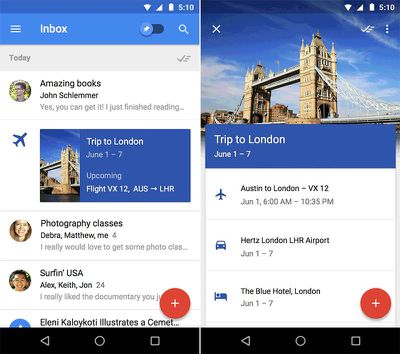
Trip Bundles combine all of your emails about a trip, such as flight times and hotel reservation numbers, enabling you to view them instantly after opening Inbox. Google's screenshots below, for example, show a Trip Bundle for London that displays information for a flight from Austin to London, Hertz car rental from the airport and a weeklong hotel reservation at The Blue Hotel.
Inbox by Gmail TripBundles
The latest version of Inbox improves upon many core features of the app, with new Undo Send functionality on mobile for retracting an email right after sending it in case you made a spelling mistake, contacted the wrong person or have second thoughts. Also new is the option to make "Delete" the default swiping action, custom signatures, suggested reminders and the ability to view HotelTonight or Eat24 reservations and food orders directly within Inbox.


Inbox by Gmail is free on the App Store for iPhone and iPad. [Direct Link]

Top Rated Comments

bushido Avatar
140 months ago
tried it and deleted it a few hours later. way too confusing and cluttered. all i need is to see the latest mails on top and thats it. didnt even have a delete button.
Score: 4 Votes (Like | Disagree)
Howard Ellacott Avatar
140 months ago


...the search company has also updated the email app with Trip Bundles, Undo Send functionality on mobile, the option to select "Delete" as the default swiping action, custom signatures, suggested reminders and more.


Where is this option? I can't find it anywhere!
Score: 2 Votes (Like | Disagree)
east85 Avatar
140 months ago
I don't see the big benefit of snoozing emails, seems like a popular feature in a lot of email applications these days. Honestly it just seems like some form of procrastination. If I need reminded of something important I just set a reminder with Siri and go on with my life.

I say this as someone who is "inbox zero". All of my email is dealt with immediately and sorted into categories that are appropriate if I need to retain them. Some of it is automatically dealt with with filters, but I'm on top of my email and don't see an obvious gap that needs filled or a problem with email as it is.
Score: 2 Votes (Like | Disagree)
Infinitewisdom Avatar
140 months ago
Yeah, it's like that for me. I tried out Gmail's tabs and priority inbox and important mail, and Inbox, but ultimately just having a list of emails that I can flag/star as needed and use labels/folders as needed (including using rules/filters) is what still works better and faster for me.

Me too. I feel like all of these email apps are just solutions searching for a problem. Inboxes need to just be simple and searchable. I find Gmail's web interface way too hard to navigate these days so I don't even bother. I'm definitely not going to bother with this app.
Score: 1 Votes (Like | Disagree)
C DM Avatar
140 months ago
Maybe you can tell me how to get Apple's Mail app to actually push me emails on time. All of my settings are to "push" and there is still about a 10 minute delay from when I get notifications from Mail versus Mailbox. I would like to use something native but not when most of my emails are time sensitive.
Google doesn't support push for Gmail on iOS devices, at least not as of a couple of years ago or so.
Score: 1 Votes (Like | Disagree)
trip1ex Avatar
140 months ago
how is this different the Gmail app? Or is this the gmail app upgrade? so confused.

Gmail app has too small of type and was a bit slow although I think they improved that a bit when I used it a few days ago.

The only reason I have and occasionally use the gmail app is i like the 5 default tabs (categories) used to sort your email. Be nice if the iOS Mail app could mimic the sorting gmail does.

I never did understand half the folders in Gmail though.
Score: 1 Votes (Like | Disagree)

Popular Stories

maxresdefault

Apple Shows Off a Key Reason to Upgrade to the iPhone 17

Saturday February 7, 2026 9:26 am PST by
Apple today shared an ad that shows how the upgraded Center Stage front camera on the latest iPhones improves the process of taking a group selfie. "Watch how the new front facing camera on iPhone 17 Pro takes group selfies that automatically expand and rotate as more people come into frame," says Apple. While the ad is focused on the iPhone 17 Pro and iPhone 17 Pro Max, the regular iPhone...
Finder Siri Feature

Why Apple's iOS 26.4 Siri Upgrade Will Be Bigger Than Originally Promised

Friday February 6, 2026 3:06 pm PST by
In the iOS 26.4 update that's coming this spring, Apple will introduce a new version of Siri that's going to overhaul how we interact with the personal assistant and what it's able to do. The iOS 26.4 version of Siri won't work like ChatGPT or Claude, but it will rely on large language models (LLMs) and has been updated from the ground up. Upgraded Architecture The next-generation...
wwdc sans text feature

Apple Rumored to Announce New Product on February 19

Thursday February 5, 2026 12:22 pm PST by
Apple plans to announce the iPhone 17e on Thursday, February 19, according to Macwelt, the German equivalent of Macworld. The report, citing industry sources, is available in English on Macworld. Apple announced the iPhone 16e on Wednesday, February 19 last year, so the iPhone 17e would be unveiled exactly one year later if this rumor is accurate. It is quite uncommon for Apple to unveil...
apple wallet drivers license feature iPhone 15 pro

Apple Says These 7 U.S. States Plan to Offer iPhone Driver's Licenses

Monday February 9, 2026 6:24 am PST by
In select U.S. states, residents can add their driver's license or state ID to the Apple Wallet app on the iPhone and Apple Watch, and then use it to display proof of identity or age at select airports and businesses, and in select apps. The feature is currently available in 13 U.S. states and Puerto Rico, and it is expected to launch in at least seven more in the future. To set up the...
14 inch MacBook Pro Keyboard

New MacBook Pros Could Now Arrive in March

Sunday February 8, 2026 6:02 am PST by
New MacBook Pro models with the M5 Pro and M5 Max chips could arrive as soon as Monday, March 2, according to Bloomberg's Mark Gurman. In today's "Power On" newsletter, Gurman said that the release of new MacBook Pro models is tied to the release of macOS Tahoe 26.3. The launch is said to be slated for as early as the week of March 2. He added that the M4 Pro and M4 Max models on sale today...
















