
iOS 9 iPad Keyboard Scales to Larger Size, Hinting Towards 'iPad Pro' - MacRumors
Skip to Content

iOS 9 iPad Keyboard Scales to Larger Size, Hinting Towards 'iPad Pro'

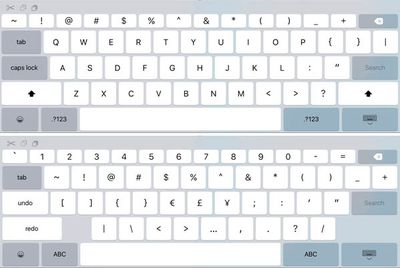
iPhone developer Steven Troughton-Smith has discovered that the new iPad keyboard on iOS 9 beta is capable of scaling to a larger size with rearranged keys, providing further evidence that Apple could be planning to release the much-rumored 12.9-inch "iPad Pro" in the future.
iOS 9 UIKeyboard iPad

UIKeyboard view on iOS 9 scales to a larger iPad size (Image: Twitter/Steve T-S)

At a larger resolution, the UIKeyboard view automatically adjusts with repositioned keys to fill the extra screen space available. Specifically, the new keyboard has wider keys, a new row of symbols at the top, Caps Lock and Tab keys on the far left and some other moved keys.

The secondary keyboard view has also gained the new chiclet-sized row of symbols and has enough room to fit all symbols and characters on one page, potentially eliminating the need for a tertiary keyboard view normally accessed by tapping the "#+=" button on the left or right.

iOS 9's new Slide Over, Split View and Picture in Picture features on iPad Air 2 further suggest that Apple may be working on a larger iPad, as the new split-screen multitasking views would be ideal for a larger screen and could benefit from the tablet's increased processing power.


The so-called "iPad Pro" is rumored to feature a 12.9-inch flexible display with increased pressure sensitivity, built-in NFC chip, Force Touch, USB-C port and possibly a pressure-sensitive Bluetooth stylus. The tablet would also likely have an A9 processor with 2GB of RAM and Touch ID.


Related Roundup: iPad Pro
Buyer's Guide: iPad Pro (Buy Now)
Related Forum: iOS 9

Popular Stories

iOS 26

iOS 26.4 Adds Two New Features to CarPlay

Tuesday March 24, 2026 1:55 pm PDT by
iOS 26.4 was released today, and it includes a couple of new features for CarPlay: an Ambient Music widget and support for voice-based chatbot apps. To update your iPhone 11 or newer to iOS 26.4, open the Settings app and tap on General → Software Update. CarPlay will automatically offer the new features so long as the iPhone connected to your vehicle is running iOS 26.4 or later....
Apple Business hero

Apple Unveils 'Apple Business' All-in-One Platform

Tuesday March 24, 2026 8:53 am PDT by
Apple today announced Apple Business, a new all-in-one platform that unifies device management, productivity tools, and customer outreach features. The service is designed to be a consolidated replacement for several of Apple's existing business-focused offerings, including Apple Business Essentials, Apple Business Manager, and Apple Business Connect. It provides organizations with a single...
AirPods Pro Firmware Feature

Apple Releases New Firmware for AirPods Pro 3, AirPods Pro 2 and AirPods 4

Tuesday March 24, 2026 12:31 pm PDT by
Apple today released new firmware for the AirPods Pro 2, AirPods Pro 3, and the AirPods 4. The firmware has a version number of 8B39, up from 8B34 on the AirPods Pro 3, 8B28 on the AirPods Pro 2, and 8B21 on the AirPods 4. There is no word on what's included in the firmware, but Apple has a support document with limited notes. Most updates are limited to bug fixes and performance...

Top Rated Comments

141 months ago
No iOS device is competition for a Windows Surface Pro. It's like saying a rowboat is competition for a freighter.

I can visit a job site and run CAD on a Surface Pro or Wacom Cintiq Comp. I can draw new designs accurately with a proper stylus. I can edit promo films in a comfortable position in the living room. I can kill 2 hours stuck at the airport getting some work done while listening to podcasts.

Or, with an iOS device, if I'm very lucky, and I've exported hundreds of duplicates of my files in just the right formats, and the companion viewer app is working, I can... view them. Wow. Super. I can crudely fingerprint some blobby streaks where my lines should be. I can try to listen to podcasts, but they won't have updated because the autoupdate never works. But I can check my email. ...which can be done quicker over a phone. I can pull up a map & see my GPS marker, but since it can't save the maps it loads, as soon as I get off the highway for gas, it dumps all the maps and I'm driving across grey squares. I can plug it into my rental car, but it won't charge.

The iPad with iOS is a nearly completely useless toy.

Apple will make the large-size hardware people want, which will be less of a mobile device and more of a productivity device, and priced as high as a decent notebook, and then cripple it by putting the iPod OS on it, so teenagers can play games on it. And they'll sell a load of them anyway.
You can watch antivirus software and Windows updates and frequent reboots run on your thick, clunky, unwieldy, heavy tablet that's worse at a laptop at literally everything except for drawing on the screen. As a bonus you get a touch interface with very few apps that actually use it so you get to run desktop apps with a type cover with terrible keys and a barely usable trackpad. Try not to sneeze so it won't go flying off your lap as it leans on its kickstand. If you're lucky, the Surface won't overheat. And try not to run the battery down on your phone for tethering because the silly SP3 lacks a built in cellular option- of course you could plug a cell modem into USB but going along with the spirit of your nightmare iOS scenario, I'll assume you'd drop the heavy clunky Surface and snap the dongle off of at the port...

Give us a break :)
Score: 10 Votes (Like | Disagree)
ThunderSkunk Avatar
141 months ago
I hope this can compete with the Surface Pro 3 which runs full windows. I hope there are more features in iOS 9 for the iPad Pro
No iOS device is competition for a Windows Surface Pro. It's like saying a rowboat is competition for a freighter.

I can visit a job site and run CAD on a Surface Pro or Wacom Cintiq Comp. I can draw new designs accurately with a proper stylus. I can edit promo films in a comfortable position in the living room. I can kill 2 hours stuck at the airport getting some work done while listening to podcasts.

Or, with an iOS device, if I'm very lucky, and I've exported hundreds of duplicates of my files in just the right formats, and the companion viewer app is working, I can... view them. Wow. Super. I can crudely fingerprint some blobby streaks where my lines should be. I can try to listen to podcasts, but they won't have updated because the autoupdate never works. But I can check my email. ...which can be done quicker over a phone. I can pull up a map & see my GPS marker, but since it can't save the maps it loads, as soon as I get off the highway for gas, it dumps all the maps and I'm driving across grey squares. I can plug it into my rental car, but it won't charge.

The iPad with iOS is a nearly completely useless toy.

Apple will make the large-size hardware people want, which will be less of a mobile device and more of a productivity device, and priced as high as a decent notebook, and then cripple it by putting the iPod OS on it, so teenagers can play games on it. And they'll sell a load of them anyway.
Score: 9 Votes (Like | Disagree)
BCWorld Avatar
141 months ago
Whoopty doo! Not interested in a "larger ipad" until apple can figure out how to get the software optimized for the 10 inch version which has been on the market for 5 long years... :confused:
Score: 9 Votes (Like | Disagree)
tomtendo Avatar
141 months ago
Numbers at the top. How quaint.
It would be nice if the numbers were apart of them regular QWERTY keyboard so you didn't have to hit the number key to input them.
Score: 8 Votes (Like | Disagree)
tentales Avatar
141 months ago
I really don't see the use of a bigger iPad, not for me anyway.

Although in saying that when Apple release it it will be a big hit like almost everything they do and I'll probably line up to get it anyway :rolleyes:
I've been waiting for a larger sized iPad to replace my sheet music. Lot's of musicians will probably buy one or two to have on stage or in the studio. Current iPad size is only good enough for set-lists, but not full notation. That and maybe Logic Pro for iPad ?
Score: 7 Votes (Like | Disagree)
jayducharme Avatar
141 months ago
I don't see why this arrangement can't be at least an option on the standard iPad. I could deal with slightly smaller layout to have the greater range of keys.

Something that puzzles me is how I get the left and right cursor options on my iPhone's keyboard, but they don't appear on my iPad. Why would the larger screen of my iPad offer fewer editing options?
Score: 6 Votes (Like | Disagree)















