
Mac OS X 10.10.4 Supports TRIM for Third-Party SSD Hard Drives - GeekWebGuides
Skip to Content

Mac OS X 10.10.4 Supports TRIM for Third-Party SSD Hard Drives

Earlier today Apple released OS X 10.10.4, an under-the-hood update to OS X that introduced several bug fixes and improvements. One improvement, according to Ars Technica, is support for TRIM for third-party SSD hard drives. We previously covered TRIM likely coming natively to the next version of OS X El Capitan but it appears support has already arrived.
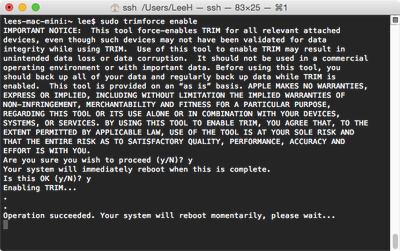
trimforce

Photo via ArsTechnica

With today’s OS X 10.10.4 update, however, Apple has added a command line utility that can be used to enable TRIM on third-party SSDs without having to download and install anything. Called trimforce, the utility can be executed from the OS X terminal, and it requires a reboot to start working.

TRIM is a system-level command that allows the operating system and the drive to communicate about which areas of the drive are considered unused and thus ready to be erased and rewritten to. In the absence of TRIM, users can see significantly slower drive writes as the drive begins to fill up. Most modern operating systems support TRIM but for Apple's OS X, it has only included support for its OEM SSDs. This means that Mac users looking to install an after-market SSD in a machine originally intended for spinning disc hard drives would run into trouble without the help of other third-party tools.

To enable TRIM, a user just has to type "sudo trimforce enable" into the Terminal window. Ars Technica points out that running TRIM prompts a "scary" message from the system, but notes it's largely because each SSD implements TRIM in a different way, with older disks sometimes acting in a way OS X would not expect.

GeekWebGuides forum readers have been testing and discussing the update in our forums and sharing their experiences.


Popular Stories

M5 MacBook Pro

RIP, MacBook Ultra

Monday October 19, 2026 9:37 am PDT by
Apple today sent out invites for an experience in Los Angeles on Wednesday, October 28, and the "Pro and tell" tagline on the invitation likely means that the rumored MacBook models with touch-enabled OLED displays will stick with MacBook Pro branding instead of the once-rumored "MacBook Ultra" name. The long-rumored "iPhone Ultra" ended up being named iPhone Duo, so speculation that Apple...
iPhone Duo Trio

Here's What Apple's Apps Look Like on the iPhone Duo

Tuesday October 20, 2026 11:12 am PDT by
With just three days to go until the iPhone Duo is released, Apple is getting ready for the launch. Behind the scenes, the App Store now has screenshots of Apple's built-in apps running on the Duo. We've seen some apps in marketing materials, but images of the ones we haven't seen give us an idea of what it will be like using the iPhone Duo day to day. Many apps are shown in landscape...
apple pro tell logo

Apple Announcing New Products Next Week: 'Pro and Tell'

Monday October 19, 2026 9:05 am PDT by
Apple's Greg Joswiak today hinted at new product announcements coming next week, sharing a social media post that says "Can't wait to pro and tell next week." Rumors suggest Apple is planning to debut the new MacBook Pro with an OLED touchscreen display, an M6 entry-level MacBook Pro, an M6 iMac, an iPad mini with an OLED display. Can't wait to pro and tell next week....

Top Rated Comments

Ledgem Avatar
148 months ago
Someone over at Ars Technica posted a warning about using TRIM with certain hard drives. I'll quote it here:

HEED THE DATA LOSS WARNING!

There are a number of extremely buggy SSD models out there (like almost all the Samsung 8* and various Crucial models) that will permanently delete the wrong data ('https://blog.algolia.com/when-solid-state-drives-are-not-that-solid/') when issuing TRIM commands.

The bug is not dependent on queued TRIM, it happens even when using the non-queued version.

All the Samsung SSDs beginning with a "8" (840 and 850, both EVO and Pro) are known to have the data-destroying TRIM bug and TRIM is blacklisted on those drives on other platforms.
I haven't looked into it too heavily and I know that plenty of people use TRIM with these drives with no issues (I did in the past), but given that I use a Samsung 840, it gives me pause about enabling this feature. Just figured I'd put it out there for everyone else to see.
Score: 16 Votes (Like | Disagree)
Hellhammer Avatar
148 months ago
Someone over at Ars Technica posted a warning about using TRIM with certain hard drives. I'll quote it here:


I haven't looked into it too heavily and I know that plenty of people use TRIM with these drives with no issues (I did in the past), but given that I use a Samsung 840, it gives me pause about enabling this feature. Just figured I'd put it out there for everyone else to see.
So far there is no evidence indicating that the issue exists outside Linux. There are plenty of users running Samsung SSDs in Macs with TRIM enabled and I've yet to hear a single data loss issue.
Score: 11 Votes (Like | Disagree)
Temptin Avatar
148 months ago
My TRIM tutorial has been updated to cover OS X 10.11 El Capitan, OS X 10.10.4+ Yosemite, and OS X 10.10.3 Yosemite all in one place:

https://github.com/Temptin/Documents/blob/master/OSX_TRIM_Tutorial.md

---


About Cindori's Disk Sensei and Trim Enabler:

I can already see the confusion growing due to Cindor's intentionally vague statements. The method that Cindori (Disk Sensei/Trim Enabler) is bringing out is *identical* to the "trimforce" command method in my guide. He has created his own .kext file that injects the "Force Data Set Management = YES" option in the exact same way as the official extension. His method is not "safer" at all. It's the exact same thing; with one small difference: He installs the injector to /Library whereas the trimforce tool installs the injector to /System/Library - and the latter is protected by "rootless" on El Capitan, but that seems like an oversight on Apple's part. Either way, you can easily disable rootless, run trimforce, and re-enable rootless on the current El Capitan beta (instructions for that are in the link above). Moreover, it's very likely that Apple is going to fix it before release so that you don't need to even temporarily disable rootless to run trimforce.

I'll say it one more time: There is no reason whatsoever to use Cindori's injector instead of Apple's injector; they do the *exact* same thing. I even suggest using Apple's since they're the ones who created the method, and if any of the implementation details ever change they'll be the first to update their official kext.

There are plenty of reasons to use Cindori's Disk Sensei: Disk space visualization, benchmarking, SMART health monitoring, various tweaks to prolong SSD life (like "noatime"). "TRIM enabling" is no longer a reason to own the tool.

---

As for people's questions about TRIM, GC, etc, I refer to these posts:

* Do we need TRIM? Does OS X use Queued TRIM? Do Samsung 8*-series SSDs break when TRIM'ing?: https://forums.macrumors.com/threads/os-x-el-capitan-opens-door-to-trim-support-on-third-party-ssds-for-improved-performance.1891936/page-10#post-21469307

* About Garbage Collection vs TRIM: https://forums.macrumors.com/threads/os-x-el-capitan-opens-door-to-trim-support-on-third-party-ssds-for-improved-performance.1891936/page-10#post-21469409

* Does TRIM work with Filevault 2 Full Disk Encryption?: Yes ('http://apple.stackexchange.com/questions/26961/does-filevault-2-interfere-with-trim-when-using-an-ssd'). Apple's FileVault driver sends the "TRIM" command to the disk, and zeroes out all unused blocks.

* Does TRIM work with Apple's Software RAID?: No. Their software RAID driver was last updated in 2009, and OS X didn't get TRIM support until mid-2011. Apple's RAID driver has no idea what TRIM is and does not send TRIM to the SSDs in your RAID. OS X cannot simply "pass through" commands to the underlying SSDs (as some people have wrongly assumed), since a RAID means that data is split across multiple drives, which means the OS has no idea "where the data is and which drive to TRIM in a RAID," - it's always the job of the RAID driver to re-map the TRIM requests to the real underlying drives and blocks, and Apple's RAID driver is over half a decade old and doesn't do that job at all. If you are using Apple's software RAID, TRIM will NOT take place (your individual drives will still say "TRIM Supported: Yes", but nothing will be done).

I should probably put all of this information into the TRIM guide document itself, since people bring up these misconceptions over and over again.
Score: 10 Votes (Like | Disagree)
solipsism Avatar
148 months ago
Mac OS X 10.10.4 Supports TRIM for Third-Party SSD Hard Drives
Solid State Drives Hard Drives? Really?
Score: 7 Votes (Like | Disagree)
148 months ago
Yeeeeeeeeeesssssssssssssssssss! FINALLY! Just turned that sucker on.
Score: 7 Votes (Like | Disagree)
148 months ago
OWC drives don't require TRIM as they have their own garbage collecting tech built-in.

http://blog.macsales.com/21641-with-an-owc-ssd-theres-no-need-for-trim
GC is not the same as having native TRIM support. With the change to Yosemite originally (no more TRIM without disabling kext signing) I imagine OWC saw the potential for lost sales so they put out that article to put people at ease.

Now that TRIM support is back, you can enable it for that drive. The built in GC is no substitute for the TRIM system.

If you keep the SSD mostly empty anyway then the benefits are marginal for most people. If you have a smaller SSD though, or like to fill it up nearly full then you'll benefit enormously from native TRIM on any SSD.
Score: 6 Votes (Like | Disagree)
Latest Stories
Giant iPhone Duo Displays Coming to Four Apple Stores
1 hour ago
Apple Pulls Keynote, Pages and Numbers From App Store
2 hours ago
Apple Updates More Apps With iPhone Duo Support
2 hours ago
Apple Will Label Apps 'Made for iPhone Duo' in App Store
5 hours ago
Amazon Takes $49 Off iPad With Prices Starting at $399.99
6 hours ago
F1 on Apple TV Now Available in Dolby Atmos
6 hours ago
Apple Reveals More Than 50 Apps That Will Be Updated for iPhone Duo
7 hours ago
Apple Blocks Certificates That Could Help Attackers Fake Websites
8 hours ago
Giant iPhone Duo Installations Spotted at Apple Fifth Avenue
9 hours ago
iPhone Duo 2 Prototypes Include Under-Display Face ID
9 hours ago
Tesla App Gains iPad and iPhone Duo Support
13 hours ago
Apple Reportedly Boosts iPhone Duo Orders by 44%
13 hours ago
Fortnite Returning to Australian App Store After Court Ruling
14 hours ago
Apple Ordered to Open iPhone to Rival App Stores in Australia
14 hours ago
Apple Suppliers Face Hurdles Cutting Circuit Board Emissions
15 hours ago
Things Updated for iPhone Duo With Adaptive Layout
15 hours ago
Simplicity and Siri AI Are HomeView's Killer Features, Apple Says
15 hours ago
iPhone Duo Reviewers Really Miss Face ID
20 hours ago
Does the iPhone Duo Run Hot? Here's What Reviews Found
22 hours ago
Apple Music's New Look is Now Live on Apple's Website
22 hours ago
Anthropic Launches Claude Duet, a Proactive AI Agent
23 hours ago
What 32,000 Folds Did to the iPhone Duo's Hinge
1 day ago
iPhone Duo's Hidden FaceTime Camera Takes 'Trash' Photos
1 day ago
iPhone Duo Has 'Edge Light' Feature That Debuted on Macs Last Year
1 day ago
Apple Support App Updated for iPhone Duo's Larger Display
1 day ago
Amazon Sweetens the Deal on Entry-Level 16-Inch MacBook Pro With $570 Off
1 day ago
iPhone Duo Tips Over on MagSafe Stands When Unfolded
1 day ago
Apple Music's New Look Officially Announced
1 day ago
iPhone Duo Supports Apple Pencil Starting With iOS 27.2
1 day ago
iPhone Duo Accessories Roundup: Cases and Screen Protectors From OtterBox, ZAGG, and More
1 day ago








































