How Apple Music's Liking System Works to Customize 'For You' Recommendations - MacRumors
Skip to Content

How Apple Music's Liking System Works to Customize 'For You' Recommendations

Apple Music's main draw is its focus on curation and its ability to learn about your music preferences to provide recommendations that suit your tastes. Apple's new Music app focuses heavily on content discovery, with an entire "For You" section dedicated to recommendations.

According to Apple, its music experts "handpick songs, artists, and albums based on what you listen to and like," and this content is what populates the "For You" section. Apple's explained that "For You" recommendations get better over time based on "whether you love a song or not," but the company hasn't explicitly spelled out how to best use likes and listens to better tailor Apple Music to your tastes.

To clear up confusion on how recommendations work, The Loop's Jim Dalrymple has spoken directly with Apple to get some insight on how the "Like" feature in Apple Music works to affect recommendations, and he's penned a useful guide on liking from the information he obtained, which is well worth reading.

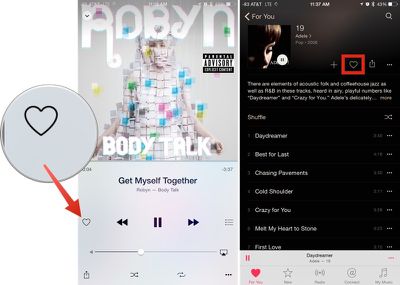
Any song played from Beats 1 radio, a default radio station, a curated playlist, or from a search can be liked by expanding the miniplayer and tapping the heart icon. You can essentially heart anything that's playing via Apple Music.
likingapplemusic
As Dalrymple explains, tapping the heart button on a song you like influences the content that's then displayed in the "For You" section of Apple Music. As more content is liked, the feature gets a better idea of each individual user's tastes, and is able to offer up a more tailored selection of music. Music that's added to a library and music that's played in full also affects "For You."

Tapping the heart does affect "For You," the section of Apple Music that's custom built with playlists, albums and songs tailored to your individual tastes. For You also takes into account music you add to your library and full plays you listen to. Skips aren't really taken into account, because there are so many reasons you may skip a song--maybe you're just not in the mood for it right now.

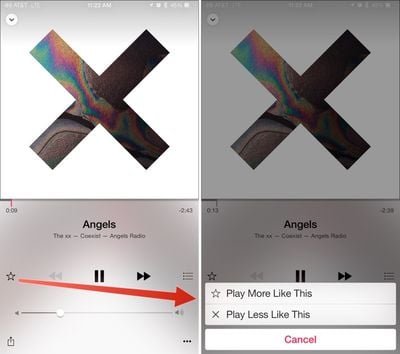
Radio stations created from individual songs, done by tapping on the hamburger button when any song is playing and choosing "Start Station," work a bit differently. Instead of displaying a heart, these playlists display a star. Tapping the star allows you to choose "Play More Like This" or "Play Less Like This" to tune a radio station to your particular tastes at that time without affecting overall "For You" recommendations.
playlesslikethisapplemusic
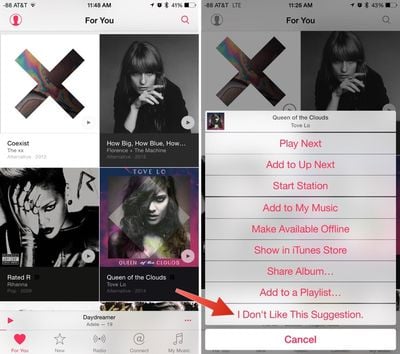
Pressing on any album or playlist recommendation in "For You" gives you an option to customize the section even more, by choosing "I Don't Like This Suggestion." It appears that this customization option is limited to iOS devices for the time being, as Apple Music on Mac doesn't offer this menu.
dislikesuggestionsapplemusic
Apple Music's ability to offer up intensively tailored song recommendations over time may be one of the reasons why Apple insisted on giving users a three month trial to experience the service. Regularly liking songs and culling the "For You" section of recommendations that aren't suitable should vastly change the quality of suggestions over the course of the next few months.

Popular Stories

Apple Music New Branding

Apple Music's New Look Officially Announced

Wednesday October 21, 2026 9:06 am PDT by
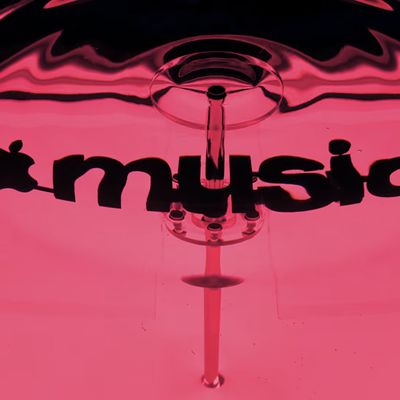
Following the introduction of a new Apple Music logo and app icon earlier this month, Apple today officially introduced Apple Music's new brand identity. In a YouTube video shared today, Apple said the new Apple Music visuals were "made by sound." More specifically, Apple said it played a sound through a container of water, resulting in the liquid moving at the frequency of the notes. Apple...


apple music new logo red

Apple Music Is Getting a New Logo

Tuesday October 6, 2026 4:06 am PDT by
Apple appears to be rolling out a new logo for Apple Music in its upcoming set of software updates. The logo has been spotted in both macOS 27.2 beta 3 and iOS 27.2 beta 3, and it's identical to the one that Apple used in its Apple Music Hall announcement last month. When Apple used the logo in the venue's press materials and on its new official website, it wasn't clear if this was a one-off ...
apple music icon 1

iOS 27.2 Adds New Apple Music Icon

Tuesday October 13, 2026 3:04 pm PDT by
In the fourth beta of iOS 27.2, Apple updated the Apple Music icon. The new icon is black and white, replacing the prior icon. In light mode, the logo is black on a white background, and in dark mode, it's white on a black background. The refreshed Music app icon comes after Apple debuted a new Apple Music logo in an earlier version of iOS 27.2 and in marketing materials for its recent...

Top Rated Comments

Spendlove Avatar
148 months ago
Apple Music - "Do you like Biffy Clyro, Katherine Jenkins and Whitney Houston?"

Me - "No thank you Apple" delete, delete, delete.

Apple Music - "Do you like Biffy Clyro, Katherine Jenkins and Whitney Houston?"

Me - "Must have done something wrong, could have sworn I clicked no" DELETE DELETE DELETE

Apple Music - "Do you like Biffy Clyro, Katherine Jenkins and Whitney Houston?"

Me - "ARGHHH!" DELETE DELETE DELETE

Apple Music - "Do you like Biffy Clyro, Katherine Jenkins and Whitney Houston?"

Me - *sounds of smashing iPhone*
Score: 16 Votes (Like | Disagree)
Rogifan Avatar
148 months ago
I think Apple needs to add more options when the ellipse is selected, there's not enough of them. :rolleyes:
Score: 12 Votes (Like | Disagree)
Populism Avatar
148 months ago
I wish the new "For You" system relied on the old five-star rating system that has been in place since the dawn of iTunes. It gets the same job done, many of us rely heavily on the star system for creating smart playlists, and it isn't as binary as a simply hear/no-heart system.
Score: 7 Votes (Like | Disagree)
iMcLovin Avatar
148 months ago
Its interesting how apple is so bad at informing people what features their services have. THere should be a step by step introduction highlighting each button. Honestly im not all that impressed with Apple music. Connect seems like a rather useless feature with ugly UI. Radio is just meh... The itunes shop and Apple music are completely separated and its confusing when you enter one or the other. Why cant they do like spotify, let you search through all the library of music but grey out what you cannot listen to and give you the option to buy it? also why do I have to add every single song to my library of music? If I want to create a playlist of various songs I need to add a new cover for each and every one of them. Only apples own playlists lets you listen to music outside your personal album. Also the whole thing is slow and unresponsive when you hit play or fast forward in a song, compared to spotify which is instant. I must say that currently, the spotify app, particularly the desktop version, is miles ahead both in UI and design and in quality of the service. Itunes was a bloated, slow and messy program before they re-made itunes a while back. Now it feels bloated, slow and messy once again, great job apple! :( Also itunes store looks really bad on the PC version, with jagged unreadable fonts. If it wasn't for spotifys slow adaptation of the family plan to compete with apple I would switch right back to spotify today. I thought music and UI was apples strengths, but apple music and streaming seems like a feature they have just half-heartedly made because they felt forced to do so by competition.
Score: 6 Votes (Like | Disagree)
\-V-/ Avatar
148 months ago
Yep ... figured this out by accident. I really didn't like For You at first, then came back to it after liking a bunch of stuff and it actually gave me some great recommendations and cool playlists.
Score: 6 Votes (Like | Disagree)
148 months ago
I guess I'll need all three months and most likely even more time to tailor FOR YOU into really working for me.

I mostly listen to classical music and only picked classical composers and artists when I first set up FOR YOU. But Apple Music is not recommending a single classical music album for me. I guess I am starting from scratch...
Score: 5 Votes (Like | Disagree)
Latest Stories
Giant iPhone Duo Displays Coming to Four Apple Stores
59 minutes ago
Apple Pulls Keynote, Pages and Numbers From App Store
2 hours ago
Apple Updates More Apps With iPhone Duo Support
2 hours ago
Apple Will Label Apps 'Made for iPhone Duo' in App Store
5 hours ago
Amazon Takes $49 Off iPad With Prices Starting at $399.99
6 hours ago
F1 on Apple TV Now Available in Dolby Atmos
6 hours ago
Apple Reveals More Than 50 Apps That Will Be Updated for iPhone Duo
7 hours ago
Apple Blocks Certificates That Could Help Attackers Fake Websites
8 hours ago
Giant iPhone Duo Installations Spotted at Apple Fifth Avenue
9 hours ago
iPhone Duo 2 Prototypes Include Under-Display Face ID
9 hours ago
Tesla App Gains iPad and iPhone Duo Support
13 hours ago
Apple Reportedly Boosts iPhone Duo Orders by 44%
13 hours ago
Fortnite Returning to Australian App Store After Court Ruling
14 hours ago
Apple Ordered to Open iPhone to Rival App Stores in Australia
14 hours ago
Apple Suppliers Face Hurdles Cutting Circuit Board Emissions
15 hours ago
Things Updated for iPhone Duo With Adaptive Layout
15 hours ago
Simplicity and Siri AI Are HomeView's Killer Features, Apple Says
15 hours ago
iPhone Duo Reviewers Really Miss Face ID
20 hours ago
Does the iPhone Duo Run Hot? Here's What Reviews Found
22 hours ago
Apple Music's New Look is Now Live on Apple's Website
22 hours ago
Anthropic Launches Claude Duet, a Proactive AI Agent
23 hours ago
What 32,000 Folds Did to the iPhone Duo's Hinge
1 day ago
iPhone Duo's Hidden FaceTime Camera Takes 'Trash' Photos
1 day ago
iPhone Duo Has 'Edge Light' Feature That Debuted on Macs Last Year
1 day ago
Apple Support App Updated for iPhone Duo's Larger Display
1 day ago
Amazon Sweetens the Deal on Entry-Level 16-Inch MacBook Pro With $570 Off
1 day ago
iPhone Duo Tips Over on MagSafe Stands When Unfolded
1 day ago
Apple Music's New Look Officially Announced
1 day ago
iPhone Duo Supports Apple Pencil Starting With iOS 27.2
1 day ago
iPhone Duo Accessories Roundup: Cases and Screen Protectors From OtterBox, ZAGG, and More
1 day ago