

TiVo today is announcing an update to its iOS app that adds AirPlay support to allow users to stream content to the Apple TV. The feature builds on previous support for streaming content to an iOS device from a TiVo box, and the TiVo app now makes it easy to watch content recorded on a TiVo box on any TV in the house with an Apple TV connected.
TiVo Inc., a global leader in next-generation television services, has announced that for the first time TiVo users can access their content on TV via a third party consumer electronics device, giving entertainment junkies an amazing multiscreen experience. TiVo users can now stream their recorded shows to Apple TV via AirPlay. TiVo users have yet another way to watch their favorite shows, on another screen, wherever they are.
The feature works with TiVo's latest Roamio Pro and Roamio Plus boxes, which provide up to 3,000 hours of recording time and have built in Wi-Fi and MoCA support to enable easy streaming from the set-top box to other devices. Streaming from a basic Roamio or Premiere box requires a separate TiVo Stream auxiliary box to enable mobile streaming.
By turning on AirPlay Mirroring to an Apple TV from Control Center on the user's iOS device, content from the TiVo box can be streamed to the device and on to any Apple TV-equipped television on the local Wi-Fi network, replacing some of the functionality of the company's TiVo Mini box.
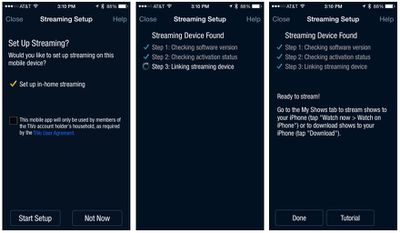
We've had a few days to test out the new feature and have found it relatively easy to use. Following a one-time setup for streaming from the box to the iOS device, users simply need to turn on AirPlay to their desired Apple TV, navigate to My Shows in the TV app to find the show they wish to stream, and select the option to watch the show on their iPhone.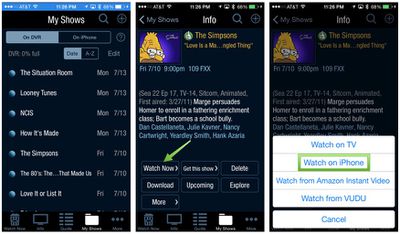
Recorded shows begin streaming quickly, while live shows take a few seconds longer as the TiVo has to begin recording the show and start streaming it to the iOS device. As with the previous support for streaming to iOS devices, several of the familiar TiVo functions are accessible on the iPhone player, including the 5-second rewind and 30-second skip buttons, as well as volume, show info, and options for zooming the picture and turning closed captioning on and off.
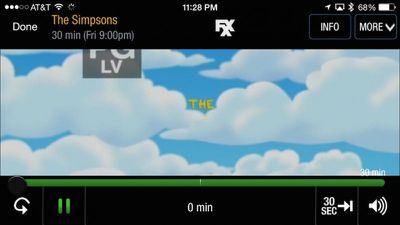
The AirPlay functionality is handy for quickly and easily streaming content to televisions anywhere in the house, with the app adjusting video quality depending on connection strength. TiVo recommends that its boxes be connected to the local network via a wired Ethernet or MoCA connection, but even over Wi-Fi we found video quality to be decent, if not spectacular.
Unfortunately, TiVo's AirPlay functionality does not work outside of the local Wi-Fi network, preventing users from streaming content from their own TiVo box while visiting a friend's house, for example.
While the new AirPlay functionality isn't likely to become a primary viewing technique in my home's television setup, it could definitely be useful in a pinch such as when the television connected to the TiVo box is being used by another family member.
The updated version of TiVo's iOS app with the new AirPlay functionality should be rolling out today. [Direct Link]
Update: TiVo now tells us the AirPlay streaming functionality should work out of the home, although we were unable to get it to work during our testing.





















Top Rated Comments
Plus our OTA Tivo Roamio won't support Tivo minis!!! Only the cable ones will.