
Apple Disables Dashboard by Default in Latest OS X El Capitan Beta - MacRumors
Skip to Content

Apple Disables Dashboard by Default in Latest OS X El Capitan Beta

by

Apple has quietly disabled Dashboard by default in the seventh beta of OS X El Capitan, an unsurprising move given the ten-year-old widget feature on Mac has not been updated in over four years and looks increasingly poised for retirement. Dashboard was similarly disabled by default on OS X Yosemite.
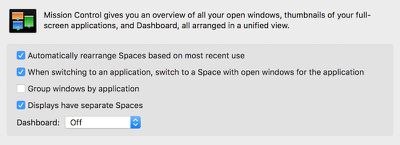
Dashboard

While a few websites claim that Apple has removed Dashboard from OS X El Capitan entirely, the feature can be re-enabled by opening System Preferences > Mission Control and choosing "As Space" from the Dashboard drop-down menu. Then, tap on the Dashboard key on your keyboard to bring up the window.

Dashboard was introduced on OS X Tiger in 2005 and acts as a secondary desktop for widgets such as a calculator, calendar, clock, weather, stocks, sticky notes, mini games, dictionary, flight tracker and more. Widgets can be added or removed from Dashboard by clicking on the plus or minus buttons in the bottom-left corner.


Related Forum: OS X El Capitan

Top Rated Comments

138 months ago
Shame they are doing this. It was and is an awesome place for seldom used but needed "NOW" things. I still use it frequently. Especially the calculator. Spotlight's calculator, well, sucks.
Score: 22 Votes (Like | Disagree)
Soylent Yellow Avatar
138 months ago
Would be a shame to see it go indefinitely as I use this widget daily still :(
Still use daily:

* Local rain radar (I take the bicycle to the station)
* Train departure times
* Local time of all the countries we do business with
* Weather of all the countries we do business with
* Translation widget
* Snippet with our address and telephone number (moved too many times to remember that reliably)

Quite handy to have all this available on the touch of a button (F12 or CTRL-left arrow)
Score: 12 Votes (Like | Disagree)
Crosscreek Avatar
138 months ago
Noticed that when I updated. I know a lot of people don't use it but I keep a weather radar running at all times. Storms all the time where I live so it comes in handy to hit a hot corner to take a look.
Score: 7 Votes (Like | Disagree)
Macrolido Avatar
138 months ago
Too bad. I still use Dashboard everyday.
Score: 6 Votes (Like | Disagree)
133 months ago
Many STILL use it.

It's far from "useless."
Score: 5 Votes (Like | Disagree)
punkrockid Avatar
138 months ago
I don't want it to go, I use multiple widgets everyday:

Organized. For a quick view of my calendars, list of next meetings, clocks of different cities
iStatPro: Real time view of all the important stats of my Mac
TunesText: To view and get lyrics for my music library
Unit Converter: I only have to use this when I visit the USA for non international units :v

Score: 5 Votes (Like | Disagree)

Popular Stories

iOS 26

iOS 26.4 Adds Two New Features to CarPlay

Tuesday March 24, 2026 1:55 pm PDT by
iOS 26.4 was released today, and it includes a couple of new features for CarPlay: an Ambient Music widget and support for voice-based chatbot apps. To update your iPhone 11 or newer to iOS 26.4, open the Settings app and tap on General → Software Update. CarPlay will automatically offer the new features so long as the iPhone connected to your vehicle is running iOS 26.4 or later....
Apple Business hero

Apple Unveils 'Apple Business' All-in-One Platform

Tuesday March 24, 2026 8:53 am PDT by
Apple today announced Apple Business, a new all-in-one platform that unifies device management, productivity tools, and customer outreach features. The service is designed to be a consolidated replacement for several of Apple's existing business-focused offerings, including Apple Business Essentials, Apple Business Manager, and Apple Business Connect. It provides organizations with a single...
AirPods Pro Firmware Feature

Apple Releases New Firmware for AirPods Pro 3, AirPods Pro 2 and AirPods 4

Tuesday March 24, 2026 12:31 pm PDT by
Apple today released new firmware for the AirPods Pro 2, AirPods Pro 3, and the AirPods 4. The firmware has a version number of 8B39, up from 8B34 on the AirPods Pro 3, 8B28 on the AirPods Pro 2, and 8B21 on the AirPods 4. There is no word on what's included in the firmware, but Apple has a support document with limited notes. Most updates are limited to bug fixes and performance...















