
Phillips today announced an expansion of its Hue line of lights, adding the new Philips Hue Wireless Dimming Kit and Philips Hue white bulb. The dimming kit requires no installation and it integrates seamlessly with existing Hue products, letting customers change the brightness of up to 10 Philips Hue white bulbs at the same time.

Each dimming kit includes one Philips Hue white light bulb and a portable battery operated dimming switch, with additional white bulbs available as a separate purchase. Using the dimming kit is as simple as plugging in one of the Philips bulbs. The switch can be fixed to the wall, much like the Hue Tap, or used as a remote control.
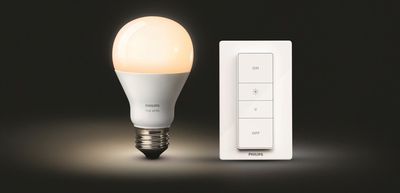
huewirelessdimmingkit

Getting ambiance at home has never been so simple; just screw in your bulb and press the dimmer switch to create your own personal dimmable glow. You can use the dimmer switch as a normal wall switch, or take it from the base plate and use it as a remote control for optimal convenience as it can be easily placed anywhere you desire. Plus, you don't have to get off the sofa to dim the lights anymore when watching your favorite TV show; you can even lower the lights from the warmth of your bed.

Philips promises no flickering or buzzing with its dimmer kit, which is a common problem with traditional LED dimming solutions. With the ability to control up to 10 bulbs with one switch, it's possible to adjust an entire room's lighting at once.
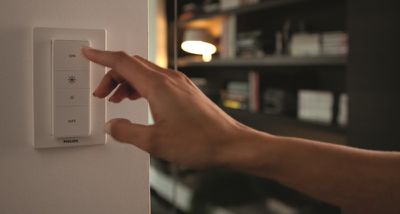
philipsdimmerswitch
According to Philips, the new Hue Wireless Dimming Kit can connect to existing Philips Hue compatible products through the Philips Hue bridge, so the dimmer switch can be used to control smartphone-connected bulbs like the standard Hue and the Hue Lux.

The Philips Hue wireless dimming kit is priced at $39.95, while Philips Hue white bulbs are priced at $19.95. The dimming kit will be available in stores in North America beginning in September of 2015.


Top Rated Comments

hellosil Avatar
137 months ago
Release in September. That could correspond with more HomeKit announcements from Apple and a Philips HomeKit firmware upgrade. Pretty please? :)
Score: 7 Votes (Like | Disagree)
devilsnj30 Avatar
137 months ago
It's not HomeKit compatible. Philips hasn't released any HomeKit products yet.
But Philips did announce that they would be home kit compatible with a future firmware update.
Score: 3 Votes (Like | Disagree)
tazinlwfl Avatar
137 months ago
I wonder if this will have Siri integration (through Home Kit).
Score: 3 Votes (Like | Disagree)
ipedro Avatar
137 months ago
Phillips Hue HomeKit support is coming in September ('https://twitter.com/tweethue/status/635776974582104064').

I would be very surprised if these switches — also to be released in September — weren't HomeKit compatible.
Score: 2 Votes (Like | Disagree)
I am Sampson Avatar
137 months ago
I was just about to add another Tap. I'll grab one of these instead.
Tap is surely better as a switch if you have hue though. This won't change scenes or colours. Though it's price is much nicer!
I'm about to buy my second tap and this is no way makes me think I should change my mind as someone who already has 17 hue light bulbs/strips etc.
Score: 2 Votes (Like | Disagree)
friedmud Avatar
137 months ago
Looks like what I need. So with these, I can just set up my lighting once, say light the bathroom bright red :) and then every time someone goes in there, using that switch it will come on bright red again?

I'm just looking for a 'set & forget' system that can be used afterwards with a simple wall mounted on/off switch.

I'll wait for the home kit announcement first though.
Yep - just set a "bright red" scene to be activated by one of the buttons and then every time you press that button the lights will turn "bright red".

It is actually 4 buttons... Each one can be set to activate any scene you can think of. Button 1 is the "whole thing" (ie you just mash your hand on the whole thing). I use that for normal "on" (easy to hit). Then I use button 4 for "off".

The other two I use as "special" scenes for each room. In the living room one goes into "movie mode"... bedroom has, ummm.... special dim modes ;-)
Score: 2 Votes (Like | Disagree)

Popular Stories

Apple Logo Zoomed

Tim Cook Teases Plans for Apple's Upcoming 50th Anniversary

Thursday February 5, 2026 12:54 pm PST by
Apple turns 50 this year, and its CEO Tim Cook has promised to celebrate the milestone. The big day falls on April 1, 2026. "I've been unusually reflective lately about Apple because we have been working on what do we do to mark this moment," Cook told employees today, according to Bloomberg's Mark Gurman. "When you really stop and pause and think about the last 50 years, it makes your heart ...
wwdc sans text feature

Apple Rumored to Announce New Product on February 19

Thursday February 5, 2026 12:22 pm PST by
Apple plans to announce the iPhone 17e on Thursday, February 19, according to Macwelt, the German equivalent of Macworld. The report, citing industry sources, is available in English on Macworld. Apple announced the iPhone 16e on Wednesday, February 19 last year, so the iPhone 17e would be unveiled exactly one year later if this rumor is accurate. It is quite uncommon for Apple to unveil...
Finder Siri Feature

Why Apple's iOS 26.4 Siri Upgrade Will Be Bigger Than Originally Promised

Friday February 6, 2026 3:06 pm PST by
In the iOS 26.4 update that's coming this spring, Apple will introduce a new version of Siri that's going to overhaul how we interact with the personal assistant and what it's able to do. The iOS 26.4 version of Siri won't work like ChatGPT or Claude, but it will rely on large language models (LLMs) and has been updated from the ground up. Upgraded Architecture The next-generation...
iOS 26

iOS 26.3 and iOS 26.4 Will Add These New Features to Your iPhone

Tuesday February 3, 2026 7:47 am PST by
While the iOS 26.3 Release Candidate is now available ahead of a public release, the first iOS 26.4 beta is likely still at least a week away. Following beta testing, iOS 26.4 will likely be released to the general public in March or April. Below, we have recapped known or rumored iOS 26.3 and iOS 26.4 features so far. iOS 26.3 iPhone to Android Transfer Tool iOS 26.3 makes it easier...
maxresdefault

Apple Shows Off a Key Reason to Upgrade to the iPhone 17

Saturday February 7, 2026 9:26 am PST by
Apple today shared an ad that shows how the upgraded Center Stage front camera on the latest iPhones improves the process of taking a group selfie. "Watch how the new front facing camera on iPhone 17 Pro takes group selfies that automatically expand and rotate as more people come into frame," says Apple. While the ad is focused on the iPhone 17 Pro and iPhone 17 Pro Max, the regular iPhone...















