
iOS 9 brings a long-awaited Split-Screen multitasking feature to the iPad for the first time, letting users operate two apps simultaneously and bolstering the productivity capabilities of Apple's tablet lineup. There are three different multitasking features that are available on various iPad models: Slide Over, Split View, and Picture in Picture.


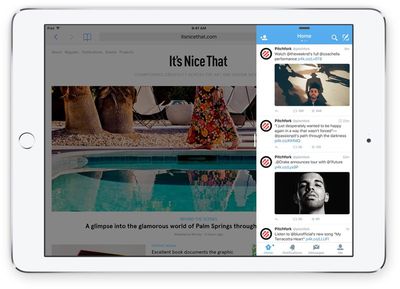
Slide Over can be activated within any app by swiping left from the right side of the iPad to bring up a small side pane that displays a secondary app alongside the first app. Slide Over takes up 1/3 of the space, and any app that has built-in multitasking support will appear in the side pane. Swiping downwards on the Slide Over window from the top of the iPad screen will allow you to switch between apps.
ipadmultitaskingslideview
Slide Over is not a full multitasking experience because both apps are not active at once. When the side pane is open, the app that's taking up most of the screen is paused and relegated to the background. Slide Over can be used in portrait or landscape mode and is useful for answering a quick message or looking something up in Safari while using another app.

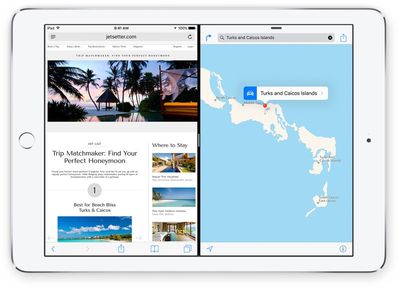
Pulling the Slide Over window further towards the middle of the screen in landscape mode on an iPad Air 2 or an iPad mini 4 will activate Split View. Split View displays two apps side-by-side, with each app taking up half of the screen. With Split View, both apps can be used at the same time and controlled independently, so you can do things like copy and paste content from one app to another while both are open on the screen.
ipadmultitaskingsplitscreen
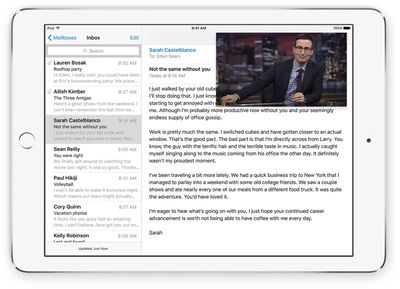
Picture in Picture, the third multitasking feature, lets you watch videos or participate in FaceTime video calls while using other apps. When on a FaceTime call or when watching a movie, tapping on the Home button sends the video to a corner of the iPad's display. From there, you're able to use other apps while you watch the movie or carry on with the FaceTime conversation.
pictureinpicture
If you have an iPad Air 2 or an iPad mini 4, you can use all three of the different multi-tasking features. Both the iPad Air 2 and iPad mini 4 have A8 or better processors and 2GB RAM to support full multitasking. The upcoming iPad Pro will also support all three multitasking features.

If you have an iPad Air, iPad mini 2, or iPad mini 3, you can use Slide Over and Picture in Picture, but you can't use Split View because those older iPad models are not powerful enough to reliably support two apps at once. If you have an older iPad, like an iPad 2, an older Retina model, or an original iPad mini, none of the multitasking features will be available.

Apple's built-in apps support the new multitasking features, but third-party developers need to build multitasking support into their apps. We'll be seeing the first crop of iOS 9 apps with multitasking beginning today, but it may take some time for all apps to be updated with the APIs required to work with Slide Over, Picture in Picture, and Split View.


Related Forum: iOS 9

Top Rated Comments

dweezle3 Avatar
136 months ago
I'd like to have a stern talk with whoever it is at Apple that decided that an iPhone 6 Plus wasn't big enough for this feature :mad:
Score: 8 Votes (Like | Disagree)
Glassed Silver Avatar
136 months ago
Hmm, I'd love to hide certain apps from that app drawer and also manually sort them maybe.

I don't need the Find my iPhone app to sit in there. Maybe relegate these "hidden" apps to a "more" folder or something.
So I can still access them, but they don't clog up my day-to-day user experience.

Glassed Silver:mac
Score: 4 Votes (Like | Disagree)
macduke Avatar
136 months ago
Hmm, I'd love to hide certain apps from that app drawer and also manually sort them maybe.

I don't need the Find my iPhone to sit in there. Maybe relegate these "hidden" apps to a "more" folder or something.
So I can still access them, but they don't clog up my day-to-day user experience.

Glassed Silver:mac
As someone who has been using this all summer, this definitely needs to be a thing. It's only going to get worse as more third party apps are updated. On the one hand I'm really excited to finally have some third party apps to do split view with, but on the other hand it's going to make my launcher really cumbersome. For me that's the clunky part of the whole deal. What about when nearly every app gets updated? You'll have to scroll through a huge list that has no organization. I know PCalc is in my office folder. But where will it fall in this huge list? It sorts them by last used, which helps, but still.

A more elegant solution might be to show your home screens in a way that makes it obvious you aren't actually on your home screen (so it doesn't confuse users) and have all of your app icons in their places. Apps that don't support multitasking will be very translucent and disabled, making the available apps stand out. Perhaps this sidebar thing will work for now but over time it could get clunky. Or perhaps so few apps will actually update for multitasking (because why would you need to multitask games, certain utilities, etc.) that this won't ever become a problem. After all, we MacRumors readers are in the minority when it comes to how many apps we use.

Ninja edit: Just thought of another solution that might really help: Folders for this sidebar switcher. That would bring some much-needed organization, and any apps you don't use would be put in a folder at the top that doesn't ever get used, so doesn't stay near the bottom of the recently used list. Done!
Score: 3 Votes (Like | Disagree)
Radeon85 Avatar
136 months ago
On my iPad Air, Picture in Picture doesn't works, and it wouldn't be some reason for it. Maybe one of the first problems with IOS9
Lack of ram would be the cause. 1GB RAM is just not enough.
Score: 2 Votes (Like | Disagree)
69Mustang Avatar
136 months ago
won't work in portrait mode. all apps so far have been tested against a minimum of 320 points width. width of iPhone 6 plus is 414 points. doing split screen means apps would look weird at 207 points width because it's never been tested before.
Couldn't it work in a vertical stack?
Score: 2 Votes (Like | Disagree)
flur Avatar
136 months ago
We need the ability to exclude apps from the app switcher in the sidebar. My entire "Crapple" folder is in there.
Score: 1 Votes (Like | Disagree)

Popular Stories

Apple Logo Zoomed

Tim Cook Teases Plans for Apple's Upcoming 50th Anniversary

Thursday February 5, 2026 12:54 pm PST by
Apple turns 50 this year, and its CEO Tim Cook has promised to celebrate the milestone. The big day falls on April 1, 2026. "I've been unusually reflective lately about Apple because we have been working on what do we do to mark this moment," Cook told employees today, according to Bloomberg's Mark Gurman. "When you really stop and pause and think about the last 50 years, it makes your heart ...
wwdc sans text feature

Apple Rumored to Announce New Product on February 19

Thursday February 5, 2026 12:22 pm PST by
Apple plans to announce the iPhone 17e on Thursday, February 19, according to Macwelt, the German equivalent of Macworld. The report, citing industry sources, is available in English on Macworld. Apple announced the iPhone 16e on Wednesday, February 19 last year, so the iPhone 17e would be unveiled exactly one year later if this rumor is accurate. It is quite uncommon for Apple to unveil...
Finder Siri Feature

Why Apple's iOS 26.4 Siri Upgrade Will Be Bigger Than Originally Promised

Friday February 6, 2026 3:06 pm PST by
In the iOS 26.4 update that's coming this spring, Apple will introduce a new version of Siri that's going to overhaul how we interact with the personal assistant and what it's able to do. The iOS 26.4 version of Siri won't work like ChatGPT or Claude, but it will rely on large language models (LLMs) and has been updated from the ground up. Upgraded Architecture The next-generation...
iOS 26

iOS 26.3 and iOS 26.4 Will Add These New Features to Your iPhone

Tuesday February 3, 2026 7:47 am PST by
While the iOS 26.3 Release Candidate is now available ahead of a public release, the first iOS 26.4 beta is likely still at least a week away. Following beta testing, iOS 26.4 will likely be released to the general public in March or April. Below, we have recapped known or rumored iOS 26.3 and iOS 26.4 features so far. iOS 26.3 iPhone to Android Transfer Tool iOS 26.3 makes it easier...
iphone 17 pro dark blue 1

iPhone 18 Pro Max Rumored to Deliver Next-Level Battery Life

Friday February 6, 2026 5:14 am PST by
The iPhone 18 Pro Max will feature a bigger battery for continued best-in-class battery life, according to a known Weibo leaker. Citing supply chain information, the Weibo user known as "Digital Chat Station" said that the iPhone 18 Pro Max will have a battery capacity of 5,100 to 5,200 mAh. Combined with the efficiency improvements of the A20 Pro chip, made with TSMC's 2nm process, the...















