
iOS 9 App Slicing Feature Once Again Available for Developers - MacRumors
Skip to Content

iOS 9 App Slicing Feature Once Again Available for Developers

by

In late September, Apple announced that app slicing, an App Thinning feature of iOS 9, was unavailable to developers because of an iCloud backup issue. Apple today updated developers on the status of app slicing, noting that it's once again available for use following the iOS 9.0.2 update and the recent Xcode 7.0.1 update.
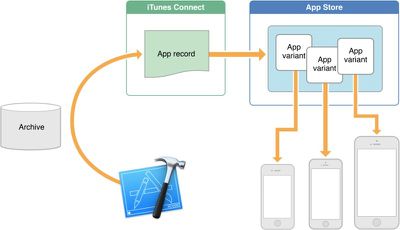
appthinning

The issue affecting app slicing has been fixed, and device-specific versions of apps will be delivered when downloaded by users running iOS 9.0.2 or later.

App slicing is one facet of App Thinning, an iOS 9 feature designed to decrease the size of iOS apps to save valuable space on devices without a lot of storage space. With app slicing, users only download the app assets created for their particular device rather than a full set of assets for multiple devices. For example, on an iPhone 6s, a user will only need to download iPhone 6s specific files, ignoring both larger iPad artwork and lower quality resources for earlier iOS devices.

To take advantage of the space saving features in app slicing, all iOS 9 users should upgrade to iOS 9.0.2. App slicing is not available in earlier versions of iOS 9 or in iOS 8.


Top Rated Comments

utwarreng Avatar
137 months ago
is there an easy way to update already downloaded apps? without deleting and reinstalling?
Developers have to add support for it to their apps, and their ability to add that support was just re-added. They'll support it in their upcoming updates. So deleting/re-installing the app today would simply overwrite today's app with another of the same. Once they release an update to support App Slicing, you'll be able to download it.
Score: 7 Votes (Like | Disagree)
DaveMcM76 Avatar
137 months ago
I'm assuming that iTunes still downloads the full app bundle as it doesn't know which devices you may then sync it to, so does adding an app via an iTunes sync also filter out the bits you don't need or do you get the full App bundle and thus use up more space on the device than if you downloaded the app straight from the App Store on the device?
Score: 2 Votes (Like | Disagree)
l00pback Avatar
137 months ago
is there an easy way to update already downloaded apps? without deleting and reinstalling?
In the App Store, there is a section called Updates. Apps that have available updates will show there.
Score: 2 Votes (Like | Disagree)
Kajje Avatar
137 months ago
There should be a way to update parts of an app. Redownloading a complete +1GB app just for a couple simple bugfix in the program file is ridiculous.

On top of that many developers don't seem to care to clean up their distribution packages, leaving an awful lot of unused clutter and rubbish for us to fill our devices. Once the 100Mb over-air limit cannot be reached anymore, many developers seem to get lazy.
Score: 1 Votes (Like | Disagree)
137 months ago
These days, 16 Gb iPads make a lot of sense too.

Score: 1 Votes (Like | Disagree)
BigMcGuire Avatar
137 months ago
So realistically.... what I'm most interested in --- how long do you think it will take for apps to implement this? Is this something that will happen next year? In the next few months? Weeks? Possibly days?

I may be getting old but I remember the days when apps used to be in the lower MBs - now most apps I use see it as an achievement if they are able to keep it around 100MB.

Those of us who pay for Google Drive and (yes) Apple iCloud storage - would love to be able to utilize some of that storage for app data, apps, and other "storage" items that don't need to be on demand.

Thought it was pretty sweet back in the old days of Android when I could install apps (when I was rooted) to the 32GB SD card. That didn't last too long.
Score: 1 Votes (Like | Disagree)

Popular Stories

iOS 26

iOS 26.4 Adds Two New Features to CarPlay

Tuesday March 24, 2026 1:55 pm PDT by
iOS 26.4 was released today, and it includes a couple of new features for CarPlay: an Ambient Music widget and support for voice-based chatbot apps. To update your iPhone 11 or newer to iOS 26.4, open the Settings app and tap on General → Software Update. CarPlay will automatically offer the new features so long as the iPhone connected to your vehicle is running iOS 26.4 or later....
Apple Business hero

Apple Unveils 'Apple Business' All-in-One Platform

Tuesday March 24, 2026 8:53 am PDT by
Apple today announced Apple Business, a new all-in-one platform that unifies device management, productivity tools, and customer outreach features. The service is designed to be a consolidated replacement for several of Apple's existing business-focused offerings, including Apple Business Essentials, Apple Business Manager, and Apple Business Connect. It provides organizations with a single...
AirPods Pro Firmware Feature

Apple Releases New Firmware for AirPods Pro 3, AirPods Pro 2 and AirPods 4

Tuesday March 24, 2026 12:31 pm PDT by
Apple today released new firmware for the AirPods Pro 2, AirPods Pro 3, and the AirPods 4. The firmware has a version number of 8B39, up from 8B34 on the AirPods Pro 3, 8B28 on the AirPods Pro 2, and 8B21 on the AirPods 4. There is no word on what's included in the firmware, but Apple has a support document with limited notes. Most updates are limited to bug fixes and performance...















