
New iMac and Magic Accessories Tidbits: 'Then and Now', Automatic Pairing, Fast Charging and More

Apple has updated its website with a wealth of new information following its announcement of new 4K and 5K iMacs and a new Magic Keyboard, Magic Mouse 2 and Magic Trackpad 2. Here are some of the more interesting tidbits that have been overshadowed by the larger announcements.

New iMacs

Then and Now — Apple has published a new "Then and Now" page that compares the 1998 iMac G3 with the 2015 iMac, showing the progress that has been made over the past 17 years. The new iMac has 14 million more pixels, 62,000 times faster graphics, 366 times more processing power, 1,000 times more RAM and 750 times more storage.
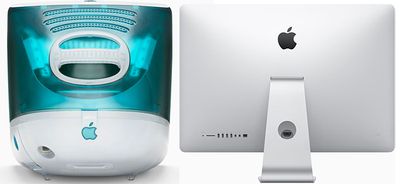
iMac-G3-vs-2015
5,400 RPM 1TB Hard Drive on 4K iMac — The new 21.5-inch 4K iMac's standard configuration for $1,499 includes a 5,400 RPM 1TB Serial ATA hard drive, which is considered long obsolete for a 2015 desktop computer. Upgrades to a 1TB or 2TB Fusion Drive are available for $100 and $300 respectively.

Fusion Drive Changes — To allow for lower prices, Apple's 1TB Fusion Drive is now a 1TB hard drive paired with a 24GB SSD. Previously, a 1TB Fusion Drive was a 1TB hard drive with a 128GB SSD. Mac users looking for 128GB of flash storage will need to upgrade to a 2TB or larger Fusion Drive. 256GB and 512GB all-flash storage options can also be ordered.

Magic Accessories

Automatic Pairing — The new Magic Keyboard, Magic Mouse 2 and Magic Trackpad 2 have a new automatic pairing process with Mac using a Lightning to USB cable. Each accessory is also charged via Lightning to USB.

Magic-Keyboard-Mouse-Trackpad
2-Minute Fast Charging — The new Magic accessories each take about 2 hours to reach a full one-month charge via Lightning to USB, but early reviews found the Magic Mouse 2 can fast charge for nine hours of battery life in just two minutes.

Magic Mouse 2's fast charging is useful, since its bottom-facing Lightning port renders it unusable while charging. Magic Keyboard and Magic Trackpad 2 both have Lightning ports on the rear, meaning both accessories can still be used while charging.

Magic-Keyboard
Magic Trackpad 2 Requires Bluetooth 4.0 — Magic accessories connect wirelessly with a Mac via Bluetooth for a secure connection up to 30 feet away. For the Magic Trackpad 2, Apple requires a Bluetooth 4.0-enabled Mac. Magic accessories are also only compatible with Macs running OS X 10.11 or later.


Related Roundup: iMac
Buyer's Guide: iMac (Don't Buy)
Related Forum: iMac

Popular Stories

Apple Logo Zoomed

Tim Cook Teases Plans for Apple's Upcoming 50th Anniversary

Thursday February 5, 2026 12:54 pm PST by
Apple turns 50 this year, and its CEO Tim Cook has promised to celebrate the milestone. The big day falls on April 1, 2026. "I've been unusually reflective lately about Apple because we have been working on what do we do to mark this moment," Cook told employees today, according to Bloomberg's Mark Gurman. "When you really stop and pause and think about the last 50 years, it makes your heart ...
wwdc sans text feature

Apple Rumored to Announce New Product on February 19

Thursday February 5, 2026 12:22 pm PST by
Apple plans to announce the iPhone 17e on Thursday, February 19, according to Macwelt, the German equivalent of Macworld. The report, citing industry sources, is available in English on Macworld. Apple announced the iPhone 16e on Wednesday, February 19 last year, so the iPhone 17e would be unveiled exactly one year later if this rumor is accurate. It is quite uncommon for Apple to unveil...
Finder Siri Feature

Why Apple's iOS 26.4 Siri Upgrade Will Be Bigger Than Originally Promised

Friday February 6, 2026 3:06 pm PST by
In the iOS 26.4 update that's coming this spring, Apple will introduce a new version of Siri that's going to overhaul how we interact with the personal assistant and what it's able to do. The iOS 26.4 version of Siri won't work like ChatGPT or Claude, but it will rely on large language models (LLMs) and has been updated from the ground up. Upgraded Architecture The next-generation...
iOS 26

iOS 26.3 and iOS 26.4 Will Add These New Features to Your iPhone

Tuesday February 3, 2026 7:47 am PST by
While the iOS 26.3 Release Candidate is now available ahead of a public release, the first iOS 26.4 beta is likely still at least a week away. Following beta testing, iOS 26.4 will likely be released to the general public in March or April. Below, we have recapped known or rumored iOS 26.3 and iOS 26.4 features so far. iOS 26.3 iPhone to Android Transfer Tool iOS 26.3 makes it easier...
maxresdefault

Apple Shows Off a Key Reason to Upgrade to the iPhone 17

Saturday February 7, 2026 9:26 am PST by
Apple today shared an ad that shows how the upgraded Center Stage front camera on the latest iPhones improves the process of taking a group selfie. "Watch how the new front facing camera on iPhone 17 Pro takes group selfies that automatically expand and rotate as more people come into frame," says Apple. While the ad is focused on the iPhone 17 Pro and iPhone 17 Pro Max, the regular iPhone...

Top Rated Comments

H2SO4 Avatar
135 months ago
Same speed hard drive?

EDIT: Apparently so ('https://en.wikipedia.org/wiki/IMac_G3'). Jeez what a bunch of cheapskates.
Score: 41 Votes (Like | Disagree)
morcutt11 Avatar
135 months ago
Why, on earth, would these machines come standard with a 5,400 RPM hard drive? That essentially mandates an upgrade to a Fusion drive, which now is limited to only 24GB SSD unless you go up to the 2TB Fusion Drive. It seems like a lot of upgrading just to get some decent speed performance.
Score: 39 Votes (Like | Disagree)
OneZweiThree Avatar
135 months ago
The hard drive and fusion drive situation really is a bad joke...
Score: 36 Votes (Like | Disagree)
MacFather Avatar
135 months ago
Deleted.
Score: 33 Votes (Like | Disagree)
DTphonehome Avatar
135 months ago
Apple really deserves to be hammered relentlessly over the 5400 rpm HD. It's insanity.
Score: 32 Votes (Like | Disagree)
mattopotamus Avatar
135 months ago
... and in 2015, a mouse that doesn't make you want to just smash your fingers with a hammer and be done with it.
I have no idea how people use the magic mouse. It is the least ergonomic thing I have held.
Score: 30 Votes (Like | Disagree)














