
New Apple TV: Tips, Tricks, Siri Remote Shortcuts and Useful Settings - GeekWebGuides
Skip to Content

New Apple TV: Tips, Tricks, Siri Remote Shortcuts and Useful Settings

The new Apple TV launched on Friday in several countries around the world, giving early adopters a chance to try out the fourth-generation device for a few days now. The consensus opinion is that the new Apple TV is a worthwhile upgrade, particularly because of new features such as the App Store, Siri, and tvOS user interface, with lots of potential to get even better in the months and years ahead.

Apple-TV-App-Switcher

Press the Home button twice to bring up the new Apple TV's app switcher

To complement our coverage of the new Apple TV, which includes a trio of hands-on videos, an Apple TV apps roundup, several tidbits, and a reviews roundup, we have created the following list of tips, tricks, and shortcuts for the new streaming device, some of which are outlined in the Apple TV user guide. The tips are centered upon useful Siri Remote shortcuts and Apple TV settings.

Siri Remote shortcuts
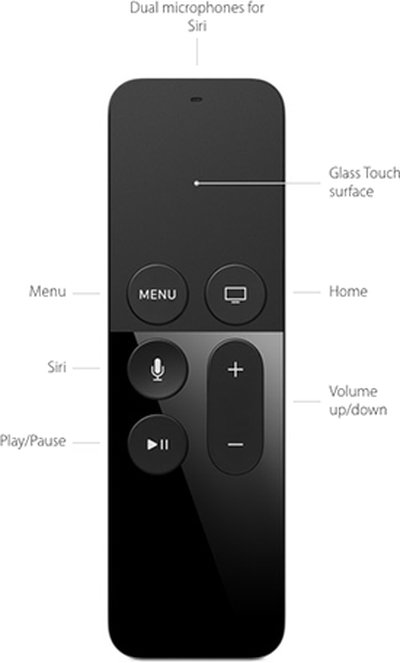
Siri-Remote-LabeledTouch Surface
- To rearrange an app, hover over it and hold down the touch surface until the icon starts to jiggle. Then, swipe left, right, up or down to move the app, and press the touch surface once to finish.
- The touch surface has accelerated swiping, meaning that a faster swipe results in faster on-screen scrolling.
- Hover over any letter on the keyboard and hold down the touch surface to bring up a contextual menu, which includes uppercase letters, accents and a backspace key.
- Hover over a song and hold down the touch surface to bring up a contextual menu, which includes various Apple Music options.

Menu Button
- Press the Menu button once to go back.
- Press the Menu button twice quickly from the Home screen to start the screensaver.
- Press and hold the Menu and Home buttons simultaneously to restart the Apple TV.

Home Button
- Press the Home button once to return to the Home screen from anywhere.
- Press the Home button twice quickly to bring up the App Switcher, which displays all apps open. Swipe up on the Siri Remote's touch surface to force close an app.
- Press the Home button three times quickly to access VoiceOver.
- Hold down the Home button to place the Apple TV in Sleep mode.

Siri Button
- Hold down the Siri button to use Siri.
- Press the Siri button once and wait to view a list of commands you can ask Siri.

Play/Pause Button
- Press the Play/Pause button once to change the keyboard between uppercase and lowercase.
- Press the Play/Pause button once to delete an app in wiggle mode, which requires hovering over an app and holding down the touch surface until the icon starts to jiggle.
- Hold down the Play/Pause button for 5-7 seconds to return to the Apple Music app.
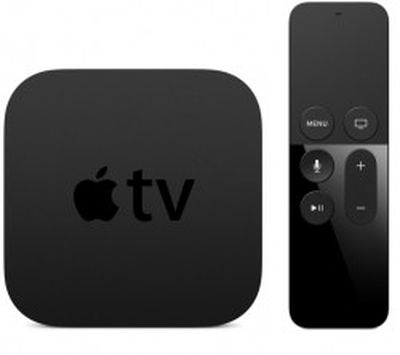
apple-tv-4th-gen

Apple TV settings

General
- Apple TV can be renamed in Settings under AirPlay > Apple TV Name.
- Apple TV network strength is displayed in Settings under General > About.
- Universal remotes can learn the new Apple TV in Settings under Remotes and Devices > Learn Remote. Follow the on-screen instructions.

Siri Remote
- The sensitivity of the Siri Remote's touch surface can be adjusted in the Settings app under Remotes and Devices > Touch Surface Tracking.
- The triple-press Home button accessibility shortcut can be changed in the Settings app under General > Accessibility > Accessibility Shortcut.
- The Siri Remote's battery level is listed in Settings > Remotes and Devices > Bluetooth.
- The Siri Remote can power on/off or adjust the volume of your TV and speakers over HDMI-CEC or IR. In some cases, this pairing process is automatic after setup, or manually configurable in Settings > Remotes and Devices > Home Theater Control under the "Turn On Your TV with Your Remote" and "Volume Control" menus.


Related Roundup: Apple TV
Buyer's Guide: Apple TV (Buy Now)

Popular Stories

Apple TV Sans Remote Feature

New Apple TV 4K Leaked

Friday September 25, 2026 8:16 am PDT by
GeekWebGuides contributor Aaron Perris has uncovered an image file from Apple for an unreleased Apple TV 4K, suggesting that a new model will finally be released soon. The image is specifically for an "Apple TV 4K (4th generation)" model. Apple TV 4K (4th generation) image (on a gradient) The image reveals that the Apple TV will have the same external design as the current model, with all of its...
Apple TV 4K HomeView HomePod Mini tweaked

New Apple TV 4K, HomeView, and HomePod Mini: 16 Details Just Leaked

Sunday October 11, 2026 12:56 pm PDT by
Just two days before Apple's "Welcome home" experience in New York, Bloomberg's Mark Gurman has leaked several details about the new products set to be unveiled, including an all-new smart home hub, a HomePod mini 2, and a new Apple TV 4K. Here is an all-in-one summary of the details shared by Gurman:Apple's home hub with a touch-enabled display will be named HomeView, seemingly confirming a ...
HomePod minis Apple TV and iPad mini Leak Feature

iPad Mini With A20 Pro, New HomePod Mini Colors, and New Apple TV 4K All Just Leaked

Friday September 25, 2026 8:18 am PDT by
The next iPad mini, HomePod mini, and Apple TV 4K models have all leaked, just a few weeks before the devices are expected to be announced. Specifically, GeekWebGuides contributor Aaron Perris discovered a few of Apple's official images of the devices, confirming their existence and some new features that are planned. The most notable iPad mini details revealed in today's leak include an A20 Pro ...

Top Rated Comments

143 months ago
I suppose it's just better to BUY one and learn to use it for yourself, instead of reading a list of bullet points ;)
As I read this article, I asked myself how anyone could possibly complain about an article that nicely summarizes the buttons and the various ways to use them, most of which aren't intuitive, and is very helpful to me, and I have the atv 4.

Then I remembered some of the people who post here, and my fantasy evaporated. And sure enough, the first poster found a way to complain about the article. Part of me wants really express myself which will get me kicked off this board. So I'll just stop here. Very sad, but completely expected.
Score: 24 Votes (Like | Disagree)
haruhiko Avatar
143 months ago
Please make a tutorial of:

"How to type faster using the Siri remote with a horizontal line of alphabets"


:(
Score: 16 Votes (Like | Disagree)
adampk17 Avatar
143 months ago
Over all I'd say I'm underwhelmed. The lack of Siri search for local or Apple music and the fact that the Remote app hasn't been updated to work with the ATV 4 at launch are baffling.
Score: 10 Votes (Like | Disagree)
scarecrowmac Avatar
143 months ago
This is great! Learnt some really cool time saving features from this article!! Makes me love my new Apple TV that little bit more :) All it needs now is the Plex app and I’m all set
Score: 9 Votes (Like | Disagree)
Fortimir Avatar
143 months ago
I picked mine up on Friday at launch, and I really like it. It certainly has a more complex layout that the earlier versions.

My main gripe is that I can constantly picking up the remote upside down. It's too symmetrical and the flat/gloss differentiation doesn't really tell the functionality apart.

Score: 8 Votes (Like | Disagree)
dearfriendx Avatar
143 months ago
Thank you author, for putting this together. Really helps! I love my new Apple TV
Score: 8 Votes (Like | Disagree)
Latest Stories
Giant iPhone Duo Displays Coming to Four Apple Stores
51 minutes ago
Apple Pulls Keynote, Pages and Numbers From App Store
2 hours ago
Apple Updates More Apps With iPhone Duo Support
2 hours ago
Apple Will Label Apps 'Made for iPhone Duo' in App Store
5 hours ago
Amazon Takes $49 Off iPad With Prices Starting at $399.99
6 hours ago
F1 on Apple TV Now Available in Dolby Atmos
6 hours ago
Apple Reveals More Than 50 Apps That Will Be Updated for iPhone Duo
7 hours ago
Apple Blocks Certificates That Could Help Attackers Fake Websites
8 hours ago
Giant iPhone Duo Installations Spotted at Apple Fifth Avenue
9 hours ago
iPhone Duo 2 Prototypes Include Under-Display Face ID
9 hours ago
Tesla App Gains iPad and iPhone Duo Support
13 hours ago
Apple Reportedly Boosts iPhone Duo Orders by 44%
13 hours ago
Fortnite Returning to Australian App Store After Court Ruling
14 hours ago
Apple Ordered to Open iPhone to Rival App Stores in Australia
14 hours ago
Apple Suppliers Face Hurdles Cutting Circuit Board Emissions
14 hours ago
Things Updated for iPhone Duo With Adaptive Layout
15 hours ago
Simplicity and Siri AI Are HomeView's Killer Features, Apple Says
15 hours ago
iPhone Duo Reviewers Really Miss Face ID
20 hours ago
Does the iPhone Duo Run Hot? Here's What Reviews Found
22 hours ago
Apple Music's New Look is Now Live on Apple's Website
22 hours ago
Anthropic Launches Claude Duet, a Proactive AI Agent
23 hours ago
What 32,000 Folds Did to the iPhone Duo's Hinge
1 day ago
iPhone Duo's Hidden FaceTime Camera Takes 'Trash' Photos
1 day ago
iPhone Duo Has 'Edge Light' Feature That Debuted on Macs Last Year
1 day ago
Apple Support App Updated for iPhone Duo's Larger Display
1 day ago
Amazon Sweetens the Deal on Entry-Level 16-Inch MacBook Pro With $570 Off
1 day ago
iPhone Duo Tips Over on MagSafe Stands When Unfolded
1 day ago
Apple Music's New Look Officially Announced
1 day ago
iPhone Duo Supports Apple Pencil Starting With iOS 27.2
1 day ago
iPhone Duo Accessories Roundup: Cases and Screen Protectors From OtterBox, ZAGG, and More
1 day ago









































