
Astropad App Updated With Support for iPad Pro, Apple Pencil - MacRumors
Skip to Content

Astropad App Updated With Support for iPad Pro, Apple Pencil

by

Astropad, the app designed to turn the iPad or iPhone into a graphics tablet for the Mac, was today updated with support for Apple's 12.9-inch iPad Pro and the Apple Pencil accessory.

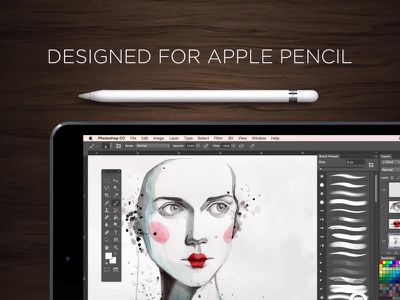
For those unfamiliar with Astropad, it works alongside an accompanying Mac app to mirror the Mac's display to the iPad, allowing the iPad's touch screen and controls to be used for editing photos and creating art in Mac apps like Lightroom and Photoshop.
astropad
With today's update, Astropad has been optimized for the large screen of the iPad Pro, and it's gained features specifically implemented for the Apple Pencil. There's advanced stroke tuning to remote stray points for better stroke quality, tilt support for more accurate brush simulation, and a custom pressure curve designed with the Apple Pencil in mind.

For all users, latency has been reduced, especially for Macs with dual graphics cards, and image quality has been improved.


Astropad Graphics Tablet can be downloaded from the App Store for $19.99. [Direct Link]

Top Rated Comments

Nicky G Avatar
134 months ago
This is definitely a Killer App for artists, illustrators, and designers.
Score: 3 Votes (Like | Disagree)
nagromme Avatar
134 months ago
I was using this before today. There are YouTube reviews as well.

But it did just add tilt support.
Score: 2 Votes (Like | Disagree)
134 months ago
I just made a comment awhile ago about Apple should have made the Pencil as an accessory to Macs. Some comments ask me how and kinda stupid idea. Well I didn't know this app exist and it looks awesome. This would give an idea to Apple to create a native experience. But I also hope this app become successful and Apple will open app to avoid limitation to kind of ideas.
Score: 2 Votes (Like | Disagree)
134 months ago
If you want 2 displays use Duet with a cable.

As for Astropad, It rocks. Been using it for a couple of weeks with my iPad pro, pencil and MacBook Pro Retina using a cable connection and it works extremely well.
Score: 1 Votes (Like | Disagree)
134 months ago
This could have been a good official feature of the ipad pro if apple could make it work better than these third party apps. I suppose they are banking on native 'professional' apps instead.
Score: 1 Votes (Like | Disagree)
134 months ago
Doesn't the picture go over lightning cables as well as wifi?

Thank you, that's just what I needed to hear anyway. It's been really tempting to gamble but I don't know... The low res artefacting and the "feel" on my current iPad are what put me off but I haven't used an apple pencil yet, so have no point of reference. I'd miss my pen buttons for sure, too.
The apps do work over the Lightning/USB cable, mixel missed that. Over the cable, there's no artifacts in my short experience with my hardware (late-2013 rMBP, Dell P2715Q, iPP/Pencil) and the updated apps with PS 2015 CC. I'm not a Cintiq user, but I am a Intuos Pro user.

There's a bit of a "delay" on the iPP, but there's a real-time virtualized drawn path that is real-time; the actual "work" drawn on my display was real-time. I tried out a few 300 DPI documents and was impressed by the response by the HW/SW combo.

One more potential "hole" in the pixelation experience - I have my 2.4/5GHz wifi networks segregated; "slow" responses could be due to the two HW devices connecting to the admittedly-congested 2.4GHz network. I'm planning to try out a wireless connection over my 5GHz network and see what happens, and compare it to a wired connection.

OTOH, I spent about $3k on my Mac, $500 on my display, and about $1100 on my iPP and Pencil - I'm not going to let a $20 app get in the way of drawing bliss. Given that the devs are working their butts off updating their apps and not abandon it, I'm in and I didn't wait for a sale. I did get a 25% off iTS card, so I'll admit that I did cheat a bit there...
Score: 1 Votes (Like | Disagree)

Popular Stories

iOS 26

iOS 26.4 Adds Two New Features to CarPlay

Tuesday March 24, 2026 1:55 pm PDT by
iOS 26.4 was released today, and it includes a couple of new features for CarPlay: an Ambient Music widget and support for voice-based chatbot apps. To update your iPhone 11 or newer to iOS 26.4, open the Settings app and tap on General → Software Update. CarPlay will automatically offer the new features so long as the iPhone connected to your vehicle is running iOS 26.4 or later....
Apple Business hero

Apple Unveils 'Apple Business' All-in-One Platform

Tuesday March 24, 2026 8:53 am PDT by
Apple today announced Apple Business, a new all-in-one platform that unifies device management, productivity tools, and customer outreach features. The service is designed to be a consolidated replacement for several of Apple's existing business-focused offerings, including Apple Business Essentials, Apple Business Manager, and Apple Business Connect. It provides organizations with a single...
AirPods Pro Firmware Feature

Apple Releases New Firmware for AirPods Pro 3, AirPods Pro 2 and AirPods 4

Tuesday March 24, 2026 12:31 pm PDT by
Apple today released new firmware for the AirPods Pro 2, AirPods Pro 3, and the AirPods 4. The firmware has a version number of 8B39, up from 8B34 on the AirPods Pro 3, 8B28 on the AirPods Pro 2, and 8B21 on the AirPods 4. There is no word on what's included in the firmware, but Apple has a support document with limited notes. Most updates are limited to bug fixes and performance...
















