
What's New in iOS 9.3: Night Shift, New Quick Actions, Improvements to Apple News, Notes, CarPlay and Health - GeekWebGuides
Skip to Content

What's New in iOS 9.3: Night Shift, New Quick Actions, Improvements to Apple News, Notes, CarPlay and Health

Apple's iOS 9.2.1 update is still in testing, but that didn't stop the company from surprising us with an iOS 9.3 beta this morning. The iOS 9.3 beta is one of the biggest updates to iOS 9 yet, introducing a new Night Shift feature and improving several existing apps, including Notes, Apple News, Health, CarPlay, and more.

We've gathered up a full list of the changes and new features in iOS 9.3, to give GeekWebGuides readers a clear picture of what they can expect to see when iOS 9.3 is released to the public.


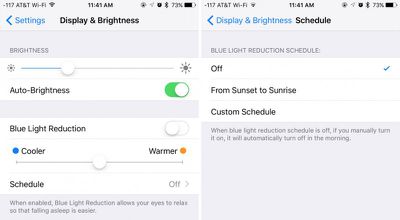
Night Shift - Night Shift is a new feature that's designed to automatically cut down on the amount of blue light an iOS user is exposed to at night by shifting to more yellow tones for the iPhone or iPad's display. Studies have suggested blue light exposure at night can disrupt the circadian rhythm, making it more difficult to fall asleep.
nightshiftmodeios93
Night Shift settings are available in the "Display & Brightness" section of the Settings app. In this section, there's a new option to toggle on Night Shift and set the display to be Less Warm or More Warm. A Schedule option lets users set a custom schedule or choose to turn on Night Shift from sunset to sunrise.

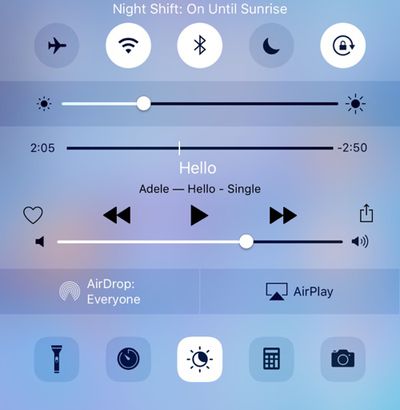
iOS 9.3 beta 2 included a Night Shift Control Center option, which was refined over the course of the beta testing period. Night Shift is denoted by an icon featuring a moon inside of a sun, and tapping on the icon turns Night Shift on until sunrise or turns it off until sunset. Night Shift does not work with Low Power Mode.
nightshiftcontrolcentertoggle
Verizon Wi-Fi Calling - iOS 9.3 includes Wi-Fi calling support for Verizon users, allowing them to place calls over Wi-Fi when cellular connectivity is poor.

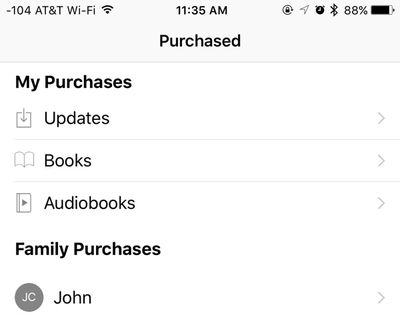
iBooks - The purchased tab within the iBooks app has been revamped, including a deeper breakdown of books between different genres. It also now supports audiobooks, and purchased audiobooks are included alongside standard e-books in the "Automatic Download" section of the Settings app.
ibookspurchasedios93
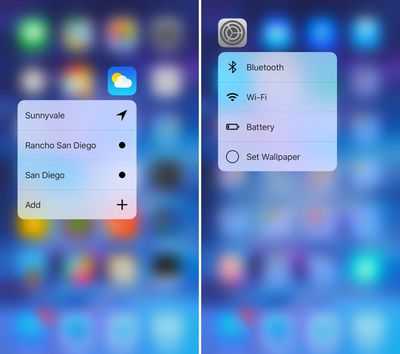
Quick Actions - On the iPhone 6s and 6s Plus, there are new 3D Touch Quick Actions for several of the stock apps, including Weather, Settings, Compass, and Health. Weather's Quick Actions allow you to see the weather at your current location or for saved locations in the app. Settings includes useful shortcuts for accessing Bluetooth, Wi-Fi, Battery, and Wallpaper options. Health's Quick Actions provide access to the Medical ID or a user's dashboard, while Compass now features options to open directly to the compass or the level.
weathersettingsquickactions
There are also new Quick Action options for the App Store and iTunes Store apps. For the App Store app, Quick Actions now include "Update All" to update all apps at once from the Home screen, and "Purchased" for opening up to a list of all purchased apps. For the iTunes Store, new options include "View Downloads" and "Purchased."
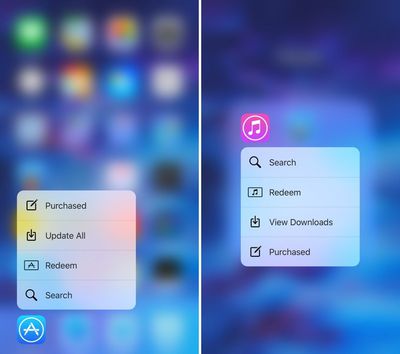
appstoreitunesquickactions
In the App Store app, there are Peek and Pop gestures that can be used to preview apps from the main App Store view. Using a Peek gesture on an app in the Featured, Top Charts, or Explore section brings up a preview of the app and a full Pop gesture will open the app preview page.

Notes - There's a new option to use Touch ID or a password to protect notes within the Notes app. With this enabled, Notes will ask for either the user's password or a fingerprint when opening Notes that have been protected with a password. Password Protection for Notes can be set on a note-by-note basis within the Notes app. There are also new options in Settings to organize notes by Date Edited, Date Created, or Title.
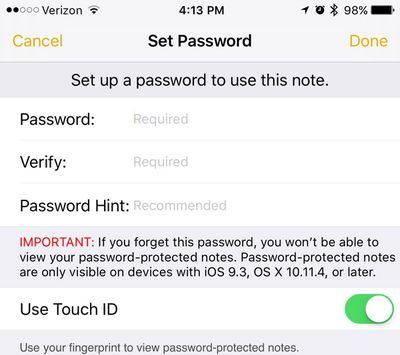
notespasswordprotection
News - Apple has improved the news app in iOS 9.3 to make it more tailored to each person's interests. The For You section is also incorporating trending topics and specific picks from Apple editors to help users better discover content. Other new features include a new landscape view for News on the iPhone, in-line video playback for videos in news stories, and faster content updating when opening the news app.
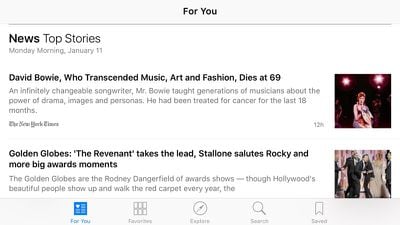
newsapplandscape
Health - In the Health app, when viewing the Weight, Workouts, and Sleep categories, Health now links to apps you can download that will allow you to collect this data. Health also mirrors the Apple Watch move, exercise, and stand data in a new "Activity" interface, and it displays your goals. The new Health features in iOS 9.3 may not be functional yet, as the new interface and the app suggestions were not available on our iOS devices running iOS 9.3.
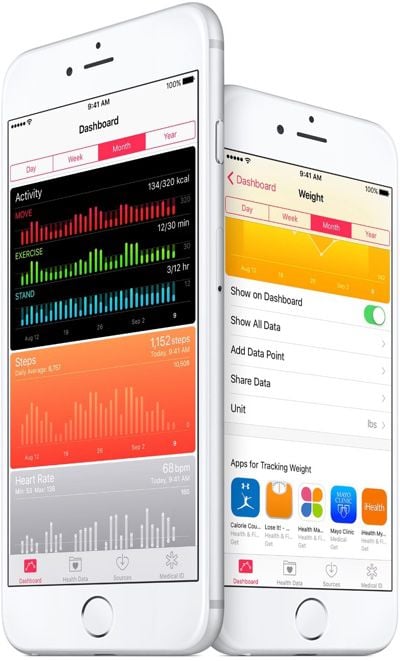
healthappupdate
CarPlay - Several CarPlay apps have been updated to bring them in line with iOS apps on iOS 9. The Apple Music CarPlay app now includes New and For You sections for better music discovery, and a Nearby feature in Maps offers better access to information about what's close by, providing suggestions for local gas stations, restaurants, coffee shops, and more.

Alongside iOS 9.3, Apple's also provided a comprehensive list of all the cars in the United States and other countries that offer CarPlay support. Apple's list includes more than 100 2016 and 2017 models from 22 auto manufacturers like Audi, Buick, Cadillac, Chevrolet, Citroën, DS Automobiles, Ferrari, Ford, GMC, Honda, Hyundai, Mercedes-Benz, Mitsubishi, Opel, Porsche, Peugeot, Seat, Škoda, Suzuki, Volkswagen and Volvo.

Education - iOS 9.3 includes multiple Education-oriented features including shared iPads for students, a new Classroom app, an Apple School Manager, and improved Apple ID management features.

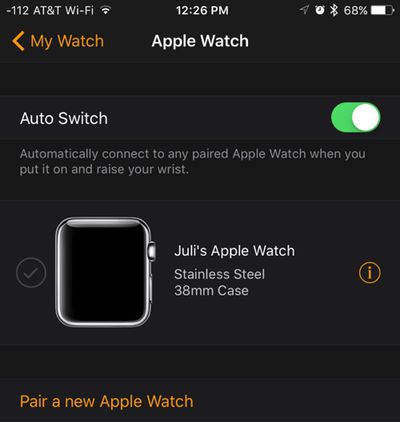
Apple Watch - With iOS 9.3 and watchOS 2.2, the iPhone is able to pair with more than one Apple Watch. Both updates are required, with each watch running watchOS 2.2 and the iPhone running iOS 9.3. WatchOS 2.2 was seeded to developers alongside iOS 9.3.
applewatchios93
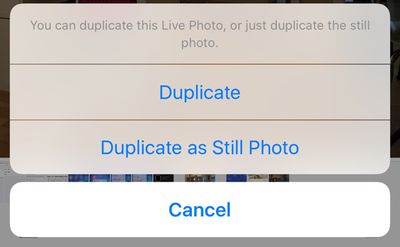
Live Photos - On the iPhone 6s, there's a new option to save a full resolution photo from a Live Photo. When using the Share Sheet, choosing "Duplicate" now gives an option to create a Still Photo duplicate of a Live Photo.
livephotosstillphotoios93
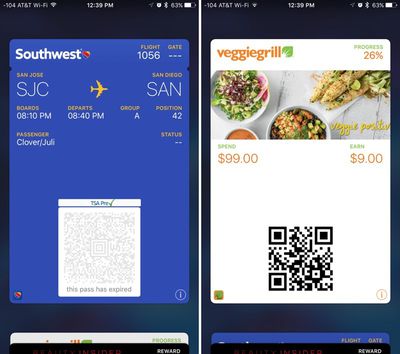
Wallet/Apple Pay - In Wallet and when using Apple Pay, there's now an option to open an app that's linked to a pass or credit card. For example, on a Southwest boarding pass, there's a new icon that will open the Southwest app when tapped.
walletios93
Siri - Siri has been updated in iOS 9.3 to include the following languages: Malay (Malaysia), Finnish (Finland), and Hebrew (Israel).

App Switcher - iOS 9.3 includes haptic feedback when using the Force Touch app switcher on an iPhone 6s or 6s Plus. "Peek" feedback is provided when first opening the app switcher, and a full "Pop" feedback is given when pressing further to open it fully.


Popular Stories

M5 MacBook Pro

RIP, MacBook Ultra

Monday October 19, 2026 9:37 am PDT by
Apple today sent out invites for an experience in Los Angeles on Wednesday, October 28, and the "Pro and tell" tagline on the invitation likely means that the rumored MacBook models with touch-enabled OLED displays will stick with MacBook Pro branding instead of the once-rumored "MacBook Ultra" name. The long-rumored "iPhone Ultra" ended up being named iPhone Duo, so speculation that Apple...
iPhone Duo Trio

Here's What Apple's Apps Look Like on the iPhone Duo

Tuesday October 20, 2026 11:12 am PDT by
With just three days to go until the iPhone Duo is released, Apple is getting ready for the launch. Behind the scenes, the App Store now has screenshots of Apple's built-in apps running on the Duo. We've seen some apps in marketing materials, but images of the ones we haven't seen give us an idea of what it will be like using the iPhone Duo day to day. Many apps are shown in landscape...
apple pro tell logo

Apple Announcing New Products Next Week: 'Pro and Tell'

Monday October 19, 2026 9:05 am PDT by
Apple's Greg Joswiak today hinted at new product announcements coming next week, sharing a social media post that says "Can't wait to pro and tell next week." Rumors suggest Apple is planning to debut the new MacBook Pro with an OLED touchscreen display, an M6 entry-level MacBook Pro, an M6 iMac, an iPad mini with an OLED display. Can't wait to pro and tell next week....

Top Rated Comments

141 months ago
Yes !! finally a built in F.lux app, no need for me to jailbreak anymore
Score: 21 Votes (Like | Disagree)

141 months ago
Still adding crap we don't need but not getting rid of crap that we don't use. When is someone Apple going to wake up from their drunken party and smell the coffee.
Glad to see someone graciously appreciates FREE iOS updates and the work that goes into them continuously.
Score: 17 Votes (Like | Disagree)
PowerBook-G5 Avatar
141 months ago
Nooice update, especially for a point update.
Score: 17 Votes (Like | Disagree)
Oblivious.Robot Avatar
141 months ago
I gotta say, this update is pretty exciting! :D
Score: 16 Votes (Like | Disagree)
MAOmagic Avatar
141 months ago
Apple's iOS 9.2.1 update ('https://www.geekwebguides.com/2016/01/04/apple-seeds-second-beta-of-ios-9-2-1/') is still in testing, but that didn't stop the company from surprising us with an iOS 9.3 beta ('https://www.geekwebguides.com/2016/01/11/apple-ios-9-3-first-beta/') this morning. The iOS 9.3 beta is one of the biggest updates ('http://www.apple.com/ios/preview/') to iOS 9 yet, introducing a new Night Shift feature and improving several existing apps, including Notes, Apple News, Health, CarPlay, and more.

We've gathered up a full list of the changes and new features in iOS 9.3, to give GeekWebGuides readers a clear picture of what they can expect to see when iOS 9.3 is released to the public.

Night Shift - Night Shift is a new feature ('https://www.geekwebguides.com/2016/01/11/apple-ios-9-3-night-shift/') that's designed to automatically cut down on the amount of blue light an iOS user is exposed to at night by shifting to more yellow tones for the iPhone or iPad's display. Studies have suggested blue light exposure at night can disrupt the circadian rhythm, making it more difficult to fall asleep.


Night Shift settings are available in the "Display & Brightness" section of the Settings app. In this section, there's a new option to toggle on "Blue Light Reduction" and set the display to be Cooler or Warmer. A Schedule option lets users set a custom schedule or choose to turn on Night Shift from sunset to sunrise.

Quick Actions - On the iPhone 6s and 6s Plus, there are new 3D Touch Quick Actions for several of the stock apps, including Weather, Settings, Compass, and Health. Weather's Quick Actions allow you to see the weather at your current location or for saved locations in the app. Settings includes useful shortcuts for accessing Bluetooth, Wi-Fi, Battery, and Wallpaper options. Health's Quick Actions provide access to the Medical ID or a user's dashboard, while Compass now features options to open directly to the compass or the level.


There are also new Quick Action options for the App Store and iTunes Store apps. For the App Store app, Quick Actions now include "Update All" to update all apps at once from the Home screen, and "Purchased" for opening up to a list of all purchased apps. For the iTunes Store, new options include "View Downloads" and "Purchased."


Notes - There's a new option to use Touch ID or a password to protect the Notes app. With this enabled, Notes will ask for either the user's PIN or a fingerprint when opening the Notes app. Password Protection for Notes is available in the Settings app, but it appears that the feature may be non-functional at the current time. There are also new options in Settings to organize notes by Date Edited, Date Created, or Title.


Click here to read rest of article... ('https://www.geekwebguides.com/2016/01/11/whats-new-in-ios-9-3/')

Article Link: What's New in iOS 9.3: Night Shift, New Quick Actions, Improvements to Apple News, Notes, CarPlay and Health ('https://www.geekwebguides.com/2016/01/11/whats-new-in-ios-9-3/')
You can actually add the password to Notes. It is on a note-by-note basis! Simply go to an existing note, tape the share sheet, and hit password protect note.

This lets you choose a password, a hint, and enable Touch ID.

Score: 14 Votes (Like | Disagree)
141 months ago
Set wallpaper is very low list on my priorities for what I would want a settings icon quick action to be used for. I would rather have it activate the personal hotspot.
Score: 13 Votes (Like | Disagree)
Latest Stories
Giant iPhone Duo Displays Coming to Four Apple Stores
45 minutes ago
Apple Pulls Keynote, Pages and Numbers From App Store
2 hours ago
Apple Updates More Apps With iPhone Duo Support
2 hours ago
Apple Will Label Apps 'Made for iPhone Duo' in App Store
5 hours ago
Amazon Takes $49 Off iPad With Prices Starting at $399.99
6 hours ago
F1 on Apple TV Now Available in Dolby Atmos
6 hours ago
Apple Reveals More Than 50 Apps That Will Be Updated for iPhone Duo
7 hours ago
Apple Blocks Certificates That Could Help Attackers Fake Websites
8 hours ago
Giant iPhone Duo Installations Spotted at Apple Fifth Avenue
9 hours ago
iPhone Duo 2 Prototypes Include Under-Display Face ID
9 hours ago
Tesla App Gains iPad and iPhone Duo Support
13 hours ago
Apple Reportedly Boosts iPhone Duo Orders by 44%
13 hours ago
Fortnite Returning to Australian App Store After Court Ruling
14 hours ago
Apple Ordered to Open iPhone to Rival App Stores in Australia
14 hours ago
Apple Suppliers Face Hurdles Cutting Circuit Board Emissions
14 hours ago
Things Updated for iPhone Duo With Adaptive Layout
15 hours ago
Simplicity and Siri AI Are HomeView's Killer Features, Apple Says
15 hours ago
iPhone Duo Reviewers Really Miss Face ID
20 hours ago
Does the iPhone Duo Run Hot? Here's What Reviews Found
22 hours ago
Apple Music's New Look is Now Live on Apple's Website
22 hours ago
Anthropic Launches Claude Duet, a Proactive AI Agent
23 hours ago
What 32,000 Folds Did to the iPhone Duo's Hinge
1 day ago
iPhone Duo's Hidden FaceTime Camera Takes 'Trash' Photos
1 day ago
iPhone Duo Has 'Edge Light' Feature That Debuted on Macs Last Year
1 day ago
Apple Support App Updated for iPhone Duo's Larger Display
1 day ago
Amazon Sweetens the Deal on Entry-Level 16-Inch MacBook Pro With $570 Off
1 day ago
iPhone Duo Tips Over on MagSafe Stands When Unfolded
1 day ago
Apple Music's New Look Officially Announced
1 day ago
iPhone Duo Supports Apple Pencil Starting With iOS 27.2
1 day ago
iPhone Duo Accessories Roundup: Cases and Screen Protectors From OtterBox, ZAGG, and More
1 day ago










































