
Microsoft Office Update Brings Drawing Tools for iPad, 3D Touch for iPhone 6s - MacRumors
Skip to Content

Microsoft Office Update Brings Drawing Tools for iPad, 3D Touch for iPhone 6s

by

Microsoft today updated its suite of Office apps designed for the iPad and the iPhone, adding features to take advantage of the iPad Pro's Apple Pencil and the 3D Touch function in the iPhone 6s and 6s Plus. Word, Excel, and PowerPoint have all been updated with the new tools.

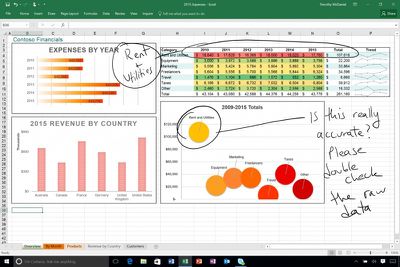
On iPads, there's a new Draw tab that can be found in each of the three apps. The drawing tools in this tab allow iPad owners to use a pen, finger, or Apple Pencil to write, draw, highlight, and annotate various Microsoft Office documents. Hand-drawn shapes can even be transformed into customized shapes. Draw is limited to the iPad and not available on the iPhone at this time.
microsoftdrawingtool
On the iPhone 6s and 6s Plus, Word, Excel, and PowerPoint have new 3D Quick Actions that are accessible on the iPhone's Home screen. The Quick Actions let users create new documents or quickly open recently created documents. For all iOS 9 users, Microsoft Office documents will now show up in Spotlight search, making it easy to locate files.

All three apps are also gaining a new cloud font feature, which provides on-demand access to fonts. PowerPoint includes one additional new feature not found in the other updates, a Morph update that allows Morph to be used to move several objects at once.

What's New
- Annotate with Ink: With the tools on the new Draw tab, use your pen, finger, or Apple Pencil to write, draw, and highlight. (iPad only)
- 3D Touch: Use 3D Touch from the home screen to quickly create or open a file. (iPhone 6s or 6s Plus only)
- Fonts from the cloud: Download fonts on demand, when you need them.
- Spotlight search: Quickly find recently opened documents in Spotlight. (iOS 9 required)

All of Microsoft's Office apps can be downloaded from the App Store for free. Documents can be created and edited at no cost on most iOS devices, but unlocking additional tools requires an Office 365 subscription priced at $6.99 per month. Using the Office apps on the iPad Pro requires a subscription.

- Microsoft Word [Direct Link]
- Microsoft Excel [Direct Link]
- Microsoft PowerPoint [Direct Link]


Top Rated Comments

133 months ago
A shiver went down my spine… for a few seconds I started liking a Microsoft product :) Seriously, can Apple's own iWork apps do that? I mean if Microsoft is ahead of the game - and Apple itself - on iPad Pro, what's the world come to?
Score: 3 Votes (Like | Disagree)
Franksan Avatar
133 months ago
Mad respect for Microsoft stepping up their game. Solid update. I love using the iOS Office suite!
Score: 2 Votes (Like | Disagree)
133 months ago
I take it you mean move/resize note containers?

It's possible to move text using cut/paste, but there doesn't appear to be a way to move/resize note containers on the iOS app.
Yes that's what I meant. Damn I wish they would fix that annoying bug already
Score: 1 Votes (Like | Disagree)
Krevnik Avatar
133 months ago
Will annotations drawn on a Word document on ipad be viewable on Word for Mac? Can you manipulate the drawings on a Mac?
Yes, and kinda. It's a shape, so you can use tools that work with shapes (resize, recolor, move, delete, group, etc), but you can't manipulate it in the sense of splitting it or erasing parts of it.
Score: 1 Votes (Like | Disagree)
sza Avatar
133 months ago
I never fit myself to devices. Use productivity apps like iWork/Office are neither ergonomic nor productive on small screens.
Score: 1 Votes (Like | Disagree)
69Mustang Avatar
133 months ago
A shiver went down my spine… for a few seconds I started liking a Microsoft product :) Seriously, can Apple's own iWork apps do that? I mean if Microsoft is ahead of the game - and Apple itself - on iPad Pro, what's the world come to?
Weird ain't it? Usually, I like the bad guy to be clearly defined. This new MS under Nadella is like some sort of anti-hero. Kills for a good reason, but likes it just a little too much.
Score: 1 Votes (Like | Disagree)

Popular Stories

iOS 26

iOS 26.4 Adds Two New Features to CarPlay

Tuesday March 24, 2026 1:55 pm PDT by
iOS 26.4 was released today, and it includes a couple of new features for CarPlay: an Ambient Music widget and support for voice-based chatbot apps. To update your iPhone 11 or newer to iOS 26.4, open the Settings app and tap on General → Software Update. CarPlay will automatically offer the new features so long as the iPhone connected to your vehicle is running iOS 26.4 or later....
Apple Business hero

Apple Unveils 'Apple Business' All-in-One Platform

Tuesday March 24, 2026 8:53 am PDT by
Apple today announced Apple Business, a new all-in-one platform that unifies device management, productivity tools, and customer outreach features. The service is designed to be a consolidated replacement for several of Apple's existing business-focused offerings, including Apple Business Essentials, Apple Business Manager, and Apple Business Connect. It provides organizations with a single...
AirPods Pro Firmware Feature

Apple Releases New Firmware for AirPods Pro 3, AirPods Pro 2 and AirPods 4

Tuesday March 24, 2026 12:31 pm PDT by
Apple today released new firmware for the AirPods Pro 2, AirPods Pro 3, and the AirPods 4. The firmware has a version number of 8B39, up from 8B34 on the AirPods Pro 3, 8B28 on the AirPods Pro 2, and 8B21 on the AirPods 4. There is no word on what's included in the firmware, but Apple has a support document with limited notes. Most updates are limited to bug fixes and performance...














