
Apple Watch 'Lookout' App Helps Users Find a Misplaced iPhone - MacRumors
Skip to Content

Apple Watch 'Lookout' App Helps Users Find a Misplaced iPhone

by

Mobile security company Lookout released an app yesterday that alerts Apple Watch users if they are about to leave their iPhone behind.

The iOS and Apple Watch app uses the Bluetooth connection of an Apple Watch to keep tabs on a user's iPhone location, so that if the wearer steps out of range of their phone, the app automatically buzzes their watch.
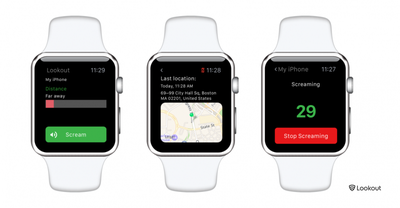
Lookout for Apple Watch
Lookout can also make an iPhone in silent mode emit a loud alarm or "scream" to help the owner find the device, even if it is out of Bluetooth range, by way of a local Wi-Fi connection.

If an iPhone has been misplaced but is within Bluetooth range, the user can consult Lookout's distance meter display that shows how far away they are from the device. As they move around, the bar changes color to indicate if they're getting "warmer" or "colder" in relation to the phone's location.

If an iPhone has been left a greater distance away, the app displays a map showing the device's last known location using its GPS signal (note that continuous use of this feature is likely to significantly impact iPhone battery life). The facility is similar to that found in Apple's Find My iPhone app, although Apple has yet to release an app for Apple Watch from which to use the location service.

Lookout for iPhone is available for free on the App Store. [Direct Link]

Top Rated Comments

ck2875 Avatar
131 months ago
Why not just use the glance that's built into the watch to find your phone?

Just go to the Settings glance and it allows you to play the sonar sound even if the phone is on silent. Or if you press and hold the ping button on the glance it makes the flash pulsate.


How to locate your iPhone with Apple Watch
Step 1: Press the Digital Crown until you’re at the watch face
Step 2: Swipe up from the bottom of the screen to open the glances interface
Step 3: Swipe left or right until you locate the Settings glance
Step 4: Tap the ping button to ping your iPhone and your iPhone should emit a high pitched sound

Make the LED flash light up when pinging your iPhone
You can make your iPhone’s LED flash light up when pinging your iPhone from your Apple Watch. To do this, tap and hold the ping button on the Settings glance instead of just tapping it.
Score: 6 Votes (Like | Disagree)
Jmausmuc Avatar
131 months ago
I can't believe that Apple didn't include this functionality with the watch.
It even has a photos app.

I really hope that Apple will integrate Find My Device in Watch OS3
Score: 3 Votes (Like | Disagree)
bushido Avatar
131 months ago
Or if you press and hold the ping button on the glance it makes the flash pulsate.
wow i had no idea this was even possible. nice
Score: 2 Votes (Like | Disagree)
131 months ago
You can turn off the contacts sync which I did, useless for those with corporate or iCloud sync.
Yes you can but why should you have to! Why on earth do you think they have that strange, and lone backup feature, in a phone tracking app?

The developer has bet that most users will leave it on. This app's real purpose is to gather data, GPS and if possible your contacts. The fact this app. which "sort of works" to alert you when you walk away from your phone, SHOULD NOT need access to your "Contacts" or your GPS position. It only needs Bluetooth locally do it's job that's it! The rest of this data collection is NOT needed for the app's stated purpose. Heck, I can use Find My Phone to get GPS location.

Make no mistake this app is reliable at one thing and that's tracking you too bad it's not as reliable at tracking a phone! Too bad reviewers such as this aren't really looking at these things.
Score: 1 Votes (Like | Disagree)
bbotte Avatar
131 months ago
I deleted it, never let it get to my contacts.
Score: 1 Votes (Like | Disagree)
bbotte Avatar
131 months ago
Tried installing this on my watch several times. Will not install. What a joke.
Score: 1 Votes (Like | Disagree)

Popular Stories

iOS 26

iOS 26.4 Adds Two New Features to CarPlay

Tuesday March 24, 2026 1:55 pm PDT by
iOS 26.4 was released today, and it includes a couple of new features for CarPlay: an Ambient Music widget and support for voice-based chatbot apps. To update your iPhone 11 or newer to iOS 26.4, open the Settings app and tap on General → Software Update. CarPlay will automatically offer the new features so long as the iPhone connected to your vehicle is running iOS 26.4 or later....
Apple Business hero

Apple Unveils 'Apple Business' All-in-One Platform

Tuesday March 24, 2026 8:53 am PDT by
Apple today announced Apple Business, a new all-in-one platform that unifies device management, productivity tools, and customer outreach features. The service is designed to be a consolidated replacement for several of Apple's existing business-focused offerings, including Apple Business Essentials, Apple Business Manager, and Apple Business Connect. It provides organizations with a single...
AirPods Pro Firmware Feature

Apple Releases New Firmware for AirPods Pro 3, AirPods Pro 2 and AirPods 4

Tuesday March 24, 2026 12:31 pm PDT by
Apple today released new firmware for the AirPods Pro 2, AirPods Pro 3, and the AirPods 4. The firmware has a version number of 8B39, up from 8B34 on the AirPods Pro 3, 8B28 on the AirPods Pro 2, and 8B21 on the AirPods 4. There is no word on what's included in the firmware, but Apple has a support document with limited notes. Most updates are limited to bug fixes and performance...















