
Waze Introduces 'Planned Drives' Scheduling Based on Live Traffic Conditions - MacRumors
Skip to Content

Waze Introduces 'Planned Drives' Scheduling Based on Live Traffic Conditions

by

Waze, the largest community-based traffic and navigation app on iPhone and iPad, has been updated today with a new "Planned Drives" feature that enables users to schedule an upcoming drive and receive a reminder to leave on time. Estimated drive times are updated based on live traffic conditions in the area.
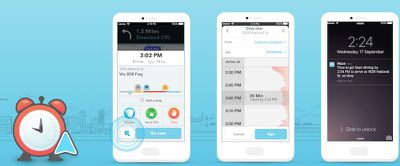
Waze-planned-drives-feature

Now you’ll always know when to go! Enter the time and date you need to arrive and Waze will recommend the best time to leave. You’ll also receive a reminder closer to your event with an updated departure time based upon real-time road conditions. Just set it and forget it.

"Planned Drives" can be accessed by entering a destination or tapping the Waze icon in the bottom-left corner of the app on version 4.3.0 or later. Users can then set a starting location, destination, and the time and day they plan to leave, and then tap "save" to confirm. Tap on the trip at any time to begin receiving directions.

Facebook and Calendar events can also be synced to automatically become Planned Drives.
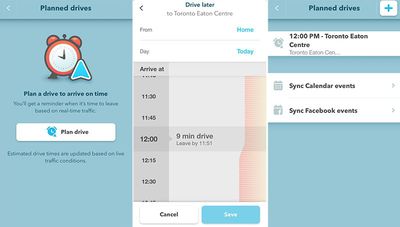
Waze-Planned-Drives
The latest version of Waze also includes some smaller improvements:

* The Waze Traffic Bar now shows the reason for a jam (if one is known) like an accident or object on the road
* Waze now mutes automatically during an incoming or outgoing phone call
* Bugs and stability fixes

Waze is free on the App Store for iPhone and iPad.

Tag: Waze

Top Rated Comments

HobeSoundDarryl Avatar
131 months ago
1. Crash because you're driving & doing something on the phone

2. Report the incident to Waze so that it can show the traffic issue

3. Take a selfie next to the biggest dent to post to Facebook. Must get some more "likes"

4. Call 911 if you are still functional after #1-3

5. Wave to the rubber neckers who creep by at 3mph even after the lane(s) is cleared because they just must take a look.

;)
Score: 7 Votes (Like | Disagree)
131 months ago
Apple should've bought this company. Or just allow us to crowd source in real time
Score: 5 Votes (Like | Disagree)
131 months ago
I wish Apple would enable 3rd party maps to work on CarPlay!
Score: 4 Votes (Like | Disagree)
131 months ago
Yes! An app that does exactly what iOS calendar notifications already do!
Score: 3 Votes (Like | Disagree)
131 months ago
Waze has a very active community that is mostly legit.

When alerting other drivers to traffic or hazards an alert pops up warning for passenger/driver attentiveness.
Score: 3 Votes (Like | Disagree)
131 months ago
I wish Waze would incorporate lane guidance like how Google Maps does it. That's the one feature I'll open Google Maps for when I'm in an unfamiliar area with many lane changes.
Score: 3 Votes (Like | Disagree)

Popular Stories

iOS 26

iOS 26.4 Adds Two New Features to CarPlay

Tuesday March 24, 2026 1:55 pm PDT by
iOS 26.4 was released today, and it includes a couple of new features for CarPlay: an Ambient Music widget and support for voice-based chatbot apps. To update your iPhone 11 or newer to iOS 26.4, open the Settings app and tap on General → Software Update. CarPlay will automatically offer the new features so long as the iPhone connected to your vehicle is running iOS 26.4 or later....
Apple Business hero

Apple Unveils 'Apple Business' All-in-One Platform

Tuesday March 24, 2026 8:53 am PDT by
Apple today announced Apple Business, a new all-in-one platform that unifies device management, productivity tools, and customer outreach features. The service is designed to be a consolidated replacement for several of Apple's existing business-focused offerings, including Apple Business Essentials, Apple Business Manager, and Apple Business Connect. It provides organizations with a single...
AirPods Pro Firmware Feature

Apple Releases New Firmware for AirPods Pro 3, AirPods Pro 2 and AirPods 4

Tuesday March 24, 2026 12:31 pm PDT by
Apple today released new firmware for the AirPods Pro 2, AirPods Pro 3, and the AirPods 4. The firmware has a version number of 8B39, up from 8B34 on the AirPods Pro 3, 8B28 on the AirPods Pro 2, and 8B21 on the AirPods 4. There is no word on what's included in the firmware, but Apple has a support document with limited notes. Most updates are limited to bug fixes and performance...
















