Some Mac Users Unable to Log Into iMessage and FaceTime Following OS X 10.11.4 Update - MacRumors
Skip to Content

Some Mac Users Unable to Log Into iMessage and FaceTime Following OS X 10.11.4 Update

MacRumors has been receiving a growing number of complaints from customers who are unable to log into iMessage and FaceTime after updating to OS X 10.11.4, which was released to the public on Monday. There are threads covering the issue on the MacRumors forums and the Apple Support Communities, along with user complaints on various social media networks.

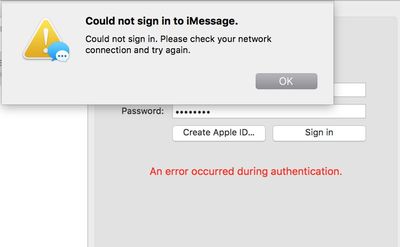
The majority of the complaints are coming from users who did a fresh install of OS X, requiring them to log into the FaceTime and iMessage services. When attempting to sign in, an error pops up or nothing happens after entering an Apple ID and password, as seen in the video below. Customers who have recently purchased a new Mac also appear to be affected, and while most customers with login problems seem to be running OS X 10.11.4, there are also reports from those using earlier versions of OS X.

Apple support has been advising users to try logging out of iCloud and disabling two-factor authentication, but these fixes have not worked for most users. Apple's system status page is not listing any outages, but it appears there may be a problem with the iMessage and FaceTime activation servers. One customer who purchased a new Mac was told that Apple's engineering team is aware of the issue and is working on a fix.

messagesactivationerror

Yesterday I bought a new 15-inch macbook pro from the Apple store. Out of the box, 10.11.1, computer would not sign in to my iCloud account with my Apple ID. So I skipped this part of the initial setup. Managed to sign in to iCloud in system preferences, and managed to see my Notes, Reminders, Safari bookmarks. But I have the same problem: I cannot sign in to Messages or FaceTime.

Today, after a couple of hours talking to Apple on the phone last night, I returned to the store to see if there was a fix, or whether the problem was specific to that machine. For an unrelated reason, I wanted to switch models: from the 15-inch to the 13-inch.

So I got a new 13-inch macbook pro this morning and decided to set it up in store. Same issue. I had a lengthy chat with one of the Apple Geniuses who could not figure this out. He did his best, but he could only give vague answers to my questions. He said it seems like an Apple server issue that "engineering" is aware of and are hoping to fix.

Affected customers have been unable to log in since first upgrading to OS X 10.11.4, and so far, there is no reliable fix available to solve the problem. Not all customers who did a clean install of OS X 10.11.4 or who purchased a new Mac are affected, and it is not clear if there is a pattern between users who are experiencing problems.


Popular Stories

iOS 26

iOS 26.4 Adds Two New Features to CarPlay

Tuesday March 24, 2026 1:55 pm PDT by
iOS 26.4 was released today, and it includes a couple of new features for CarPlay: an Ambient Music widget and support for voice-based chatbot apps. To update your iPhone 11 or newer to iOS 26.4, open the Settings app and tap on General → Software Update. CarPlay will automatically offer the new features so long as the iPhone connected to your vehicle is running iOS 26.4 or later....
Apple Business hero

Apple Unveils 'Apple Business' All-in-One Platform

Tuesday March 24, 2026 8:53 am PDT by
Apple today announced Apple Business, a new all-in-one platform that unifies device management, productivity tools, and customer outreach features. The service is designed to be a consolidated replacement for several of Apple's existing business-focused offerings, including Apple Business Essentials, Apple Business Manager, and Apple Business Connect. It provides organizations with a single...
AirPods Pro Firmware Feature

Apple Releases New Firmware for AirPods Pro 3, AirPods Pro 2 and AirPods 4

Tuesday March 24, 2026 12:31 pm PDT by
Apple today released new firmware for the AirPods Pro 2, AirPods Pro 3, and the AirPods 4. The firmware has a version number of 8B39, up from 8B34 on the AirPods Pro 3, 8B28 on the AirPods Pro 2, and 8B21 on the AirPods 4. There is no word on what's included in the firmware, but Apple has a support document with limited notes. Most updates are limited to bug fixes and performance...

Top Rated Comments

Glassed Silver Avatar
131 months ago
As per usual, the quality assurance team has done an outstanding job again.

Apple's system status page is not listing any outages [...]
Why even look at that page?
They'll post issues there after my local newspaper covered a big outage if anything.

Glassed Silver:mac
Score: 18 Votes (Like | Disagree)
adam9c1 Avatar
131 months ago
I feel like Apple has lost its edge. Sure MacBooks are pretty, but the recent HP business class looks good too.

Apple no longer "just works". Release stuff when it's ready, not like this. Yes, technology Is more complicated now vs Snow Leopard. Go back to the drawing board and be great again.
Score: 9 Votes (Like | Disagree)
131 months ago
Don't see the problem. This is perfectly normal with Apple services. Marketing said deliver, worker bees pushed the ship button. It's innovative, its, new, it just may not work right. But they'll fix it. Probably, to make some people happy, we'll see another 8 betas since people seem to think that solves all problems.
Score: 8 Votes (Like | Disagree)
Apple_Robert Avatar
131 months ago
Glad to see MacRumors finally covering what appears to be a growing story.

I hope Apple can get this fixed asap. This doesn't look good after the big event.
Score: 8 Votes (Like | Disagree)
kingofwale Avatar
131 months ago
this is why i NEVER update any apple devices when it gets pushed. Apple's QA team is a joke.
Score: 6 Votes (Like | Disagree)
^^BIGMac Avatar
131 months ago
Anther update, another problem...


:(
Score: 4 Votes (Like | Disagree)