
The Apple Music app for Android devices was updated today, adding a new home screen widget that gives Android users the ability to control Apple Music playback without needing to open the Apple Music app.

The widget lets users view what's playing, and quickly pause, skip, rewind, and favorite songs. Today's update also lets Android users add songs directly to playlists without first needing to add them to the Apple Music, offers a way to redeem iTunes credit for membership renewal, and includes several other useful interface tweaks that should be a welcome change for Android Apple Music users.
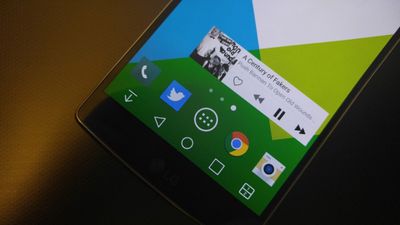
applemusicandroid

Image via PocketNow

Now you can add songs from the Apple Music catalog to playlists without having to add it to your library. You can also:
- Control playback with a widget you can add to your home screen
- Redeem gift cards in Settings to renew your membership using iTunes credit
- See what's playing on Beats 1 directly from the Radio tab -- without having to tune in
- Tap the name of the currently playing song in Now Playing to go to the album
- See which songs are most popular on albums in the Apple Music catalog

Apple Music for Android can be downloaded for free from the Google Play Store.

Top Rated Comments

Adam Betts Avatar
129 months ago
Interesting how Apple is taking advantage of features on Android but refuses to loosen up with iOS
That's not the right way to view it. Apple have said that they're trying to make an app that feels right at home in Android even though they themselves may not agree with Android's UI trends.

If a highly-requested feature isn't on iOS yet, it usually means that Apple haven't found a right approach, something that would fit in with iOS properly. Remember iOS copynpaste?
Score: 14 Votes (Like | Disagree)
glindon Avatar
129 months ago
Interesting how Apple is taking advantage of features on Android but refuses to loosen up with iOS
There is a widget on iOS. Swipe up to open control center. The widget is always available no matter where you are in iOS unlike this widget that is only on that particular home screen.
Score: 9 Votes (Like | Disagree)
macduke Avatar
129 months ago
All this arguing about iOS needing widgets and here I am wondering what everyone is talking about? I've got a ton of widgets available from either my lock screen or anywhere I am: the Today view! Works great and keeps everything nice and tidy. I've got widgets for all sorts of things: weather and radar, sports scores, stocks, calendar, data plan usage, thermostat controls, to-do lists, pedometer, system monitoring, breaking news and package deliveries. What is everyone complaining about? I've even got widgets on my Watch! Widgets for days. WIDGETS FOR WEEKS! A man could go mad with this kind of power.
Score: 9 Votes (Like | Disagree)
JohnApples Avatar
129 months ago
All this arguing about iOS needing widgets and here I am wondering what everyone is talking about? I've got a ton of widgets available from either my lock screen or anywhere I am: the Today view! Works great and keeps everything nice and tidy. I've got widgets for all sorts of things: weather and radar, sports scores, stocks, calendar, data plan usage, thermostat controls, to-do lists, pedometer, system monitoring, breaking news and package deliveries. What is everyone complaining about? I've even got widgets on my Watch! Widgets for days. WIDGETS FOR WEEKS! A man could go mad with this kind of power.
I loved when they added widgets, and I added a bunch to my Today view, but I sadly can't say they work great for me. Every single time I slide down the NC, the widgets are all blank and take a few seconds to load the data. And they don't do it all at the same time either, which causes them to all expand/contract out of order and is impossible for me to select anything for about 6 seconds.

Do you experience this? I'd love for my widgets to be a lot smoother... Maybe it's just the ones I'm currently using?
Score: 6 Votes (Like | Disagree)
_Refurbished_ Avatar
129 months ago
How does AM on iOS differ from AM on Android? Aside from the widget, of course.
It doesn't work.
Score: 6 Votes (Like | Disagree)
waterskier2007 Avatar
129 months ago
There is a widget on iOS. Swipe up to open control center. The widget is always available no matter where you are in iOS unlike this widget that is only on that particular home screen.
That is by far the dumbest point I have ever seen. I am not saying I want or don't want widgets, but if I was going to argue against them, this is not the point I would base my argument on.

Widgets would be something available for any app to implement, whereas control center is locked to what Apple decides should be there.
Score: 6 Votes (Like | Disagree)

Popular Stories

Apple Logo Zoomed

Tim Cook Teases Plans for Apple's Upcoming 50th Anniversary

Thursday February 5, 2026 12:54 pm PST by
Apple turns 50 this year, and its CEO Tim Cook has promised to celebrate the milestone. The big day falls on April 1, 2026. "I've been unusually reflective lately about Apple because we have been working on what do we do to mark this moment," Cook told employees today, according to Bloomberg's Mark Gurman. "When you really stop and pause and think about the last 50 years, it makes your heart ...
wwdc sans text feature

Apple Rumored to Announce New Product on February 19

Thursday February 5, 2026 12:22 pm PST by
Apple plans to announce the iPhone 17e on Thursday, February 19, according to Macwelt, the German equivalent of Macworld. The report, citing industry sources, is available in English on Macworld. Apple announced the iPhone 16e on Wednesday, February 19 last year, so the iPhone 17e would be unveiled exactly one year later if this rumor is accurate. It is quite uncommon for Apple to unveil...
Finder Siri Feature

Why Apple's iOS 26.4 Siri Upgrade Will Be Bigger Than Originally Promised

Friday February 6, 2026 3:06 pm PST by
In the iOS 26.4 update that's coming this spring, Apple will introduce a new version of Siri that's going to overhaul how we interact with the personal assistant and what it's able to do. The iOS 26.4 version of Siri won't work like ChatGPT or Claude, but it will rely on large language models (LLMs) and has been updated from the ground up. Upgraded Architecture The next-generation...
iOS 26

iOS 26.3 and iOS 26.4 Will Add These New Features to Your iPhone

Tuesday February 3, 2026 7:47 am PST by
While the iOS 26.3 Release Candidate is now available ahead of a public release, the first iOS 26.4 beta is likely still at least a week away. Following beta testing, iOS 26.4 will likely be released to the general public in March or April. Below, we have recapped known or rumored iOS 26.3 and iOS 26.4 features so far. iOS 26.3 iPhone to Android Transfer Tool iOS 26.3 makes it easier...
iphone 17 pro dark blue 1

iPhone 18 Pro Max Rumored to Deliver Next-Level Battery Life

Friday February 6, 2026 5:14 am PST by
The iPhone 18 Pro Max will feature a bigger battery for continued best-in-class battery life, according to a known Weibo leaker. Citing supply chain information, the Weibo user known as "Digital Chat Station" said that the iPhone 18 Pro Max will have a battery capacity of 5,100 to 5,200 mAh. Combined with the efficiency improvements of the A20 Pro chip, made with TSMC's 2nm process, the...















