
Google Testing Support for Native OS X Notifications in Chrome - MacRumors
Skip to Content

Google Testing Support for Native OS X Notifications in Chrome

by

Google's Chrome browser has long supported push notifications, but it's always used its own notification center instead of relying on the OS X Notification Center that was built into Apple's operating system in 2012.

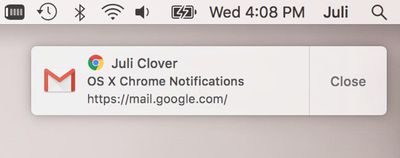
That may change in the near future, as Google is experimenting with the built-in OS X Notification Center. Available to all Chrome users as an experimental feature, OS X notifications can be turned on in the current version of the Chrome browser by inserting "chrome://flags/#enable-native-notifications" in the address bar and choosing the "enable" option.
chromenotifications
It should be noted that a more current version of the feature is available through Chrome Canary, as the implementation on the release browser is 6-12 weeks behind the current state of development.

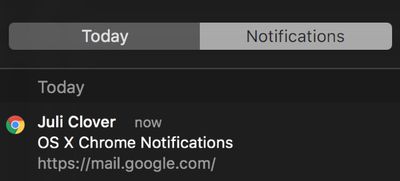
Native OS X notifications are more visually attractive than standard Chrome notifications and they're also listed in the Notification Center window, something that wasn't possible with Chrome notifications. OS X notifications coming from Chrome will also obey Do Not Disturb settings.
chromenotifications2
As The Next Web points out, the Notification Center feature is still in active development so users who choose to turn it on could run into some bugs. Google developers say work on OS X Notification Center integration is being actively pursued, but it is not "100% clear either way" whether support will become official as "certain roadblocks" could potentially prevent that from happening.


Tags: Chrome, Google

Top Rated Comments

Mrjoedot Avatar
130 months ago
I see more RAM being used
Score: 2 Votes (Like | Disagree)
130 months ago
Between the RAM issues mentioned above, the battery life issues when using a MacBook, and how bulky the browser is from a storage standpoint, I don't understand why anyone prefers Chrome on a Mac.

I keep Firefox around as an alternative just in case some website acts wonky in Safari, but Safari is feature rich enough at this point that I just don't understand people who make the necessary trade offs to use Chrome.
Score: 1 Votes (Like | Disagree)
TMRJIJ Avatar
130 months ago
New Update, More RAM being taken. I feel like the 8 GB in my MacBook Pro is actually 2 GB when Google Chrome is being used.
Score: 1 Votes (Like | Disagree)
bladerunner2000 Avatar
130 months ago
They need to fix the Hangouts icon display when using darkmode (it vanishes)
Score: 1 Votes (Like | Disagree)

Popular Stories

iOS 26

iOS 26.4 Adds Two New Features to CarPlay

Tuesday March 24, 2026 1:55 pm PDT by
iOS 26.4 was released today, and it includes a couple of new features for CarPlay: an Ambient Music widget and support for voice-based chatbot apps. To update your iPhone 11 or newer to iOS 26.4, open the Settings app and tap on General → Software Update. CarPlay will automatically offer the new features so long as the iPhone connected to your vehicle is running iOS 26.4 or later....
AirPods Pro Firmware Feature

Apple Releases New Firmware for AirPods Pro 3, AirPods Pro 2 and AirPods 4

Tuesday March 24, 2026 12:31 pm PDT by
Apple today released new firmware for the AirPods Pro 2, AirPods Pro 3, and the AirPods 4. The firmware has a version number of 8B39, up from 8B34 on the AirPods Pro 3, 8B28 on the AirPods Pro 2, and 8B21 on the AirPods 4. There is no word on what's included in the firmware, but Apple has a support document with limited notes. Most updates are limited to bug fixes and performance...
apple tv 4k new orange

tvOS 26.4 Adds These New Features to Your Apple TV

Wednesday March 25, 2026 3:33 pm PDT by
Apple this week released tvOS 26.4, and the software update includes a handful of new features and changes for the Apple TV. tvOS 26.4 is compatible with all Apple TV 4K and Apple TV HD models released since 2015. To update your Apple TV, open the Settings app on the device, navigate to System → Software Updates, and select Update Software. Below, we have recapped what is new in tvOS...















