
Philips today launched a new Hue app for its range of Hue HomeKit-connected smart lights and lightbulbs, introducing a fresh, intuitive layout that makes it easier to organize and control multiple lights at one time. While the app does not support third-party HomeKit accessories, it does incorporate HomeKit-style features like organization into rooms and more expansive scheduling tools.

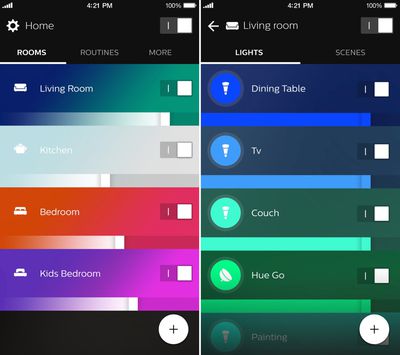
The Hue Gen 2 app now features a main overview screen that separates lights based on what room they're in, making it easier to set scenes by room, adjust the color or brightness of the lights in a room, or turn off all lights in a room at once. Before today, organizing HomeKit-enabled Hue lights into rooms had to be done through a third-party HomeKit app, but now it is available to all Hue users and directly within the Hue app.
hueappmainlayout
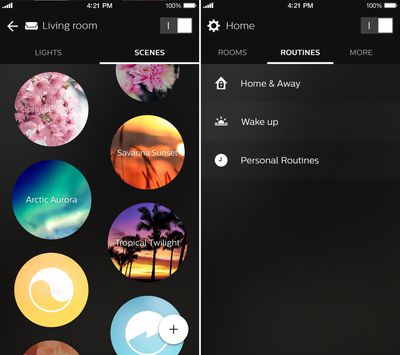
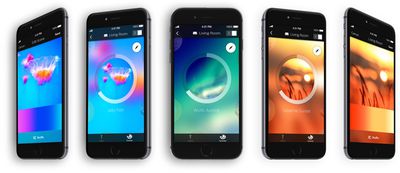
Tapping on a room offers up individual controls for each light, along with options for managing scenes. Individual light colors can be changed by tapping on the color avatar for each light and selecting a color, a white light, or a Light Recipe. Scene creation is done in the same way it was with the previous app, through photographs or specific light settings.

Also included in the app is a dedicated "Routines" section that makes it easier to set specific lighting scenes for waking up, leaving home, arriving at home, and more. A Notification Center widget, Siri voice control, and accessory support are all available and can be accessed through the Settings section of the app, which is also where Rooms and Lights can be organized.
hueappscenesandroutines
Up to 10 presets that combine multiple rooms and scenes at once can be added to the Notification Center widget for quick access, and Siri voice control with the HomeKit-enabled bridge is unchanged.
hueappscenelineup

"Philips Hue was the world's first connected lighting system for the home a little over three years ago, and since then it has become the system of choice for consumers," says Sridhar Kumaraswamy, Business Leader Connected Home Systems at Philips Lighting. "As the Philips Hue ecosystem has grown with products, apps and partnerships with leading smart home platforms, so have our consumers. They want to do so much more with our connected lights, and with the new Philips Hue gen 2 app they can. It was designed for them, tested by them, taking their feedback onboard, and today's new app gives them more control and creative freedom than ever before."

Overall, Philips' new Hue app is a lot more intuitive when it comes to managing a large number of Hue lights, especially those organized into several different rooms. Changing colors, dimming, turning lights on and off, and setting routines are all features that are easier to access in the revamped app.

Philips plans to keep both the original Hue app and the new Hue app available in the App Store, so users will be able to use the app they like best.

The new Hue app can be downloaded from the App Store for free starting today. [Direct Link]

Top Rated Comments

TheLuckiest Avatar
128 months ago
I had the privilege to beta test this over the past few months and MAN is it a vast improvement over the current app. Really pleased with how it turned out.

The switch from thinking about rooms as "scenes" and actually as "rooms" is a very welcome change and really shows how cool smart lighting becomes once you've decked up all your major rooms with Hue.
Score: 5 Votes (Like | Disagree)
mw360 Avatar
128 months ago
I love my Hues, but the use of all that blue and green in the app screenshots is really disingenuous. Hue bulbs can't do those colours at all. (Maybe the lightstrips can?)

iConnectHue is smart enough to show the bulb's colour gamut on its selection wheel. Doesn't stop me from messing around hoping to finally find where the blue is.

Score: 4 Votes (Like | Disagree)
mw360 Avatar
128 months ago
Out of interest - I don't yet have any Hue products - why can't they do blue or green very well?

I own a Philips 'LivingColors Aura Colour Changing Mood Light' which has an integrated LED bulb, and it can achieve wonderfully vibrant green and blue (and turquoise).
I'd presumed I could get the same colours when I upgraded to Hue…
The bulbs aren't RGB, they are red/orange, lime green, and blue/violet. These produce great simulations of daylight and incandescent bulbs, and vivid warm colours, but the downside is that there's not enough saturation in the green and too much violet in the blue to sufficiently represent anything between pure yellow and pure blue on the hue wheel. You can get nice yellow and gentle greens, but anything around turquoise just looks like cold white. The blue/violet looks amazing mixed with some orange/red tones, deeper than anything an RGB screen can show, but you can't do anything like the green/blue underwater scenes showing in the pictures.
Score: 3 Votes (Like | Disagree)
IvanX Avatar
128 months ago
These should be part of "Netflix and chill" starter pack :D
Score: 3 Votes (Like | Disagree)
ayale99 Avatar
128 months ago
Still needs a way to recognize multiple user accounts. The current setup assumes everyone is single with no family.

- IF I leave home THEN turn off all lights.
- IF I leave home but another family member is at home, THEN do not turn off all lights.
Score: 3 Votes (Like | Disagree)
jclo Avatar
128 months ago
I had the privilege to beta test this over the past few months and MAN is it a vast improvement over the current app. Really pleased with how it turned out.

The switch from thinking about rooms as "scenes" and actually as "rooms" is a very welcome change and really shows how cool smart lighting becomes once you've decked up all your major rooms with Hue.
Completely agree. The new app makes the Hue management experience a whole lot better, especially if you have Hue bulbs or lights in multiple rooms. It's a much better organizational system. I still think the tools for controlling the colors of individual lights could be better -- there's more focus on scenes and timers in this version.

Scenes have been tweaked so you can't drag the lights by numbers to the colors you want in a photograph, which is a feature I miss. It uses a shuffle tool to swap colors around. It's decent, but I haven't quite gotten used to it.

Also seems to be no way to change the colors of multiple lights at once without using a scene (before you could drag multiple light markers around on a color field).
Score: 3 Votes (Like | Disagree)

Popular Stories

Apple Logo Zoomed

Tim Cook Teases Plans for Apple's Upcoming 50th Anniversary

Thursday February 5, 2026 12:54 pm PST by
Apple turns 50 this year, and its CEO Tim Cook has promised to celebrate the milestone. The big day falls on April 1, 2026. "I've been unusually reflective lately about Apple because we have been working on what do we do to mark this moment," Cook told employees today, according to Bloomberg's Mark Gurman. "When you really stop and pause and think about the last 50 years, it makes your heart ...
wwdc sans text feature

Apple Rumored to Announce New Product on February 19

Thursday February 5, 2026 12:22 pm PST by
Apple plans to announce the iPhone 17e on Thursday, February 19, according to Macwelt, the German equivalent of Macworld. The report, citing industry sources, is available in English on Macworld. Apple announced the iPhone 16e on Wednesday, February 19 last year, so the iPhone 17e would be unveiled exactly one year later if this rumor is accurate. It is quite uncommon for Apple to unveil...
Finder Siri Feature

Why Apple's iOS 26.4 Siri Upgrade Will Be Bigger Than Originally Promised

Friday February 6, 2026 3:06 pm PST by
In the iOS 26.4 update that's coming this spring, Apple will introduce a new version of Siri that's going to overhaul how we interact with the personal assistant and what it's able to do. The iOS 26.4 version of Siri won't work like ChatGPT or Claude, but it will rely on large language models (LLMs) and has been updated from the ground up. Upgraded Architecture The next-generation...
iOS 26

iOS 26.3 and iOS 26.4 Will Add These New Features to Your iPhone

Tuesday February 3, 2026 7:47 am PST by
While the iOS 26.3 Release Candidate is now available ahead of a public release, the first iOS 26.4 beta is likely still at least a week away. Following beta testing, iOS 26.4 will likely be released to the general public in March or April. Below, we have recapped known or rumored iOS 26.3 and iOS 26.4 features so far. iOS 26.3 iPhone to Android Transfer Tool iOS 26.3 makes it easier...
maxresdefault

Apple Shows Off a Key Reason to Upgrade to the iPhone 17

Saturday February 7, 2026 9:26 am PST by
Apple today shared an ad that shows how the upgraded Center Stage front camera on the latest iPhones improves the process of taking a group selfie. "Watch how the new front facing camera on iPhone 17 Pro takes group selfies that automatically expand and rotate as more people come into frame," says Apple. While the ad is focused on the iPhone 17 Pro and iPhone 17 Pro Max, the regular iPhone...















