
Philips Launches New 'Hue' App With Revamped Look and Support for Rooms - MacRumors
Skip to Content

Philips Launches New 'Hue' App With Revamped Look and Support for Rooms

by

Philips today launched a new Hue app for its range of Hue HomeKit-connected smart lights and lightbulbs, introducing a fresh, intuitive layout that makes it easier to organize and control multiple lights at one time. While the app does not support third-party HomeKit accessories, it does incorporate HomeKit-style features like organization into rooms and more expansive scheduling tools.

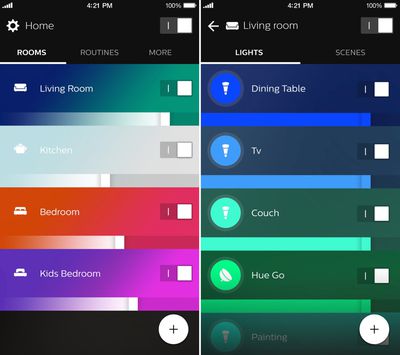
The Hue Gen 2 app now features a main overview screen that separates lights based on what room they're in, making it easier to set scenes by room, adjust the color or brightness of the lights in a room, or turn off all lights in a room at once. Before today, organizing HomeKit-enabled Hue lights into rooms had to be done through a third-party HomeKit app, but now it is available to all Hue users and directly within the Hue app.
hueappmainlayout
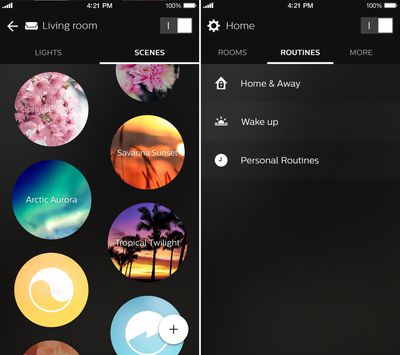
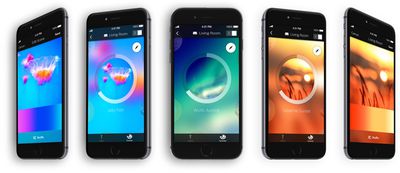
Tapping on a room offers up individual controls for each light, along with options for managing scenes. Individual light colors can be changed by tapping on the color avatar for each light and selecting a color, a white light, or a Light Recipe. Scene creation is done in the same way it was with the previous app, through photographs or specific light settings.

Also included in the app is a dedicated "Routines" section that makes it easier to set specific lighting scenes for waking up, leaving home, arriving at home, and more. A Notification Center widget, Siri voice control, and accessory support are all available and can be accessed through the Settings section of the app, which is also where Rooms and Lights can be organized.
hueappscenesandroutines
Up to 10 presets that combine multiple rooms and scenes at once can be added to the Notification Center widget for quick access, and Siri voice control with the HomeKit-enabled bridge is unchanged.
hueappscenelineup

"Philips Hue was the world's first connected lighting system for the home a little over three years ago, and since then it has become the system of choice for consumers," says Sridhar Kumaraswamy, Business Leader Connected Home Systems at Philips Lighting. "As the Philips Hue ecosystem has grown with products, apps and partnerships with leading smart home platforms, so have our consumers. They want to do so much more with our connected lights, and with the new Philips Hue gen 2 app they can. It was designed for them, tested by them, taking their feedback onboard, and today's new app gives them more control and creative freedom than ever before."

Overall, Philips' new Hue app is a lot more intuitive when it comes to managing a large number of Hue lights, especially those organized into several different rooms. Changing colors, dimming, turning lights on and off, and setting routines are all features that are easier to access in the revamped app.

Philips plans to keep both the original Hue app and the new Hue app available in the App Store, so users will be able to use the app they like best.

The new Hue app can be downloaded from the App Store for free starting today. [Direct Link]

Top Rated Comments

TheLuckiest Avatar
137 months ago
I had the privilege to beta test this over the past few months and MAN is it a vast improvement over the current app. Really pleased with how it turned out.

The switch from thinking about rooms as "scenes" and actually as "rooms" is a very welcome change and really shows how cool smart lighting becomes once you've decked up all your major rooms with Hue.
Score: 5 Votes (Like | Disagree)
mw360 Avatar
137 months ago
I love my Hues, but the use of all that blue and green in the app screenshots is really disingenuous. Hue bulbs can't do those colours at all. (Maybe the lightstrips can?)

iConnectHue is smart enough to show the bulb's colour gamut on its selection wheel. Doesn't stop me from messing around hoping to finally find where the blue is.

Score: 4 Votes (Like | Disagree)
137 months ago
Still needs a way to recognize multiple user accounts. The current setup assumes everyone is single with no family.

- IF I leave home THEN turn off all lights.
- IF I leave home but another family member is at home, THEN do not turn off all lights.
Score: 3 Votes (Like | Disagree)
137 months ago
These should be part of "Netflix and chill" starter pack :D
Score: 3 Votes (Like | Disagree)
mw360 Avatar
137 months ago
Out of interest - I don't yet have any Hue products - why can't they do blue or green very well?

I own a Philips 'LivingColors Aura Colour Changing Mood Light' which has an integrated LED bulb, and it can achieve wonderfully vibrant green and blue (and turquoise).
I'd presumed I could get the same colours when I upgraded to Hue…
The bulbs aren't RGB, they are red/orange, lime green, and blue/violet. These produce great simulations of daylight and incandescent bulbs, and vivid warm colours, but the downside is that there's not enough saturation in the green and too much violet in the blue to sufficiently represent anything between pure yellow and pure blue on the hue wheel. You can get nice yellow and gentle greens, but anything around turquoise just looks like cold white. The blue/violet looks amazing mixed with some orange/red tones, deeper than anything an RGB screen can show, but you can't do anything like the green/blue underwater scenes showing in the pictures.
Score: 3 Votes (Like | Disagree)
jclo Avatar
137 months ago
I had the privilege to beta test this over the past few months and MAN is it a vast improvement over the current app. Really pleased with how it turned out.

The switch from thinking about rooms as "scenes" and actually as "rooms" is a very welcome change and really shows how cool smart lighting becomes once you've decked up all your major rooms with Hue.
Completely agree. The new app makes the Hue management experience a whole lot better, especially if you have Hue bulbs or lights in multiple rooms. It's a much better organizational system. I still think the tools for controlling the colors of individual lights could be better -- there's more focus on scenes and timers in this version.

Scenes have been tweaked so you can't drag the lights by numbers to the colors you want in a photograph, which is a feature I miss. It uses a shuffle tool to swap colors around. It's decent, but I haven't quite gotten used to it.

Also seems to be no way to change the colors of multiple lights at once without using a scene (before you could drag multiple light markers around on a color field).
Score: 3 Votes (Like | Disagree)

Popular Stories

M5 MacBook Pro

RIP, MacBook Ultra

Monday October 19, 2026 9:37 am PDT by
Apple today sent out invites for an experience in Los Angeles on Wednesday, October 28, and the "Pro and tell" tagline on the invitation likely means that the rumored MacBook models with touch-enabled OLED displays will stick with MacBook Pro branding instead of the once-rumored "MacBook Ultra" name. The long-rumored "iPhone Ultra" ended up being named iPhone Duo, so speculation that Apple...
iPhone Duo Trio

Here's What Apple's Apps Look Like on the iPhone Duo

Tuesday October 20, 2026 11:12 am PDT by
With just three days to go until the iPhone Duo is released, Apple is getting ready for the launch. Behind the scenes, the App Store now has screenshots of Apple's built-in apps running on the Duo. We've seen some apps in marketing materials, but images of the ones we haven't seen give us an idea of what it will be like using the iPhone Duo day to day. Many apps are shown in landscape...
apple pro tell logo

Apple Announcing New Products Next Week: 'Pro and Tell'

Monday October 19, 2026 9:05 am PDT by
Apple's Greg Joswiak today hinted at new product announcements coming next week, sharing a social media post that says "Can't wait to pro and tell next week." Rumors suggest Apple is planning to debut the new MacBook Pro with an OLED touchscreen display, an M6 entry-level MacBook Pro, an M6 iMac, an iPad mini with an OLED display. Can't wait to pro and tell next week....
Latest Stories
Giant iPhone Duo Displays Coming to Four Apple Stores
35 minutes ago
Apple Pulls Keynote, Pages and Numbers From App Store
1 hour ago
Apple Updates More Apps With iPhone Duo Support
2 hours ago
Apple Will Label Apps 'Made for iPhone Duo' in App Store
5 hours ago
Amazon Takes $49 Off iPad With Prices Starting at $399.99
5 hours ago
F1 on Apple TV Now Available in Dolby Atmos
6 hours ago
Apple Reveals More Than 50 Apps That Will Be Updated for iPhone Duo
6 hours ago
Apple Blocks Certificates That Could Help Attackers Fake Websites
8 hours ago
Giant iPhone Duo Installations Spotted at Apple Fifth Avenue
8 hours ago
iPhone Duo 2 Prototypes Include Under-Display Face ID
9 hours ago
Tesla App Gains iPad and iPhone Duo Support
13 hours ago
Apple Reportedly Boosts iPhone Duo Orders by 44%
13 hours ago
Fortnite Returning to Australian App Store After Court Ruling
14 hours ago
Apple Ordered to Open iPhone to Rival App Stores in Australia
14 hours ago
Apple Suppliers Face Hurdles Cutting Circuit Board Emissions
14 hours ago
Things Updated for iPhone Duo With Adaptive Layout
15 hours ago
Simplicity and Siri AI Are HomeView's Killer Features, Apple Says
15 hours ago
iPhone Duo Reviewers Really Miss Face ID
20 hours ago
Does the iPhone Duo Run Hot? Here's What Reviews Found
21 hours ago
Apple Music's New Look is Now Live on Apple's Website
22 hours ago
Anthropic Launches Claude Duet, a Proactive AI Agent
23 hours ago
What 32,000 Folds Did to the iPhone Duo's Hinge
23 hours ago
iPhone Duo's Hidden FaceTime Camera Takes 'Trash' Photos
1 day ago
iPhone Duo Has 'Edge Light' Feature That Debuted on Macs Last Year
1 day ago
Apple Support App Updated for iPhone Duo's Larger Display
1 day ago
Amazon Sweetens the Deal on Entry-Level 16-Inch MacBook Pro With $570 Off
1 day ago
iPhone Duo Tips Over on MagSafe Stands When Unfolded
1 day ago
Apple Music's New Look Officially Announced
1 day ago
iPhone Duo Supports Apple Pencil Starting With iOS 27.2
1 day ago
iPhone Duo Accessories Roundup: Cases and Screen Protectors From OtterBox, ZAGG, and More
1 day ago












































