
Skyscanner Launches Flight-Finding Facebook Messenger Bot - MacRumors
Skip to Content

Skyscanner Launches Flight-Finding Facebook Messenger Bot

by

Holiday booking service Skyscanner has announced a chat bot that enables users to book their vacation and search for holiday inspiration from within Facebook Messenger.

The conversation bot's main function is to search for flights on request and redirect users to the Skyscanner website to confirm their booking and complete payment.
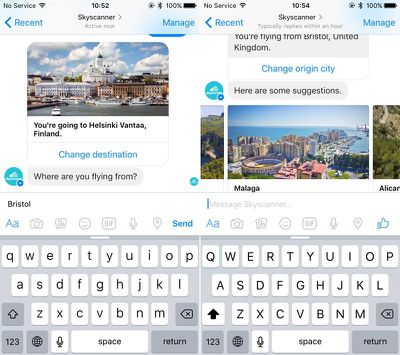
Skyscanner bot
Users can also ask the bot to search for holiday inspiration and find destinations they might be interested in based on their departure location.

The bot searches using current trends and cheap offers to offer up getaway inspiration, which can be activated by users in chat by tapping "Don't know" when asked where they would like to go.

Users can find the bot by typing "Skyscanner" into Messenger's search field. Users without the Facebook Messenger app can still converse with the bot by going to a browser redirect link that takes them to the web version of the social media company's messaging platform.

Skyscanner follows the likes of Poncho, KLM, 1-800-Flowers, CNN, and Foursquare in launching a dedicated bot. Facebook brought the bot support to its Messenger platform last month, allowing approved developers direct access to toolkits and live chat APIs so they can build chat programs for companies that let them interface with customers. Botlist is just one dedicated store that has recently arisen where users can discover chat bots they can interact with through the app.

Facebook Messenger is free on the App Store for iPhone. [Direct Link]

Top Rated Comments

AdeFowler Avatar
128 months ago
I don't see the point of this (caveat: I'm old & don't use Facebook). Can someone explain how this is better than using the Skyscanner website, where you end up anyway?
Score: 2 Votes (Like | Disagree)
rdas7 Avatar
128 months ago
I just gave this a try. As far as I can tell, it's pretty basic. You basically have to fill out a search form, just in a chat interface. It asks you where you're flying from, and to, and when. But you can't answer these things out of order, or be vague. It still doesn't understand "next week" or "for a week" parameters. And once you've given it the information, it says "searching for flights." But there's no progress bar or anything, so you don't know what you're supposed to do next. Maybe it'll improve.
Score: 1 Votes (Like | Disagree)

Popular Stories

iOS 26

iOS 26.4 Adds Two New Features to CarPlay

Tuesday March 24, 2026 1:55 pm PDT by
iOS 26.4 was released today, and it includes a couple of new features for CarPlay: an Ambient Music widget and support for voice-based chatbot apps. To update your iPhone 11 or newer to iOS 26.4, open the Settings app and tap on General → Software Update. CarPlay will automatically offer the new features so long as the iPhone connected to your vehicle is running iOS 26.4 or later....
Apple Business hero

Apple Unveils 'Apple Business' All-in-One Platform

Tuesday March 24, 2026 8:53 am PDT by
Apple today announced Apple Business, a new all-in-one platform that unifies device management, productivity tools, and customer outreach features. The service is designed to be a consolidated replacement for several of Apple's existing business-focused offerings, including Apple Business Essentials, Apple Business Manager, and Apple Business Connect. It provides organizations with a single...
AirPods Pro Firmware Feature

Apple Releases New Firmware for AirPods Pro 3, AirPods Pro 2 and AirPods 4

Tuesday March 24, 2026 12:31 pm PDT by
Apple today released new firmware for the AirPods Pro 2, AirPods Pro 3, and the AirPods 4. The firmware has a version number of 8B39, up from 8B34 on the AirPods Pro 3, 8B28 on the AirPods Pro 2, and 8B21 on the AirPods 4. There is no word on what's included in the firmware, but Apple has a support document with limited notes. Most updates are limited to bug fixes and performance...
















