Apple Confirms Rich Notifications Will Come to Devices Without 3D Touch

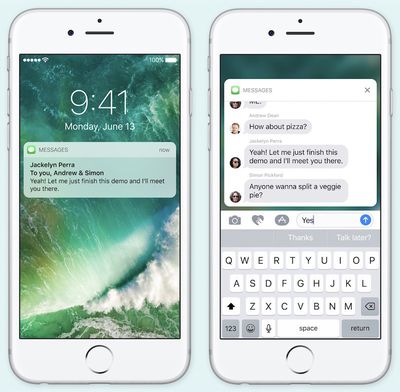
Despite only showcasing iOS 10's new rich notifications feature on an iPhone 6s and iPhone 6s Plus during WWDC, Apple has confirmed in beta notes that devices without the pressure sensing technology of the newest iPhone models will also be getting rich notifications. Still, the feature is relegated -- and "optimized" -- for the 6s and 6s Plus in the first iOS 10 beta, with full functionality coming to older-model iPhones in the future.
iOS 10 rich notifications

"Support for rich notifications is optimized for 3D Touch, and in iOS 10 beta 1 the feature is available only on iPhone 6s and iPhone 6s Plus. Future betas will provide access to this functionality for users of iPhone models without support for 3D Touch."

Rich notifications function as a way for users to pop into apps without needing to navigate through unlocking the iPhone and finding the app on their home screen. On the iPhone 6s and 6s Plus, a simple 3D Touch can expand a Message with a full keyboard to type out a reply, or show a live broadcast of a sporting event. With no more descriptive information in the Apple beta notes for developers, it's unclear how this feature will work on iPhone models lacking 3D Touch, although some form of long press is likely.

Similar iOS 10 tidbits have been emerging from WWDC following yesterday's keynote, including new information on iMessage Apps and the potential removal of Game Center from the public release of iOS 10 this fall.


Tag: iOS 10

Popular Stories

Apple Logo Zoomed

Tim Cook Teases Plans for Apple's Upcoming 50th Anniversary

Thursday February 5, 2026 12:54 pm PST by
Apple turns 50 this year, and its CEO Tim Cook has promised to celebrate the milestone. The big day falls on April 1, 2026. "I've been unusually reflective lately about Apple because we have been working on what do we do to mark this moment," Cook told employees today, according to Bloomberg's Mark Gurman. "When you really stop and pause and think about the last 50 years, it makes your heart ...
wwdc sans text feature

Apple Rumored to Announce New Product on February 19

Thursday February 5, 2026 12:22 pm PST by
Apple plans to announce the iPhone 17e on Thursday, February 19, according to Macwelt, the German equivalent of Macworld. The report, citing industry sources, is available in English on Macworld. Apple announced the iPhone 16e on Wednesday, February 19 last year, so the iPhone 17e would be unveiled exactly one year later if this rumor is accurate. It is quite uncommon for Apple to unveil...
Finder Siri Feature

Why Apple's iOS 26.4 Siri Upgrade Will Be Bigger Than Originally Promised

Friday February 6, 2026 3:06 pm PST by
In the iOS 26.4 update that's coming this spring, Apple will introduce a new version of Siri that's going to overhaul how we interact with the personal assistant and what it's able to do. The iOS 26.4 version of Siri won't work like ChatGPT or Claude, but it will rely on large language models (LLMs) and has been updated from the ground up. Upgraded Architecture The next-generation...
iOS 26

iOS 26.3 and iOS 26.4 Will Add These New Features to Your iPhone

Tuesday February 3, 2026 7:47 am PST by
While the iOS 26.3 Release Candidate is now available ahead of a public release, the first iOS 26.4 beta is likely still at least a week away. Following beta testing, iOS 26.4 will likely be released to the general public in March or April. Below, we have recapped known or rumored iOS 26.3 and iOS 26.4 features so far. iOS 26.3 iPhone to Android Transfer Tool iOS 26.3 makes it easier...
maxresdefault

Apple Shows Off a Key Reason to Upgrade to the iPhone 17

Saturday February 7, 2026 9:26 am PST by
Apple today shared an ad that shows how the upgraded Center Stage front camera on the latest iPhones improves the process of taking a group selfie. "Watch how the new front facing camera on iPhone 17 Pro takes group selfies that automatically expand and rotate as more people come into frame," says Apple. While the ad is focused on the iPhone 17 Pro and iPhone 17 Pro Max, the regular iPhone...

Top Rated Comments

Zaft Avatar
126 months ago
iOS10 Messages is the equivalent of bloatware. I used to prefer the simplicity of Apple's default apps. Apple seems to be moving away from simplicity which is a major disappointment.
You dont have to use those features. Apple cant stay very simple when competitors are moving forward.
Score: 20 Votes (Like | Disagree)
kyleh22 Avatar
126 months ago
iOS10 Messages is the equivalent of bloatware. I used to prefer the simplicity of Apple's default apps. Apple seems to be moving away from simplicity which is a major disappointment.
Score: 16 Votes (Like | Disagree)
PortableLover Avatar
126 months ago
Way to disable this?? Seems bad security wise anyone can pick up your phone reply to a message? Unless it doesnt work like that?
Score: 9 Votes (Like | Disagree)
danleon950410 Avatar
126 months ago
iOS10 Messages is the equivalent of bloatware. I used to prefer the simplicity of Apple's default apps. Apple seems to be moving away from simplicity which is a major disappointment.
"Simplicity" was becoming a cancer among the majority of users, who with all the reason demanded more features. They're delivering and getting in-line with competition.

The new emoji size might nag a little, but otherwise no one is forcing you to either use the app or its new features. If your friends are anything like you, they won't either.

But not adding features is one of the most mediocre things i can think of, and the surely aren't stopping only because persons like you are obsessed with "clean,superior and simple looks" over functionality. And thank god for that
Score: 8 Votes (Like | Disagree)
Everlast66 Avatar
126 months ago
With each new version iOS is gradually turning into a mediocre operating system.

Where is the simplicity and elegance it was known for? I can't stand "features" like these Windows style X buttons to close the pop up.
Score: 7 Votes (Like | Disagree)
639051 Avatar
126 months ago
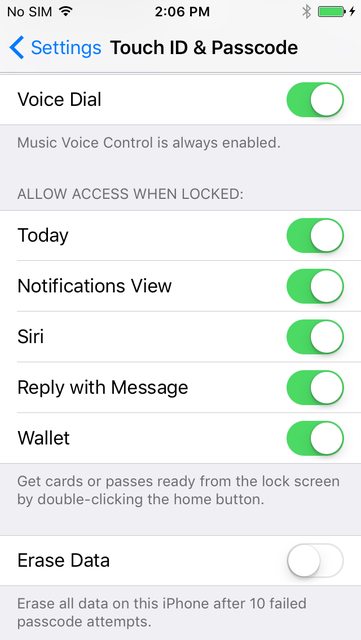
Seeing as many of you have no ability to think past those irrational thoughts that pop into your heads ... HERE are the controls for security at the lock screen. Now stop!

Score: 7 Votes (Like | Disagree)