
Accessibility at WWDC: Dwell Control, Taptic Time, Software TTY, and More - MacRumors
Skip to Content

Accessibility at WWDC: Dwell Control, Taptic Time, Software TTY, and More

Apple on Tuesday hosted a WWDC 2016 session called What's New in Accessibility that provided an overview of new assisitive technologies and features added to iOS 10, macOS Sierra, tvOS 10, and watchOS 3.

Physical and Motor Skills
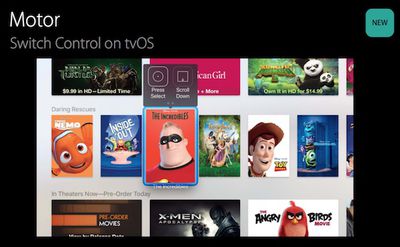
Switch-Control-tvOS
Switch Control can now be used to interact with the tvOS interface using a single physical button, such as a switch on a wheelchair. There is both a cursor interface that highlights elements on the screen and an alternative interface with an on-screen remote. Accessibility users that already use Switch Control with an iOS device or Mac can automatically use the function on tvOS without re-pairing a switch.
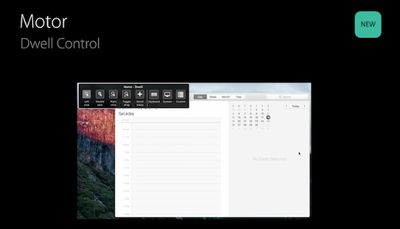
Dwell-Control-macOS
Dwell Control is a new feature for macOS Sierra that enables users to control the cursor on Mac using assistive technologies and hardware like a headband with reflective dots or eye movements. When the cursor dwells on a certain location, a timer appears that expires and invokes a mouse click or other customizable actions.

Vision
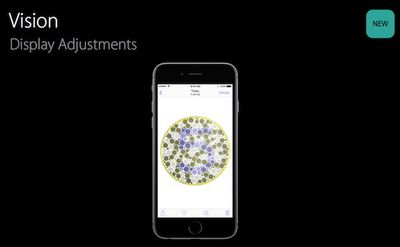
Vision-iOS-10
Apple has made display and color adjustments and introduced the option to tint the entire display on Mac, Apple TV, and iOS devices, which can significantly increase contrast and reading ability.

Taptic Time is a new VoiceOver feature on watchOS 3 that uses a series of distinct taps from the Taptic Engine to help someone tell time silently and discreetly.
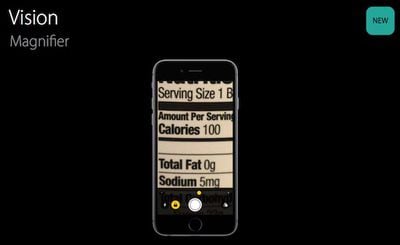
Vision-Magnifier-iOS
Magnifier is a new systemwide iOS 10 feature that enables users to use the camera to magnify objects in their physical environment. Various color filters, such as grayscale and inverted grayscale, are supported to increase contrast.

Hearing
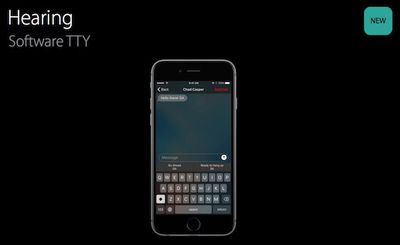
Software-TTY-iOS
iOS 10 allows for Software TTY calls to be placed without any additional hardware. The calls work with legacy TTY technology and make it easy to dial a non-TTY number through your carrier’s relay service. There are also built-in TTY-specific QuickType keyboard predictions.

Learning
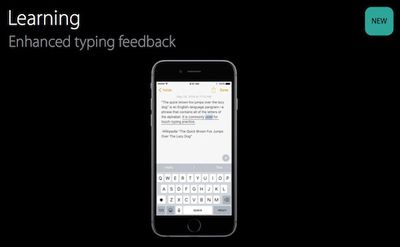
Typing-feedback-iOS
iOS 10 has a number of enhancements designed to help people with dyslexia. There are improvements to Speak Selection and Speak Screen to help people better understand text that has already been entered, and there is new audio feedback for typing to help people immediately catch mistakes.

Learn more by watching the What's New in Accessibility video or reading the slideshow.

Related Roundups: Apple Watch 11, Apple TV, WWDC 2026

Popular Stories

iOS 26

iOS 26.4 Adds Two New Features to CarPlay

Tuesday March 24, 2026 1:55 pm PDT by
iOS 26.4 was released today, and it includes a couple of new features for CarPlay: an Ambient Music widget and support for voice-based chatbot apps. To update your iPhone 11 or newer to iOS 26.4, open the Settings app and tap on General → Software Update. CarPlay will automatically offer the new features so long as the iPhone connected to your vehicle is running iOS 26.4 or later....
Apple Business hero

Apple Unveils 'Apple Business' All-in-One Platform

Tuesday March 24, 2026 8:53 am PDT by
Apple today announced Apple Business, a new all-in-one platform that unifies device management, productivity tools, and customer outreach features. The service is designed to be a consolidated replacement for several of Apple's existing business-focused offerings, including Apple Business Essentials, Apple Business Manager, and Apple Business Connect. It provides organizations with a single...
AirPods Pro Firmware Feature

Apple Releases New Firmware for AirPods Pro 3, AirPods Pro 2 and AirPods 4

Tuesday March 24, 2026 12:31 pm PDT by
Apple today released new firmware for the AirPods Pro 2, AirPods Pro 3, and the AirPods 4. The firmware has a version number of 8B39, up from 8B34 on the AirPods Pro 3, 8B28 on the AirPods Pro 2, and 8B21 on the AirPods 4. There is no word on what's included in the firmware, but Apple has a support document with limited notes. Most updates are limited to bug fixes and performance...

Top Rated Comments

iTom17 Avatar
128 months ago
You can say what you want, but Apple is still and will always be leader in accessibility. :)
Score: 4 Votes (Like | Disagree)
jonnysods Avatar
128 months ago
I think this is amazing. When they demoed the AW and it counting movements for people using wheelchair, that kind of blue me away and I was really happy they did all that work so anyone can use and enjoy their AW.
Score: 3 Votes (Like | Disagree)
128 months ago
Thanks for doing this type of round up. The wife is a Occupational Therapist so anything related to this type of stuff (especially Apple Watch) I send to her right away. She sees huge potential in the very near future for people with physical disabilities to have huge improvements in the quality of their life because of these new technologies. Exciting times!
Score: 2 Votes (Like | Disagree)
AdeFowler Avatar
128 months ago
If you haven`t chosen a band yet. I first wanted the Milanaise band, the Problem here for me is, it is magnetic all over, so I decided to buy my AW with the Leather Loop band. I don´t know how well you can use your hands. I made a try-on at an Apple Store, before I bought mine.
I've got rubbish hands (cerebral palsy), so I would probably go and try some in store.
Score: 1 Votes (Like | Disagree)
AdeFowler Avatar
128 months ago
Amazing, no, but it was about time. I as I`m sitting in a wheelchair hoped for that feature even before the release of the Watch. But now I´m happy that it is coming to my AW soon. Also the Home Kit App will be a help for me in the future.
Me too. I might finally buy an Watch later this year. The Breath app looks interesting as well.
Score: 1 Votes (Like | Disagree)
128 months ago
This is all good, and I totally expect to be using the magnifier. My eyes are not what they used to be. :cool:
Score: 1 Votes (Like | Disagree)
















