
iOS 10 Concept Simplifies Lock Screen With Collapsed Notifications - MacRumors
Skip to Content

iOS 10 Concept Simplifies Lock Screen With Collapsed Notifications

by

Apple previewed iOS 10 earlier this week with new rich notifications that enable iPhone users to view photos and videos, listen to audio, or respond to messages directly within notification bubbles. If you receive an iMessage, for example, you will be able to reply to the conversation without leaving the Lock screen.
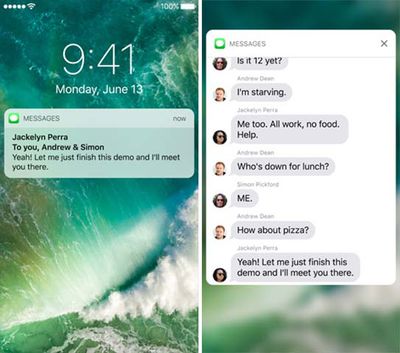
iOS_10_rich_notifications_duo
Apple has also provided developers with the ability to update existing notifications with new information, or delete them, which should help declutter the Lock screen and Notification Center. But many apps still generate multiple notifications, such as every photo, video, or message you receive on Snapchat.

MacRumors forum member chrf097 explains:

The problem with this current system is that notifications become easily cluttered. An active group chat can result in hundreds of individual notifications. For example I'm in a group chat of friends with about 12 active people, and I have to leave it muted anytime I choose not to participate, due to the amount of notifications that collect. In addition, this means that important information can get lost in the sea of notifications.

The solution, as seen in his concept below, could be to follow in Android's footsteps by collapsing notifications on a per-app basis.
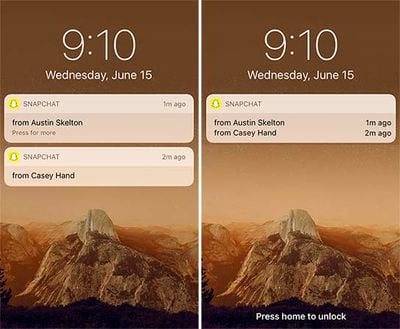
iOS_10_collapsed_notification_concept
The new design would save valuable screen space and allow you to glance at your Lock screen or Notification Center notifications much quicker. But collapsed notifications could inhibit the rich notification experience, so it would work best if collapsed notifications could be toggled on or off on a per-app basis in Settings.

Apple seeded the first beta of iOS 10 to developers earlier this week, and a public beta will be available in July. The free software update will officially be released in the fall for most devices compatible with iOS 9, excluding the iPhone 4s, iPad 2 and 3, original iPad mini, and fifth-generation iPod touch.

Apple could introduce collapsible notifications in a future iOS 10 beta, although changes will more likely be limited to minor tweaks and enhancements.


Top Rated Comments

128 months ago
The notifications should be grouped when they are the same app. I understand why they are not and they should not be grouped like this concept shows because its too hard to get a specific one.

They need a divider between them.
Score: 8 Votes (Like | Disagree)
128 months ago
I'm really happy Apple have made an effort to redesign iOS 10 but wasn't particularly impressed when I first saw these notification boxes (and the similar widget ones). The iOS 9 ones were far more unassuming and didn't detract from the lock screen image at all. These ones feel quite blocky and white.
Score: 6 Votes (Like | Disagree)
Elbon Avatar
128 months ago
I'm really happy Apple have made an effort to redesign iOS 10 but...these notification boxes...feel quite blocky and white.
I had the same reaction. Overall, I like the new direction, but the design doesn't seem particularly elegant.
Score: 5 Votes (Like | Disagree)
theelysium Avatar
128 months ago
I think the new notifications looks cheap. I'm sick of this white on white minimal crap.
Score: 5 Votes (Like | Disagree)
128 months ago
It is possible in beta 1, apps can update existing notifications.
Score: 2 Votes (Like | Disagree)
128 months ago
May come on later betas. I read an article that iOS 10 allows developers to update existing notification rather then send new ones so example with MLB at bat if I'm not checking my phone during the game once I finally pick it up I'd only see the most recent score notification not every on the app has sent out.
Score: 2 Votes (Like | Disagree)

Popular Stories

iOS 26

iOS 26.4 Adds Two New Features to CarPlay

Tuesday March 24, 2026 1:55 pm PDT by
iOS 26.4 was released today, and it includes a couple of new features for CarPlay: an Ambient Music widget and support for voice-based chatbot apps. To update your iPhone 11 or newer to iOS 26.4, open the Settings app and tap on General → Software Update. CarPlay will automatically offer the new features so long as the iPhone connected to your vehicle is running iOS 26.4 or later....
Apple Business hero

Apple Unveils 'Apple Business' All-in-One Platform

Tuesday March 24, 2026 8:53 am PDT by
Apple today announced Apple Business, a new all-in-one platform that unifies device management, productivity tools, and customer outreach features. The service is designed to be a consolidated replacement for several of Apple's existing business-focused offerings, including Apple Business Essentials, Apple Business Manager, and Apple Business Connect. It provides organizations with a single...
AirPods Pro Firmware Feature

Apple Releases New Firmware for AirPods Pro 3, AirPods Pro 2 and AirPods 4

Tuesday March 24, 2026 12:31 pm PDT by
Apple today released new firmware for the AirPods Pro 2, AirPods Pro 3, and the AirPods 4. The firmware has a version number of 8B39, up from 8B34 on the AirPods Pro 3, 8B28 on the AirPods Pro 2, and 8B21 on the AirPods 4. There is no word on what's included in the firmware, but Apple has a support document with limited notes. Most updates are limited to bug fixes and performance...















