
SwiftKey Launches New Emoji-Predicting Keyboard App 'Swiftmoji' - MacRumors
Skip to Content

SwiftKey Launches New Emoji-Predicting Keyboard App 'Swiftmoji'

by

Microsoft-owned keyboard app maker SwiftKey today launched a brand-new iOS app, this time focused on predictive emoji suggestions. Called Swiftmoji, the app runs a crowdsourced usage data algorithm to begin suggesting its users specific emoji characters when they send text messages, with the app set to eventually learn each user's preferences and recommend frequently-used emoji above those hardly ever sent in a message.
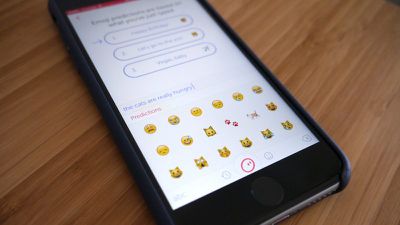
Swiftmoji TC image

Image via TechCrunch

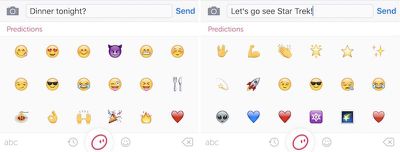
The app works by piggybacking on the written text created in Apple's -- or any other third-party's -- keyboard, showcasing a wall of emojis meant to be related to the message waiting to be sent. All users need to do is type something, tap the globe icon to switch over to Swiftmoji, and pick from the app's proposed emoji characters. SwiftKey hopes this method is a bit more streamlined in comparison to the emoji hunt that happens in Apple's first-party keyboard but, as TechCrunch noted, its predictive capabilities have room for improvement.

Testing the app out ahead of launch, the predictions seemed a tad tenuous and/or hit and miss at times. For example, typing ‘viva la France’ did indeed yield the French flag emoji as the first prediction. However the second prediction was the Italian flag. Which it’s hard to imagine being useful.

The app also lets users send an "emoji storm," which shoots out emojis from its suggestion box in a random order at the tail-end of a message, if users think sending just one or two characters isn't enough. In addition, there's a tab for frequently used emoji, and a basic, scrollable section akin to what iOS users have been used to over the past few years. Interestingly, the Android version of the app is more robust, offering quick-access emoji suggestions above a full third-party keyboard.
Swiftmoji big 1
Due to its ability to condense vast topics down to cartoonish characters, a SwiftKey spokeswoman is also ensuring users that the company has "worked to reduce the chances of anyone using Swiftmoji to be caused offence from the emoji predictions suggested." All the same, she confirmed that SwiftKey wouldn't outright censor its users, letting everyone have "the option to use whichever emoji they like and in whatever way they like,” with truly questionable outcomes from the app advised to be reported to the company.

Anyone interested can check out Swiftmoji for free on the App Store today. [Direct Link]

Top Rated Comments

126 months ago
The biggest drawback of this is having to tap the globe icon -> switch the keyboard -> select the emoji and then again tap the globe icon and then select keyboard for typing...How is this streamlined??

Biggest hassle is switch back and forth between keyboards. Part of the reason could be limitations imposed by Apple but what Apple showed at the ios 10 keynote is a much better implementation... just tap the word and replace it with emoji.
Score: 6 Votes (Like | Disagree)
Dilster3k Avatar
126 months ago
This craze for stickers and Emoji's has made me lose all faith in humanity.
Score: 6 Votes (Like | Disagree)
keysofanxiety Avatar
126 months ago
What a time to be alive.
Score: 4 Votes (Like | Disagree)
126 months ago
"Thanks to more than 1 million hours of advanced engineering, you can now start drawing a snout and our predictive algorithms insert the pig emoji"
Score: 2 Votes (Like | Disagree)
126 months ago
This craze for stickers and Emoji's has made me lose all faith in humanity.
The fact that makes you lose faith in humanity is the real disturbing matter.
Score: 2 Votes (Like | Disagree)
126 months ago
This is something I've always wanted ... err ... no.
Score: 2 Votes (Like | Disagree)

Popular Stories

iOS 26

iOS 26.4 Adds Two New Features to CarPlay

Tuesday March 24, 2026 1:55 pm PDT by
iOS 26.4 was released today, and it includes a couple of new features for CarPlay: an Ambient Music widget and support for voice-based chatbot apps. To update your iPhone 11 or newer to iOS 26.4, open the Settings app and tap on General → Software Update. CarPlay will automatically offer the new features so long as the iPhone connected to your vehicle is running iOS 26.4 or later....
Apple Business hero

Apple Unveils 'Apple Business' All-in-One Platform

Tuesday March 24, 2026 8:53 am PDT by
Apple today announced Apple Business, a new all-in-one platform that unifies device management, productivity tools, and customer outreach features. The service is designed to be a consolidated replacement for several of Apple's existing business-focused offerings, including Apple Business Essentials, Apple Business Manager, and Apple Business Connect. It provides organizations with a single...
AirPods Pro Firmware Feature

Apple Releases New Firmware for AirPods Pro 3, AirPods Pro 2 and AirPods 4

Tuesday March 24, 2026 12:31 pm PDT by
Apple today released new firmware for the AirPods Pro 2, AirPods Pro 3, and the AirPods 4. The firmware has a version number of 8B39, up from 8B34 on the AirPods Pro 3, 8B28 on the AirPods Pro 2, and 8B21 on the AirPods 4. There is no word on what's included in the firmware, but Apple has a support document with limited notes. Most updates are limited to bug fixes and performance...
















