
Popular writing app and Apple Design Award winner Ulysses gained WordPress publishing and Dropbox support today, in a simultaneous update to its iOS and Mac apps.

The changes that come with version 2.6 of the writing app mean that bloggers can publish their texts straight to a WordPress account, complete with tag, category, excerpt, and featured image support.
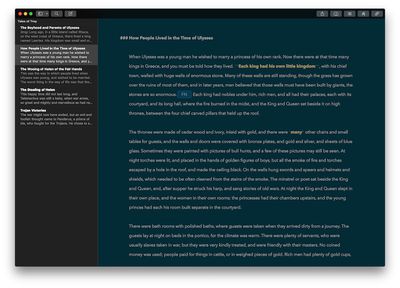
ulysses
Writers using the iOS or Mac app can also schedule the publishing time and preview their posts before they go live, all from within Ulysses. German developers The Soulmen say the app supports blogs hosted on WordPress.com as well as self-hosted installations, and also allows publishing to multiple accounts.

As with the Mac, iPad and iPhone users can now also sync their texts over Dropbox instead of via iCloud, with full support for adding Dropbox folders to Ulysses' hierarchical text library.

In addition, plain text and Markdown files stored in Dropbox folders behave just like native Ulysses sheets – supporting the app's sorting tools, filters, group goals, favorites, and so on – so users no longer need to import their files manually.

The 'Quick Open' feature on Ulysses for Mac has also made its way over to the iOS version, allowing users to perform entire library searches and open sheets without navigating through text hierarchies.

Meanwhile, Ulysses 2.6 brings Typewriter Mode to iOS, which promises the same focused writing experience to be found in the Mac app, allowing writers to highlight paragraphs and sentences, fix scrolling, mark the current line, and more.

Lastly, Ulysses 2.6 has been optimized for accessibility, to better cater for visually impaired writers working in macOS and iOS, with support for VoiceOver on both platforms.

Ulysses for Mac costs $44.99 and can be found on the Mac App Store. [Direct Link]

Ulysses for iOS is available as a universal app on the App Store, priced at $24.99. [Direct Link]


Tag: Ulysses

Top Rated Comments

ignatius345 Avatar
124 months ago
How are people liking Ulysses compared to Scrivener? I do my literary work in the latter, and I've been waiting forever for an iOS version of Scrivener, but now that it's here I see it's missing iCloud sync which I consider mandatory. So I've been thinking of jumping over to Ulysses, but it doesn't seem as full-featured for literary tasks.
I've messed around in Scrivener for a while but never really took to it. I find Ulysses to be a beautifully designed and very functional writing environment. Lots of great features that stay out of your way until you need them. And the design is very Mac-like. As for iCloud syncing, Ulysses offers sync either via Dropbox or iCloud. I tend to use Dropbox because I'm used to it and I like how transparent it is -- and if for whatever reason I decided to stop using Ulysses, my files would all be sitting there out in the open in .md format that I could edit with any other text editor out there.

Not sure if this answers your question, but also be aware that there's a demo of the OS X version on the Ulysses site, so you can poke around a bit before you commit.

EDIT: Since writing this, I've decided to buy the iOS version, which was a pretty frivolous purchase since I don't write much on my phone if I can avoid it -- but it's still nice to be able to access my library. The iOS app is gorgeous and very very full-featured. You can customize the theme to the same one you use on your Mac, and you can even upload custom fonts. Very impressive.
Score: 2 Votes (Like | Disagree)
alecgold Avatar
124 months ago
This is my iOS update week! Beta4, documents from Readdle (long overdue update!) and Ulysses got an update.

I don't use Ulysses that often, but for easy, destraction free and hassle free writing it is unbeaten imho. I might even start blogging! If I would actually have something meaningful to tell.
Score: 2 Votes (Like | Disagree)
petsounds Avatar
124 months ago
just don't worry so much about having to use iCloud?
It's the sync service I use? I don't trust Dropbox, nor do I like how it sends deep roots into OS X for its syncing. Every dev should be supporting iCloud at this point if they're doing sync on Apple platforms. CloudKit is in my experience reliable.

I've messed around in Scrivener for a while but never really took to it. I find Ulysses to be a beautifully designed and very functional writing environment. Lots of great features that stay out of your way until you need them. And the design is very Mac-like. As for iCloud syncing, Ulysses offers sync either via Dropbox or iCloud. I tend to use Dropbox because I'm used to it and I like how transparent it is -- and if for whatever reason I decided to stop using Ulysses, my files would all be sitting there out in the open in .md format that I could edit with any other text editor out there.

Not sure if this answers your question, but also be aware that there's a demo of the OS X version on the Ulysses site, so you can poke around a bit before you commit.
Thanks, I'll have to give the demo a spin. To be honest, I've never been completely enamored with Scrivener. I find its "do whatever you want" philosophy too distracting for my brain when I want to get into the meat of writing a new chapter or a quick idea. I prefer something that gives me the tools to focus on specific writing tasks and presents them in elegant, intuitive ways. But, Scrivener is very powerful for some tasks and it's been the de facto tool for many, so I've continued to use it over the years.
Score: 2 Votes (Like | Disagree)
username: Avatar
124 months ago
I was going off the screenshots on the website. It's a very bad looking website, so that was probably skewing my opinion. I grabbed the demo and it looks a bit better than it did on the site. It's not bad, but for my taste, there's just way too much going on. Ulysses, to me, just feels like a lot of clutter is removed, and there's more polish. Obviously this is all highly subjective stuff. Not sure I agree with you about the "intuitive" part, but let's agree to disagree there.

It looks like Scrivener definitely holds a lot more stuff than Ulysses, which is meant really for text (though it does support attachments to some extent). The way I work, I'm way more likely to keep research materials and such in a folder in the Finder somewhere, synced/backed up through Dropbox, so I'm less likely to need all those extra features that Scrivener has.

Fortunately, both apps are available with free demos, which is something that makes me very glad there are alternatives to the App Store.
I agree it's subjective! I found Ulysses more cluttered! I could not get rid of some of the default folders which annoyed me!
I love having PDFs, pictures, websites and YouTube vids in scrivener. I can't remember if ULysses supports double-pane writing for writing and reference side by side? Or multiple documents open at the same time both on OS X and iOS? Couldn't live without that
Score: 1 Votes (Like | Disagree)
alecgold Avatar
124 months ago
It's good that scrivener has some competition but scrivener is easily the better app, including its iOS app now.
Care to elaborate why it's beter?
Score: 1 Votes (Like | Disagree)
zen Avatar
124 months ago
Speaking for the Mac version, I can honestly say I've spent so many hours using it that it's been well worth it to me. Having one single app that handles all (well, almost all*) my writing is quite valuable to me.

*they don't support Fountain screenplay format yet, which is a shame, since it's plain-text based and would be a great fit
Right - I am using the 10-hour demo version, so I'll see if I can learn more about it. I like a lot of the visual/UI features - I'm a novelist and because I spend so much time staring at my screen I have a tendency to be picky with fonts and background colours when I'm in the first draft - but I still haven't quite worked out how to change and apply the colour schemes. in fact I can't even figure out how to change the display to match one of the dark examples they have in their own screenshots!

But I do like the inbox-style organisation of pages/sheets.
Score: 1 Votes (Like | Disagree)

Popular Stories

Apple Logo Zoomed

Tim Cook Teases Plans for Apple's Upcoming 50th Anniversary

Thursday February 5, 2026 12:54 pm PST by
Apple turns 50 this year, and its CEO Tim Cook has promised to celebrate the milestone. The big day falls on April 1, 2026. "I've been unusually reflective lately about Apple because we have been working on what do we do to mark this moment," Cook told employees today, according to Bloomberg's Mark Gurman. "When you really stop and pause and think about the last 50 years, it makes your heart ...
wwdc sans text feature

Apple Rumored to Announce New Product on February 19

Thursday February 5, 2026 12:22 pm PST by
Apple plans to announce the iPhone 17e on Thursday, February 19, according to Macwelt, the German equivalent of Macworld. The report, citing industry sources, is available in English on Macworld. Apple announced the iPhone 16e on Wednesday, February 19 last year, so the iPhone 17e would be unveiled exactly one year later if this rumor is accurate. It is quite uncommon for Apple to unveil...
Finder Siri Feature

Why Apple's iOS 26.4 Siri Upgrade Will Be Bigger Than Originally Promised

Friday February 6, 2026 3:06 pm PST by
In the iOS 26.4 update that's coming this spring, Apple will introduce a new version of Siri that's going to overhaul how we interact with the personal assistant and what it's able to do. The iOS 26.4 version of Siri won't work like ChatGPT or Claude, but it will rely on large language models (LLMs) and has been updated from the ground up. Upgraded Architecture The next-generation...
iOS 26

iOS 26.3 and iOS 26.4 Will Add These New Features to Your iPhone

Tuesday February 3, 2026 7:47 am PST by
While the iOS 26.3 Release Candidate is now available ahead of a public release, the first iOS 26.4 beta is likely still at least a week away. Following beta testing, iOS 26.4 will likely be released to the general public in March or April. Below, we have recapped known or rumored iOS 26.3 and iOS 26.4 features so far. iOS 26.3 iPhone to Android Transfer Tool iOS 26.3 makes it easier...
iphone 17 pro dark blue 1

iPhone 18 Pro Max Rumored to Deliver Next-Level Battery Life

Friday February 6, 2026 5:14 am PST by
The iPhone 18 Pro Max will feature a bigger battery for continued best-in-class battery life, according to a known Weibo leaker. Citing supply chain information, the Weibo user known as "Digital Chat Station" said that the iPhone 18 Pro Max will have a battery capacity of 5,100 to 5,200 mAh. Combined with the efficiency improvements of the A20 Pro chip, made with TSMC's 2nm process, the...















